How to Migrate from OpenClaw to Hermes Agent Without Losing Your Workflows or Memory
Introduction
Moving from OpenClaw to a new environment like Hermes Agent is often an exciting step for teams looking to upgrade their AI capabilities. However, once you make the decision to switch, you quickly hit a frustrating roadblock: your new agent is completely blank.
Switching AI tools without losing context is one of the biggest challenges in modern AI workflows. The intelligence of an AI agent doesn't just come from its underlying foundational model; it comes from the documents you’ve uploaded, the preferences it has learned, and the specific context you’ve built up over hundreds of interactions.
If you want to migrate from OpenClaw to Hermes Agent without starting your projects over from scratch, you need a strategy for AI workflow continuity. This guide will explain why standard migration methods fail, what actually gets lost during a transition, and how to use a portable memory layer to keep your work intact.
Quick Answer: How to Migrate from OpenClaw to Hermes Agent
To migrate from OpenClaw to Hermes Agent without losing your workflows or memory, you should avoid relying on manual copy-pasting or basic chat history exports. Instead, the most effective approach is to decouple your data from the specific agent by using a portable AI memory layer.
Here is the best process to ensure workflow continuity:
Extract your core context: Gather your frequently used documents, ongoing research, and structured notes from OpenClaw.
Centralize in a persistent memory layer: Upload these files (PDFs, Word, Excel) into a tool-agnostic memory infrastructure like MemoryLake.
Enrich with relevant datasets: Add industry-specific open data (e.g., academic papers or financial filings) to fill any context gaps.
Connect the memory to Hermes Agent: Use API keys, plugins, or the Model Context Protocol (MCP) to route this persistent memory directly into Hermes Agent, giving it instant access to your past workflows.
Why Migrating AI Agents is Harder Than It Looks
Switching tools usually implies moving data from Point A to Point B. But AI agents do not treat data like a traditional database. In most AI platforms, memory and context are heavily siloed within specific chat sessions or proprietary workspaces.
When you decide to move to Hermes Agent, you aren’t just migrating files; you are trying to migrate understanding. If your workflow relies on the AI knowing the background of a legal case, the architectural decisions of your codebase, or the formatting rules for your weekly reports, moving to a new tool typically means resetting that understanding to zero. "Switching tools" and "preserving continuity" are two entirely different technical challenges.
What Gets Lost in a Typical OpenClaw → Hermes Agent Move
When users attempt a direct transition, they often underestimate the sheer volume of invisible work they leave behind. Without a proper migration strategy, you will likely lose:
Uploaded Documents and Files: All the PDFs, CSVs, and internal documents you fed into OpenClaw to ground its answers.
Prior Context and Nuance: The subtle instructions and background knowledge the agent accumulated about your project goals.
Workflow Memory: The sequential steps the agent learned to take when processing your specific types of requests.
Structured Knowledge: Conclusions, summaries, and synthesized notes generated in previous sessions.
Task History: The continuous thread of what has already been tried, what failed, and what the next steps are.
Why Common Migration Methods Break Down
Most users try to brute-force their way through an AI migration. Here is why the most common manual methods usually fail to preserve your workflows:
1. Manual Copy-Pasting and Prompt Stuffing
Trying to copy your best prompts and past conversations from OpenClaw and pasting them into Hermes Agent is not a scalable workflow. Prompt stuffing—cramming endless background text into every new prompt—eats up your token limits, increases costs, and often confuses the new agent.
2. Exporting Scattered Notes
Exporting chat logs as text files or JSON might make you feel like you own your data, but it doesn't help Hermes Agent. A raw text dump of a past conversation is incredibly difficult for a new agent to parse and use effectively in real-time.
3. Re-uploading Files One by One
If you had dozens of reference documents in OpenClaw, manually re-uploading them into Hermes Agent is tedious. Worse, if you switch agents again in the future, you will have to repeat this exact same chore.
The Solution: Transitioning to a Portable AI Memory Layer
To stop starting over with AI tools, you need to shift your perspective. Instead of trying to migrate memory into the new agent, you should move your memory outside of the agent entirely.
This is where the concept of a portable AI memory layer comes in. A tool like MemoryLake is designed to act as a persistent memory infrastructure for AI systems. It is not just a chat history logger or a basic file uploader; public documentation positions it as a "second brain" or a "memory passport" that spans across tools, models, and agents.
By using a persistent memory layer, your documents, context, and prior work sit in a centralized, governed hub. Whether you use OpenClaw, Hermes Agent, Claude, or ChatGPT, the agent simply plugs into this memory layer to retrieve exactly what it needs.
Step-by-Step: Using MemoryLake to Preserve Workflows and Memory
If you are planning to migrate to Hermes Agent, here is a practical, step-by-step guide on how to use MemoryLake to ensure workflow continuity and prevent data loss.
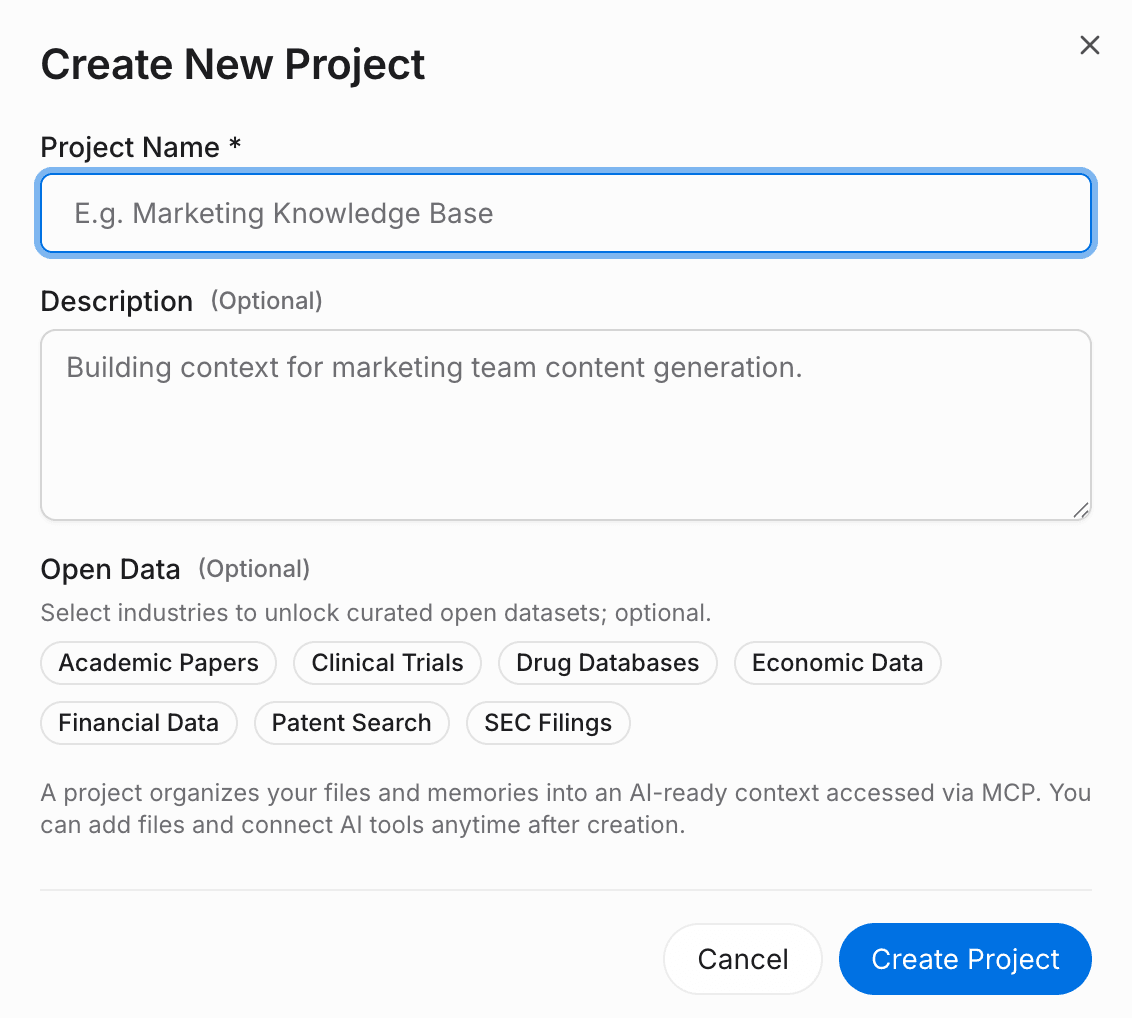
Step 1: Create a Project and Upload Your Prior Data
The first step is to rescue your context from OpenClaw's silos. In MemoryLake, you create a dedicated project that will serve as the persistent home for this specific workflow.
Action: Click the attachment button in MemoryLake to upload the source documents you previously used in OpenClaw.
Details: It supports formats like PDF, Word, Excel, and Markdown. MemoryLake automatically analyzes and structures this content for AI retrieval.
External Sources: If your OpenClaw workflow relied on live data, you can use the file section to connect external data sources directly.
Why this matters: Instead of uploading files into Hermes Agent where they might get trapped again, you are uploading them into a reusable layer.
Step 2: Test the Context in the Playground
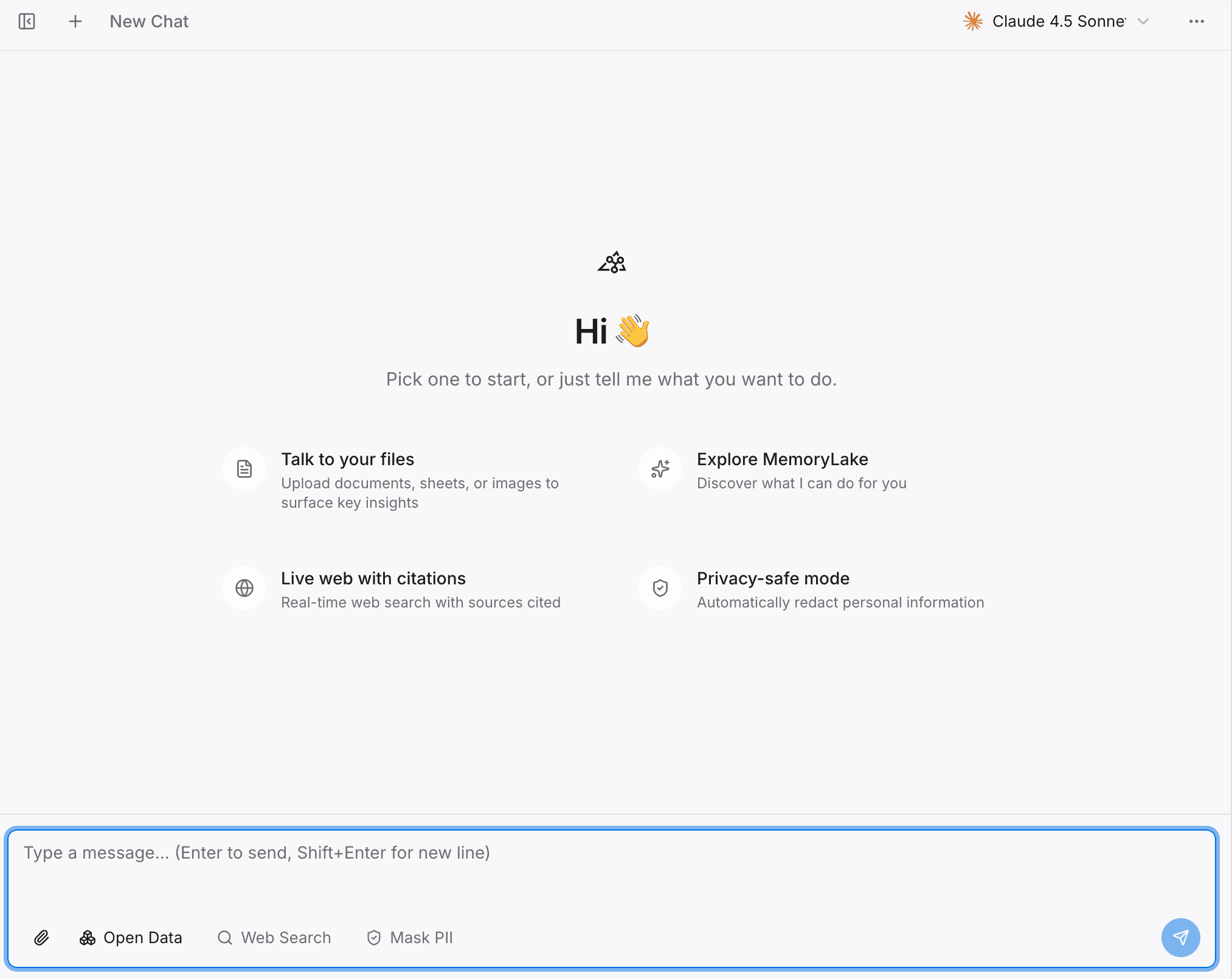
Before fully committing your workflow to Hermes Agent, you want to verify that your memory is intact and accurately retrievable.
Action: Open the MemoryLake Playground and start querying your project.
Details: Ask the same complex questions you used to ask OpenClaw.
Why this matters: This ensures your document context and historical knowledge have been properly parsed and are ready to be served to the next agent.
Step 3: Enrich Your Project with Open Data
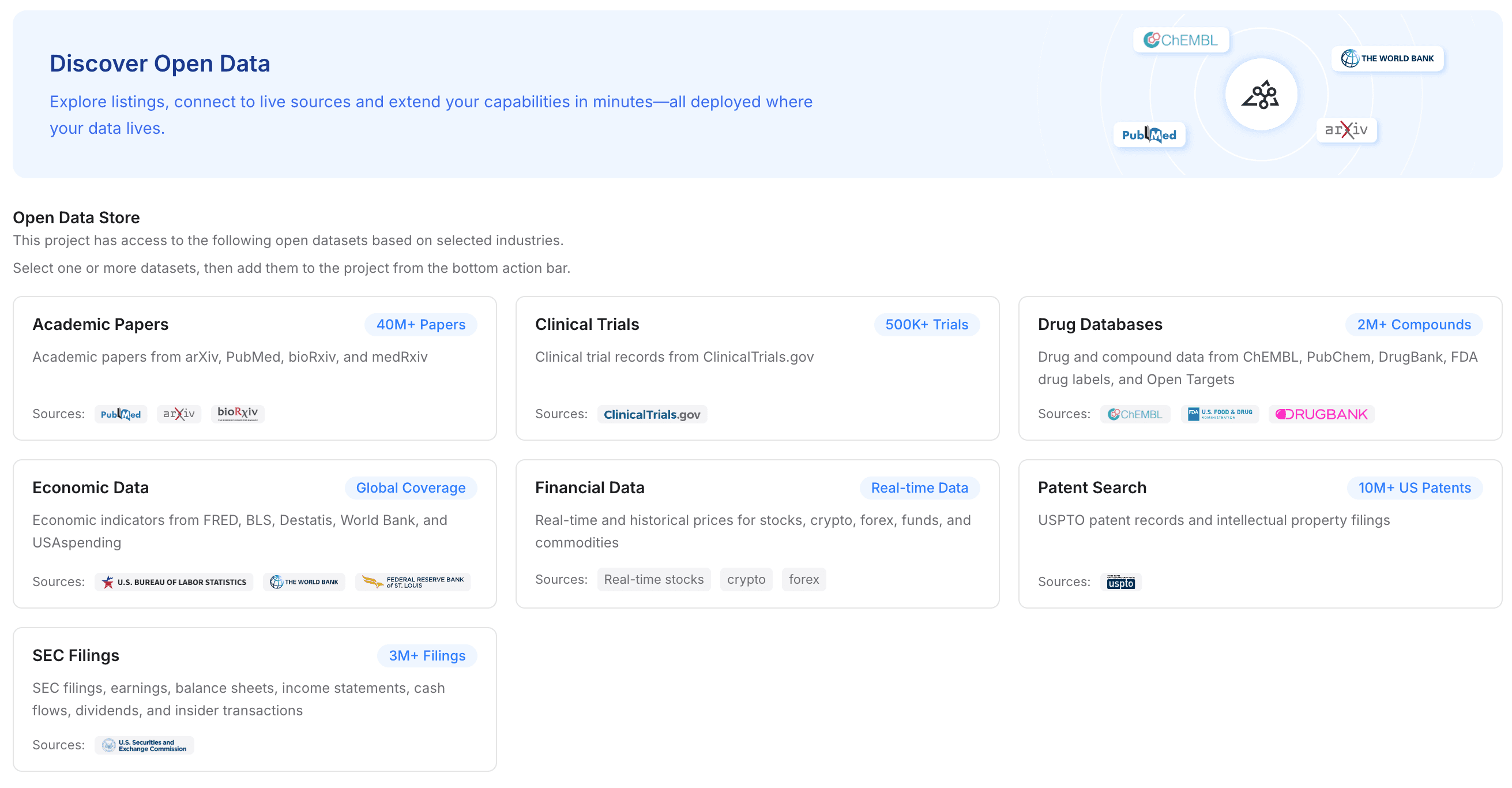
Migrations are a great time to upgrade your agent's capabilities. MemoryLake allows you to supplement your private uploads with broader industry knowledge.
Action: Navigate to the open data options and add relevant industry datasets to your project.
Details: Depending on your field, you can grant the memory layer access to academic papers, clinical trials, drug databases, economic data, financial data, patent searches, or SEC filings.
Why this matters: This instantly upgrades the baseline intelligence of Hermes Agent. Instead of just relying on your old OpenClaw files, Hermes Agent will now have document-aware memory enhanced by authoritative public data.
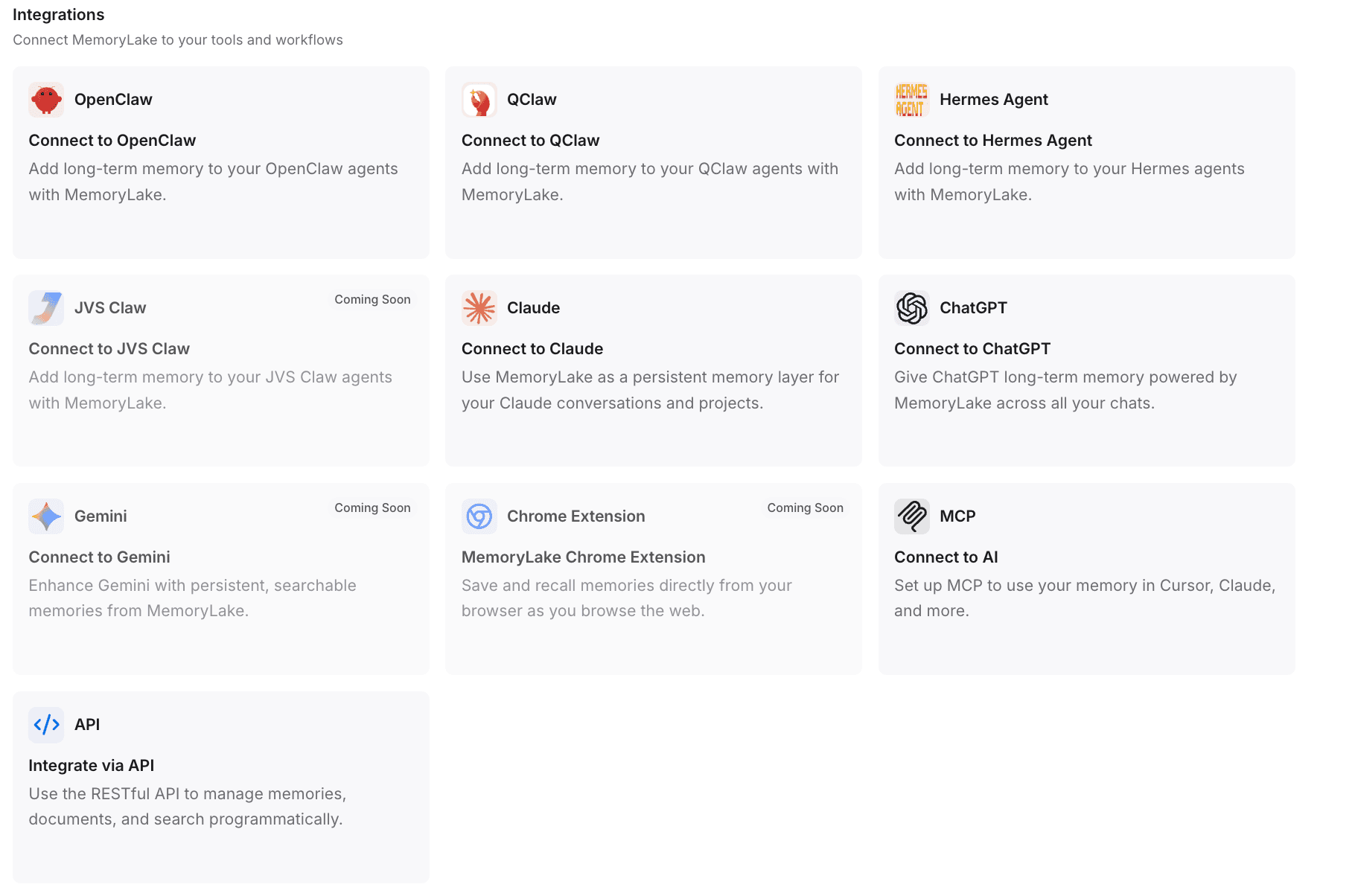
Step 4: Connect MemoryLake to Your Tools and Workflows
This is the critical step that completes the migration. You will now plug this persistent memory into Hermes Agent (and properly sunset your OpenClaw setup if desired).
Action: Generate an API key within MemoryLake.
Details for seamless integration: MemoryLake supports 1-click installations and automated configurations. For instance, public documentation highlights that you can copy the setup guide and paste it into OpenClaw; the system will automatically install the plugin, complete the configuration, and restart the gateway.
Connecting to Hermes Agent: You can use a single command line to install the plugin, or integrate it directly into Hermes Agent using the Model Context Protocol (MCP) or API integrations. MemoryLake is designed to integrate seamlessly with OpenClaw, Hermes Agent, ChatGPT, and Claude.
Why this matters: Your new Hermes Agent is instantly hydrated with all your prior knowledge. The workflow continues exactly where you left off.
Common Migration Mistakes to Avoid
Treating memory as an afterthought: Waiting until you have fully moved to Hermes Agent to realize you are missing crucial context. Always extract and centralize your data before you make the full switch.
Confusing chat logs with memory: Exporting a 50-page PDF of your OpenClaw chat history and feeding it to Hermes Agent will cause context window bloat. You need a document-aware memory system, not a raw transcript.
Relying on local files: Keeping your reference PDFs in a local desktop folder means you will constantly be dragging and dropping them into Hermes Agent's chat interface. A persistent API-based layer is much more efficient.
Best Use Cases for this Migration Approach
Using a persistent AI memory layer to bridge the gap between tools is highly recommended for:
Document-heavy workflows: Workflows that rely heavily on dense PDFs, legal contracts, or financial reports.
Research teams: Teams that spend weeks building up literature reviews and cannot afford to lose that context when trying a new foundational model.
Multi-agent users: Users who want to use Hermes Agent for coding, OpenClaw for initial drafting, and Claude for editing—all sharing the exact same memory passport.
Founders and Executives: Leaders who switch AI tools often to chase the best performance but need their operational context to remain stable.
Conclusion
Migrating from OpenClaw to Hermes Agent doesn't have to mean losing weeks of context, starting your research over, or re-uploading endless folders of PDFs. The friction you feel during a migration isn't a problem with the new agent—it's a problem with how AI memory is currently siloed.
By shifting to a model where your data lives independently of the tool, you gain the freedom to upgrade your AI assistants whenever you want without paying a penalty in lost productivity.
If your workflow depends heavily on documents, project context, and reusable intelligence, MemoryLake is worth evaluating. It gives you a way to move tools without moving backwards. For teams that switch models or agents often, utilizing a portable memory layer like MemoryLake is a strong option for preserving workflow continuity, allowing your new AI systems to pick up exactly where your old ones left off.
Frequently Asked Questions
How do you migrate from one AI agent to another without losing context?
To migrate without losing context, avoid relying strictly on manual prompt copying. Instead, extract your foundational documents and instructions, upload them into a portable AI memory layer, and connect that memory layer to your new agent via an API or MCP integration.
What usually gets lost when switching AI tools?
When switching AI tools, users typically lose uploaded reference documents, ongoing task history, structured knowledge the AI has learned about their preferences, and the specific workflow habits developed over multiple sessions.
Is chat history enough when moving between AI assistants?
No. Raw chat history is difficult for a new AI assistant to parse effectively. Pasting long chat logs consumes token limits quickly and often degrades the AI's performance. You need structured, retrievable memory rather than simple text logs.
How do you keep documents and workflow memory across tools?
You can keep documents across tools by using a tool-agnostic memory infrastructure. By storing your PDFs, Excel files, and context in a centralized layer (rather than inside a specific agent's proprietary storage), any new tool you adopt can query that same data source.
What is MemoryLake and how does it help with migration?
MemoryLake is a persistent memory layer for AI systems. It helps with migration by acting as a reusable "second brain." According to its setup flow, you can store your documents and context in MemoryLake, and then connect it directly to platforms like Hermes Agent or OpenClaw, ensuring seamless cross-tool continuity.
How do you avoid rebuilding AI workflows from scratch?
To avoid rebuilding workflows, decouple your data from your AI execution environment. Establish a persistent knowledge base that holds your prompts, rules, and reference files, and route that data into whichever AI agent you are currently using.