How to Sync Memory and Context Across Claude, ChatGPT, and Gemini in My Workflow (2026 Guide)

Introduction
Switching between the best AI models is the modern knowledge worker's default state. You might use Claude to draft a complex technical document, switch to ChatGPT to iterate on ideas, and open Gemini to cross-check research against the live web. However, this multi-model approach creates an immediate bottleneck: every time you switch tools, your project context breaks.
You end up repeatedly pasting the same background information, re-uploading the same source documents, and re-explaining your constraints. The friction of context fragmentation drains your productivity, wastes tokens, and leads to inconsistent outputs across different assistants.
To sync memory and context across Claude, ChatGPT, and Gemini, you need a centralized, persistent memory layer—such as MemoryLake—that sits outside individual AI platforms. By storing your project files, background knowledge, and past decisions in a portable system accessible via API or MCP, you can seamlessly feed identical context to any AI model without repetitive copying, pasting, or re-uploading.
This guide breaks down exactly how to stop repeating yourself, how to build a unified cross-model AI memory, and the exact step-by-step workflow for keeping Claude, ChatGPT, and Gemini perfectly in sync.
The Real Problem: Why Context Breaks Across Claude, ChatGPT, and Gemini
Different AI models excel at different cognitive tasks. It is natural to route specific workloads to the tool best suited for the job. But individual AI platforms are walled gardens.
When you move a project from ChatGPT to Claude, the new model has zero awareness of the decisions you just made. When you move from Claude to Gemini, the underlying PDF documents and data files do not come with you. Built-in "custom instructions" or "project spaces" within a single app only solve the problem if you never leave that specific ecosystem.
This leads to several systemic workflow failures:
Token waste: You constantly feed the same massive documents into the context window of different tools.
Information degradation: Because re-typing context is tedious, you provide a shorter, lazier prompt to the second AI tool, resulting in lower-quality outputs.
Version control chaos: You lose track of which AI has the most up-to-date understanding of your project state.
Context windows are temporary working memory. Chat history is an isolated, unsearchable log. Neither functions as a portable, persistent memory passport for your daily workflow.
My 2026 Workflow for Syncing Memory Across AI Tools
A sustainable cross-AI workflow requires separating your data from the AI models. Instead of treating Claude or ChatGPT as the storage unit for your project, treat them purely as compute engines. Your files, instructions, and context should live in a unified memory infrastructure layer.
Here is the high-level architecture of a synced workflow:
Centralized Project Files: All source documents, research papers, and data sheets live in one external memory layer, not uploaded individually to different chat interfaces.
Shared Long-Term Memory: Core project constraints, background information, and user preferences are stored persistently and called upon only when needed.
Task-Specific Prompting: The prompt inside Claude, ChatGPT, or Gemini contains only the immediate task instructions, while the heavy lifting of context is handled seamlessly via integrations.
Using a shared memory layer is infinitely more efficient than duplicating setups in every app. It allows you to upgrade, swap, or combine AI assistants on the fly without losing a single data point.
What Actually Needs to Be Synced
To maintain continuity across AI tools, you must identify what type of information actually constitutes "context." A proper memory layer should capture and sync the following elements:
Project background
The high-level goals, target audience, timelines, and primary objectives of what you are building. This prevents the AI from generating generic outputs that misalign with your core mission.
Working files and source documents
Raw data, PDFs, spreadsheets, and reference materials. These are the factual anchors for your AI workflows. Syncing these ensures every model is analyzing the exact same source truth.
Reusable instructions and preferences
Formatting rules, brand voice guidelines, coding standards, and specific frameworks you expect the AI to follow.
Past decisions and discussion history
The conclusions you reached in previous AI conversations. If ChatGPT helped you finalize a structural outline yesterday, Claude needs to know that outline today before drafting the content.
Domain knowledge / research context
Industry-specific terminology, specialized datasets, and deep-dive research that the base AI models might not inherently possess.
Task-specific context vs long-term memory
You must separate what the AI needs to know forever (your company's tone of voice) from what it needs to know right now (summarize this email). A structured memory layer handles the former, keeping your daily prompts lean and focused on the latter.
Step-by-Step: How to Use MemoryLake to Sync Context Across Your Workflow
To execute this cross-AI workflow, you need a system designed specifically as a portable memory passport for AI assistants. MemoryLake operates as exactly that—a persistent, user-owned memory layer that connects files, knowledge, and conversation history across different tools.
Here is how to set it up as the core memory infrastructure for your stack.
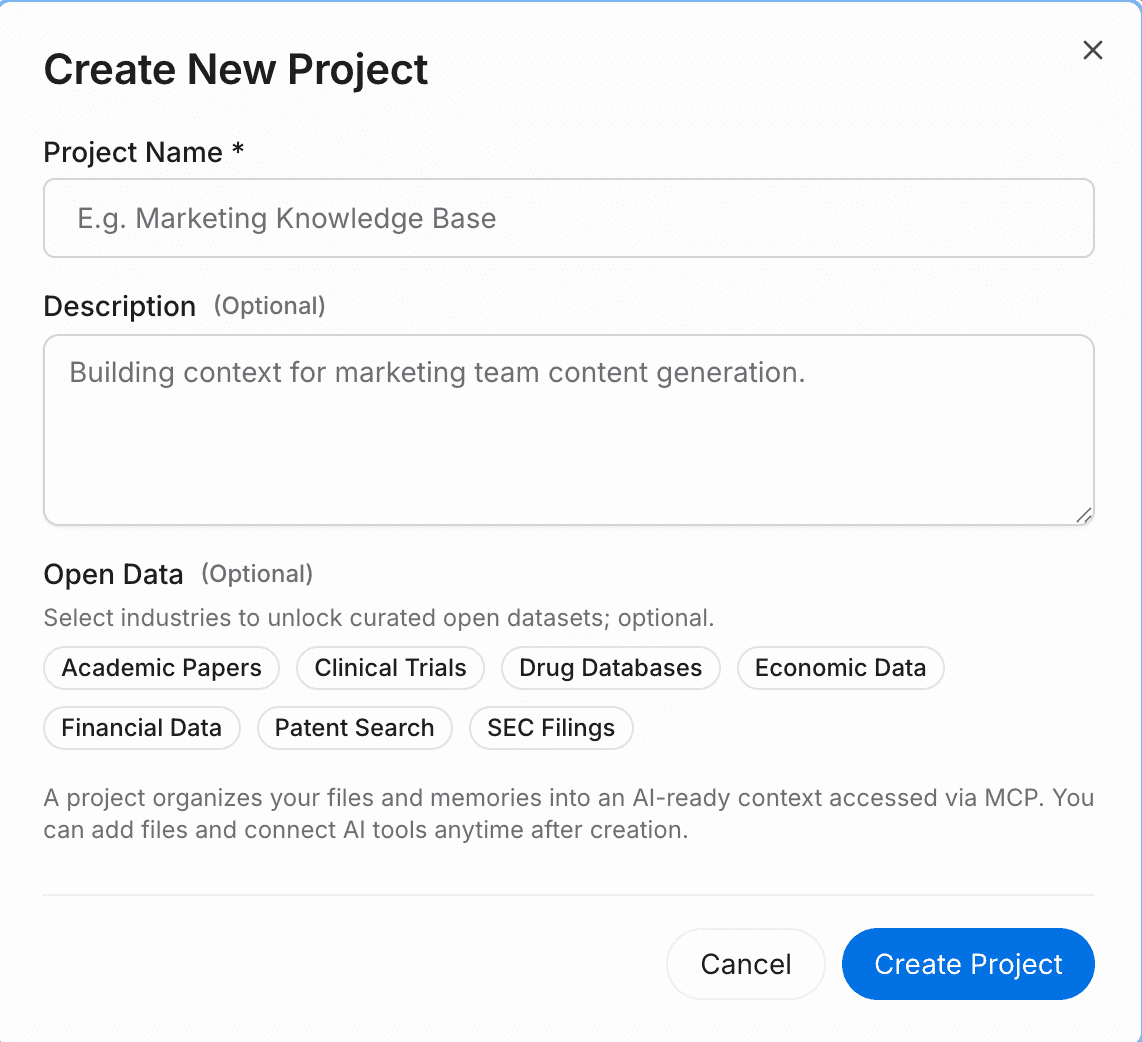
Step 1 — Create a project and upload your files and data
Start by creating a dedicated workspace for your initiative. Click the attachment button to upload your source documents directly into MemoryLake. The system will automatically analyze, parse, and structure the content for immediate retrieval.
It natively supports a wide range of formats, including PDF, Word, Excel, and Markdown. If your data lives elsewhere, you can also navigate to the files section to connect external data sources directly, ensuring your AI memory always pulls from your latest operational data without manual re-uploads.
Step 2 — Search or chat with your project
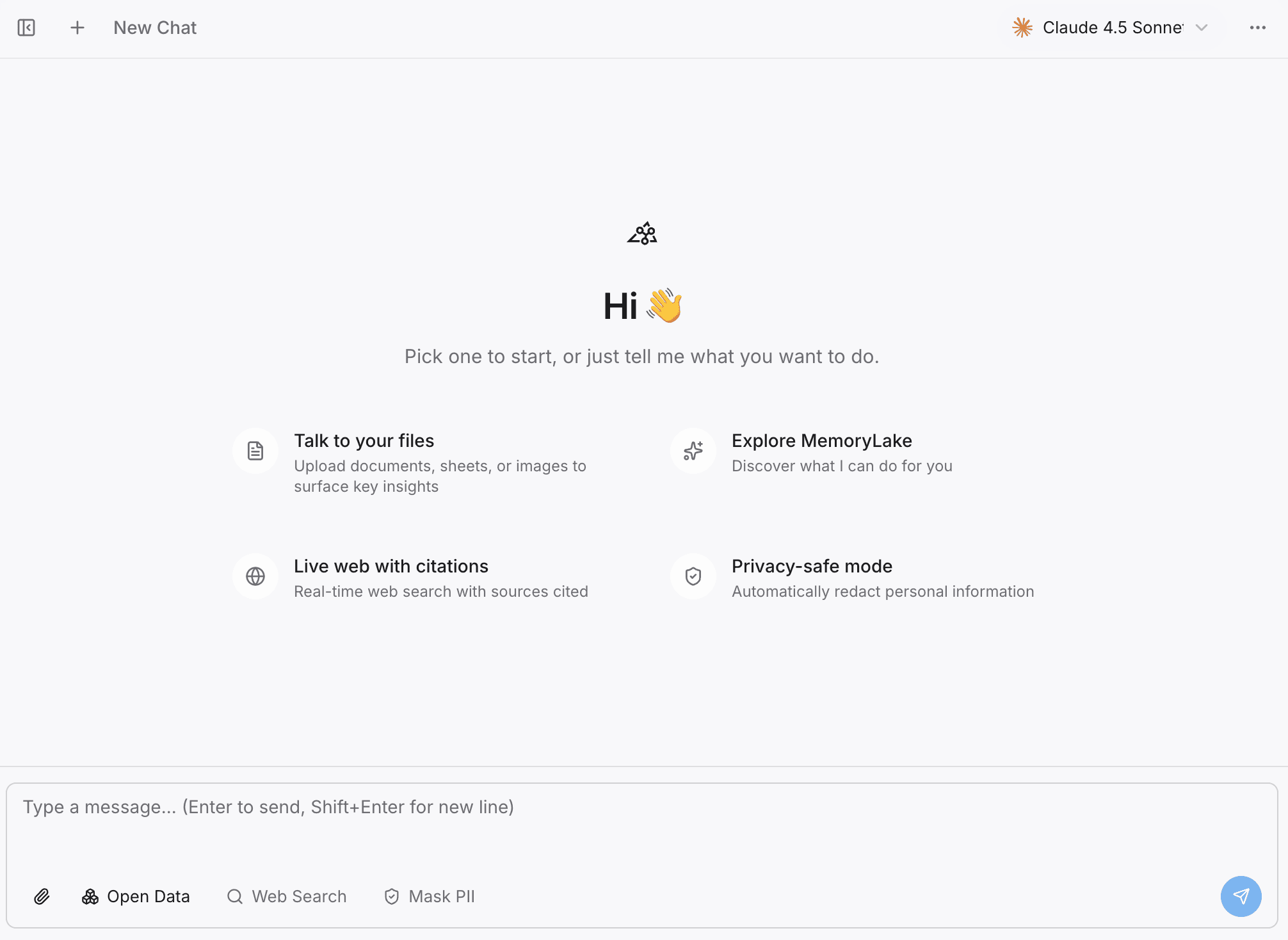
Before connecting external AI tools, you can verify your context in the built-in Playground. By asking questions directly against your project, you ensure the system has correctly indexed your knowledge.
This step highlights that MemoryLake is not just static cloud storage—it is a searchable, conversational, and highly reusable project memory layer. It pre-processes your context so that when Claude or ChatGPT accesses it, the information is already optimized for AI comprehension.
Step 3 — Add open data to strengthen the project
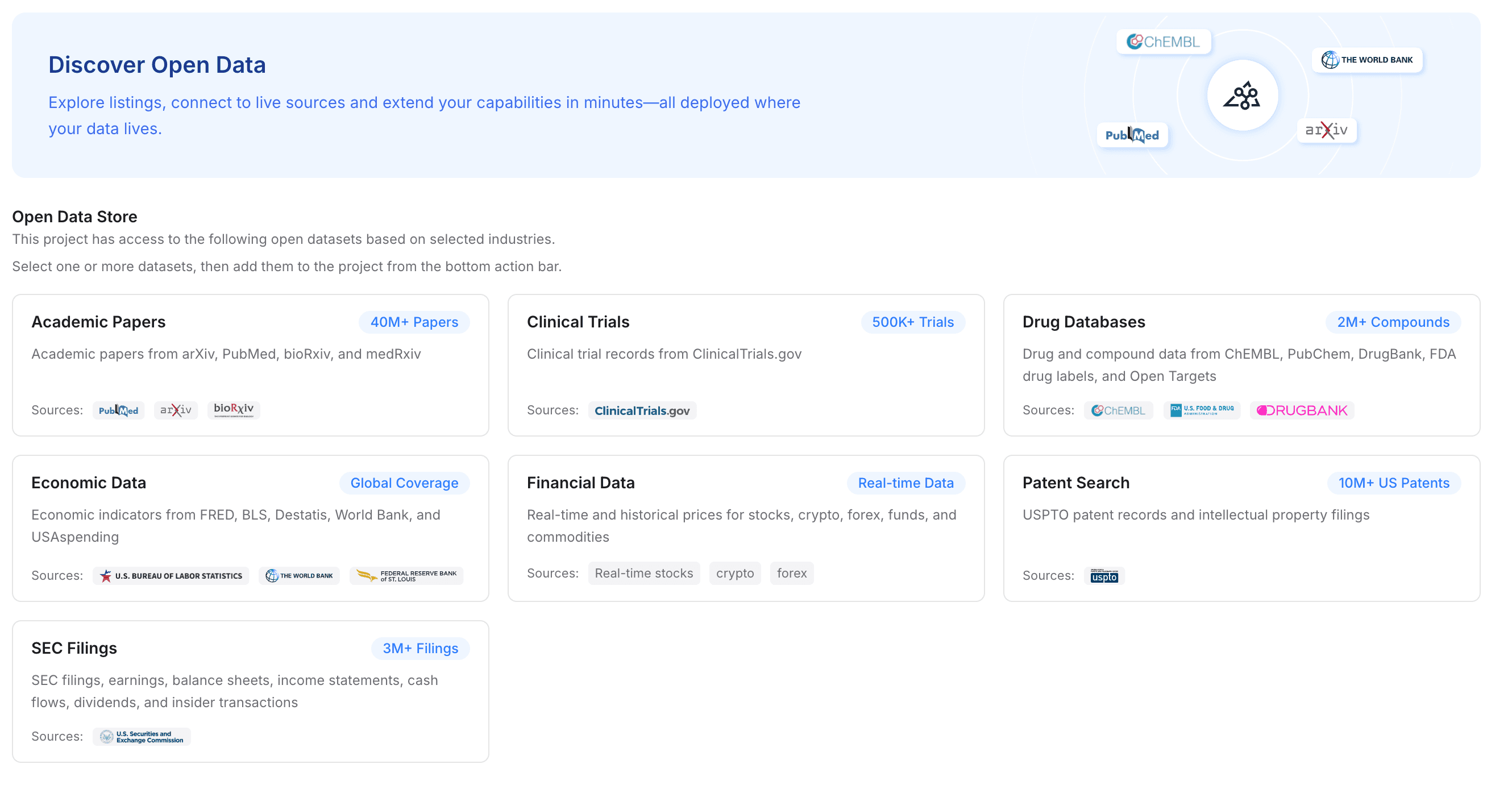
If your workflow requires deep domain expertise, you can augment your private files with open data. MemoryLake allows you to add specialized industry datasets to your project with a single click.
You can instantly integrate access to academic papers, clinical trials, drug databases, economic data, financial records, patent searches, and SEC filings. For research-heavy workflows, this provides an unparalleled advantage: you are feeding Claude, ChatGPT, and Gemini a deeply enriched context layer that combines your private files with authoritative global datasets.
Step 4 — Connect MemoryLake to your tools and workflow
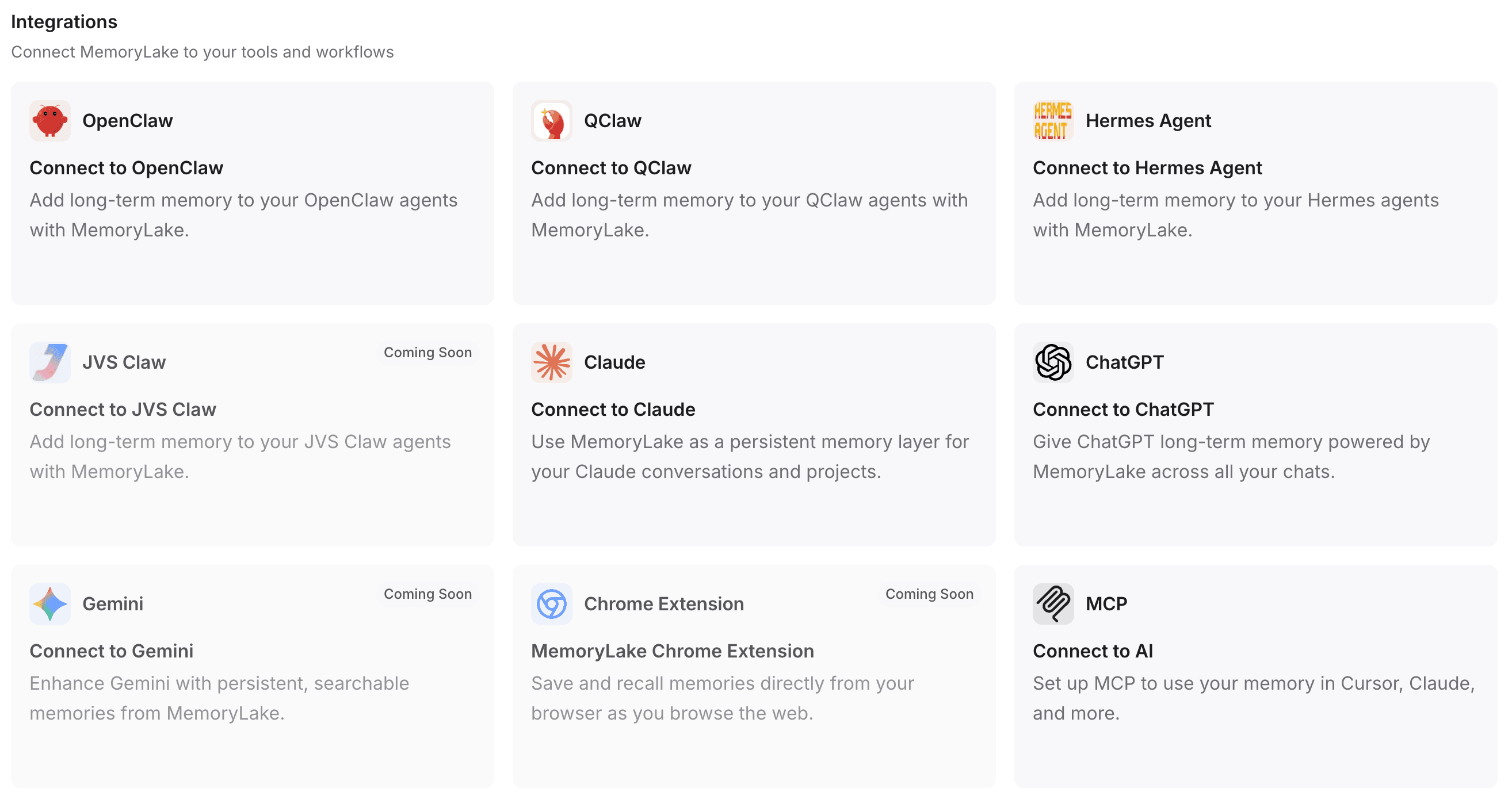
This is the critical step that bridges the gap between fragmented tools and a unified cross-model AI memory. By connecting this infrastructure to your daily assistants, you eliminate the need to repeatedly paste context.
First, select or create your personal API Key. MemoryLake supports rapid integration:
One-click installation: For supported environments, a single command is all it takes to install and configure the necessary plugins.
Automated configuration: If you use tools like OpenClaw, you can simply copy the provided integration guidelines and paste them into the client. It will automatically install the plugin, complete the configuration, and reboot the gateway for you.
Broad compatibility: You can seamlessly pipe this memory layer into ChatGPT, Claude, OpenClaw, Hermes Agent, and more.
Advanced integrations: For developers and power users, programmatically connecting via MCP (Model Context Protocol) or native API endpoints ensures your custom scripts and agents share the exact same memory passport.
How I Split Work Between Claude, ChatGPT, and Gemini Once Memory Is Synced
Once MemoryLake is handling the persistent context, the friction of multi-model productivity disappears. Your files and background knowledge are universally accessible. Here is how you can confidently split tasks across the ecosystem:
Claude for deep drafting and reasoning: With the memory layer providing the structural outline and source PDFs, Claude is best utilized for heavy text generation, complex coding architectures, and nuanced analytical writing.
ChatGPT for iteration, formatting, and ideation: Connect ChatGPT to the same memory space to rapidly brainstorm alternatives, format the data parsed by Claude, or run data analysis using its advanced reasoning models.
Gemini for multimodal tasks and ecosystem cross-checking: Use Gemini connected to your persistent memory when you need to cross-reference your project data against live Google Workspace documents, web queries, or complex multimodal inputs.
The goal is not to declare one model the absolute winner, but to design a workflow where the models are interchangeable workers accessing the same unified brain.
Common Mistakes That Still Break Multi-AI Workflows
Even with access to multiple tools, many users self-sabotage their productivity by clinging to legacy habits. Avoid these common traps:
Stuffing every prompt: Manually pasting 10,000 words of background into every new chat window wastes time, bloats the context window, and dilutes the model's attention.
Relying on a single chat window: Treating one infinite chat thread as your "project database" inevitably leads to the AI forgetting earlier instructions or hallucinating past decisions.
Failing to distinguish long-term memory from task context: Forcing an AI to read your 50-page brand guideline just to write a two-sentence tweet is inefficient.
Scattering files across tools: Uploading one CSV to ChatGPT and a related PDF to Claude guarantees the two models will give you contradictory advice.
Lacking structured project knowledge: Throwing raw data at an AI without organizing it into a coherent project space results in poor retrieval.
Treating chat history as a reusable knowledge layer: What you discussed with an AI yesterday is unstructured dialogue, not a reliable, portable knowledge base.
Memory Layer vs Chat History vs Context Window
To master a multi-model AI productivity setup, you must understand the technical distinctions between how AI handles information.
Context Window (The RAM): This is the active, short-term memory of a specific AI model during a single interaction. It is limited by a token cap. Once you exceed it, the AI starts "forgetting" the earliest information provided.
Chat History (The Log): The historical record of what you typed and what the AI answered. It is locked inside the specific app (e.g., your ChatGPT sidebar). It is essentially dead text—unsearchable by other tools and useless to Claude or Gemini.
Memory Layer (The Hard Drive): A persistent, structured infrastructure (like MemoryLake) that stores files, knowledge, and context independently of any specific AI tool. It is searchable, conversational, and completely portable across your entire AI stack.
Who This Workflow Is Best For
A persistent context workflow is highly recommended for professionals whose output depends on accuracy, consistency, and deep research:
Researchers and Academics: Who need multiple AI models to analyze the same massive sets of papers and datasets without losing the narrative thread.
Founders and Operators: Who switch between financial modeling in one AI, marketing copy in another, and product strategy in a third—all requiring the exact same business context.
Consultants and Analysts: Who manage distinct, highly confidential projects for multiple clients and need strict, siloed memory spaces that travel across their AI toolkit.
Product Teams: Who require shared context across technical documentation, user feedback, and roadmaps, ensuring no AI assistant works with outdated specifications.
Daily AI Power Users: Anyone experiencing fatigue from the endless cycle of copying and pasting the same prompts into different chat interfaces.
Final Thoughts
The real secret to cross-AI productivity is realizing that the models themselves are commodities. Today, Claude might be the best for coding; tomorrow, a new ChatGPT update might surpass it; next week, Gemini might release a breakthrough in multimodal reasoning.
If your workflows, files, and project contexts are trapped inside the chat interface of just one of these tools, you will constantly face the friction of migration and fragmentation. True multi-model efficiency does not come from trying to make every individual assistant "remember you." It comes from establishing a highly organized, easily accessible, and entirely portable memory layer that serves as the single source of truth for every tool you touch.
If your workflow is starting to break under repeated context switching, a portable memory system like MemoryLake can make your entire stack significantly more usable. By centralizing your files, connecting open data, and streaming that knowledge seamlessly into Claude, ChatGPT, and Gemini, you finally take ownership of your AI context.
Frequently Asked Questions
How do I sync context across Claude, ChatGPT, and Gemini?
To sync context across different AI tools, you need to decouple your data from the AI models. Use a third-party memory infrastructure layer to store your project files, instructions, and background knowledge, and connect it to Claude, ChatGPT, and Gemini via API or MCP integrations.
Can Claude, ChatGPT, and Gemini share memory?
Natively, no. They exist in isolated ecosystems. However, they can share memory if you use an external, portable AI memory layer that acts as a centralized knowledge base accessible by all three tools simultaneously.
What is the best way to reuse context across AI tools?
The best approach is to stop pasting text and instead create a structured project workspace in a dedicated memory system. Upload your files and define your instructions once, then ping that database from any AI assistant whenever you start a new task.
How do I avoid repeating prompts in different AI apps?
Store your core system prompts, brand guidelines, and project frameworks in a persistent memory layer. When using different apps, simply write a minimal prompt that calls upon the connected external memory to provide the necessary background.
What tool can store memory across multiple AI assistants?
Tools specifically designed as cross-model memory infrastructures, such as MemoryLake, allow you to store files, open data, and conversational context in one place, acting as a universal memory passport for your AI stack.
Is chat history enough for multi-AI workflows?
No. Chat history is locked to the specific platform where the conversation occurred. It cannot be exported dynamically to a different model, making it useless for maintaining continuity when switching from ChatGPT to Claude or Gemini.
How do I upload files once and use them across multiple AI tools?
Upload your source documents (PDFs, spreadsheets, Markdown) to an external, API-accessible memory layer. Once the documents are parsed and vectorized by that system, you can use integrations to let multiple AI tools query the exact same file repository.
What is the difference between context window, chat history, and memory layer?
The context window is an AI's temporary processing capacity for a single prompt. Chat history is an isolated text log of past interactions. A memory layer is a persistent, portable, user-owned database that structures your files and context for universal access across any AI tool.