How to Make a Business Proposal Presentation That Wins Clients
To make a business proposal presentation, start with the client's problem, not your company. Then follow a fixed outline: the problem, your proposed solution, how it works, proof, timeline, pricing, and next steps. Keep one idea per slide, back every claim with a number or a case, and end with a clear request.
This guide covers what a business proposal presentation is, a slide-by-slide outline, and how to write each slide. It also shows how to build one with AI from your notes and pricing sheet, plus an example and the mistakes to avoid.
What a business proposal presentation is
A business proposal presentation is a slide deck that asks a client or partner to buy, sign, or approve something. It turns a written proposal into a short story you can present in a meeting.
There are three common types:
- A sales proposal. It pitches a product or service to a client and asks for a signed deal.
- A partnership pitch. It proposes a joint project or channel deal and shows the value for both sides.
- An RFP response. It answers a formal request for proposal, point by point, against the buyer's requirements.
All three share one job. They must show the buyer that you understand their problem and can solve it at a fair price. The deck does not replace the written proposal. It is the part people remember after the meeting.
If your deck is for a general sales audience rather than one buyer, read our guide on how to make a sales presentation instead. A business proposal presentation is narrower. It is built for one buyer and one decision.
Before you build it: research the client
The best proposal decks are written for one reader. Spend time on research before you open PowerPoint.
Answer these questions first:
- What problem are they trying to solve? Use their words from the discovery call or the RFP.
- Who decides, and who influences? A finance lead and an operations lead want different slides.
- What does success look like for them? Ask for a number, such as hours saved or revenue gained.
- What have they tried already? This tells you which objections to expect.
- What is their budget range and timing? A proposal that ignores both rarely moves forward.
The US Small Business Administration (SBA) gives useful advice for business plans that applies here. It says to "Go into detail about the problems your business solves." It also says to "Explain the competitive advantages that will make your business a success." In a proposal, swap "your business" for "this client's project."
Write one sentence before you start: "After this meeting, I need the client to ___." Every slide should help get that answer.
Outline: a slide-by-slide structure
Here is a 10-slide outline that works for most sales and partnership proposals.
| # | Slide | What it answers |
|---|---|---|
| 1 | Title and the client's goal | What is this, and why does it matter to them? |
| 2 | Executive summary | What are we proposing, at what price, by when? |
| 3 | The problem | What is the client's situation today? |
| 4 | Proposed solution | What will we do? |
| 5 | How it works | What happens, step by step? |
| 6 | Proof | Why should they believe it will work? |
| 7 | Timeline | When will each part be delivered? |
| 8 | Pricing and options | What does it cost, and what are the choices? |
| 9 | Why us | Why this team rather than another? |
| 10 | Next steps | What do we need from them, and when? |
Cut or merge slides to fit the meeting. A 20-minute call might merge slides 4 and 5 and drop slide 9. A formal RFP response might add slides for compliance, security, or service levels.
Keep the written proposal as the appendix. Detailed terms, full pricing tables, and legal notes belong there, not on the main slides.
How to write each slide
Title and the client's goal. Put the client's name and their goal on slide 1. For example: "Cutting invoice processing time for Northwind by half." The audience should see their outcome before your logo.
Executive summary. The SBA says an executive summary should "Briefly tell your reader what your company is and why it will be successful." In a proposal, state the problem, your solution, the price, and the timeline in four short lines.
The problem. Describe the situation in the client's own numbers. Show cost, delay, or risk. If you only have estimates, say so and give the source.
Proposed solution. Name what you will deliver, not how hard you will work. Use three to five deliverables at most.
How it works. Show the process as a simple flow from start to finish. Name who does what at each stage, including the client's team.
Proof. Use one case study close to the client's industry and size. Include a result with a number and a date.
Timeline. Show phases with start and end dates. Mark the points where the client must review or approve.
Pricing and options. Give two or three options, each tied to a clear scope. Show the total and what is included. Most buyers want to compare, not just accept or reject.
Why us. Keep it to three reasons that matter to this client. Team experience, a relevant result, or a guarantee all work.
Next steps. Repeat the request. List the decision, the date, and the first action after signing.
Write each slide title as the takeaway, not the topic. "Phase 1 cuts processing time within six weeks" beats "Timeline." Our guide on writing takeaway slide titles covers this in more depth.
Pricing and proof slides
These two slides decide most proposals, so give them extra care.
Show options, not one number. A good-better-best layout lets the buyer choose a level. Each option should change scope, not just price. For example, a basic option covers one team, and a full option covers three.
Tie the price to the value. Put the client's own cost next to your fee. If slow invoicing costs them $8,000 a month, a $3,000 monthly fee is easy to weigh. The figures here are invented for illustration.
Make proof specific. A logo wall says little. One short case says more: the client type, the problem, what you did, and the result. If you have permission, add a short quote with a name and role.
Use a chart only when it helps. Microsoft's PowerPoint guidance says to "Make labels for charts and graphs understandable." It adds: "Use only enough text to make label elements in a chart or graph comprehensible."
Design tips for proposal slides
A proposal deck should look like it was built for this client.
Use the client's context. Add their logo next to yours on the title slide, if allowed. Use their terms for teams, products, and metrics.
Keep backgrounds quiet. Microsoft advises you to "Make slide backgrounds subtle and keep them consistent." It warns: "You don't want the background or design to detract from your message."
Keep text short. One idea per slide, with the detail in your talk track or the appendix.
Check every detail. Microsoft says "To earn and maintain the respect of your audience, always check the spelling and grammar in your presentation." In a proposal, also check the client's name, prices, and dates on every slide.
How to make a business proposal presentation with AI
Most of the work in a proposal deck is pulling facts from notes, pricing sheets, and past proposals. An AI tool can read those files and draft the deck in one pass.
Here is the method in three steps, using Powerdrill Bloom.
Step 1: Upload your notes, pricing, and past proposals
Start with the files you already have. That might be a discovery call note, a pricing sheet, a case study, or an RFP document.
The AI Proposal Generator says to "Upload the brief and your reference library past proposals, pricing sheets and case studies." Its sales proposal option can "Turn a discovery call note and pricing sheet into a branded sales proposal in minutes."
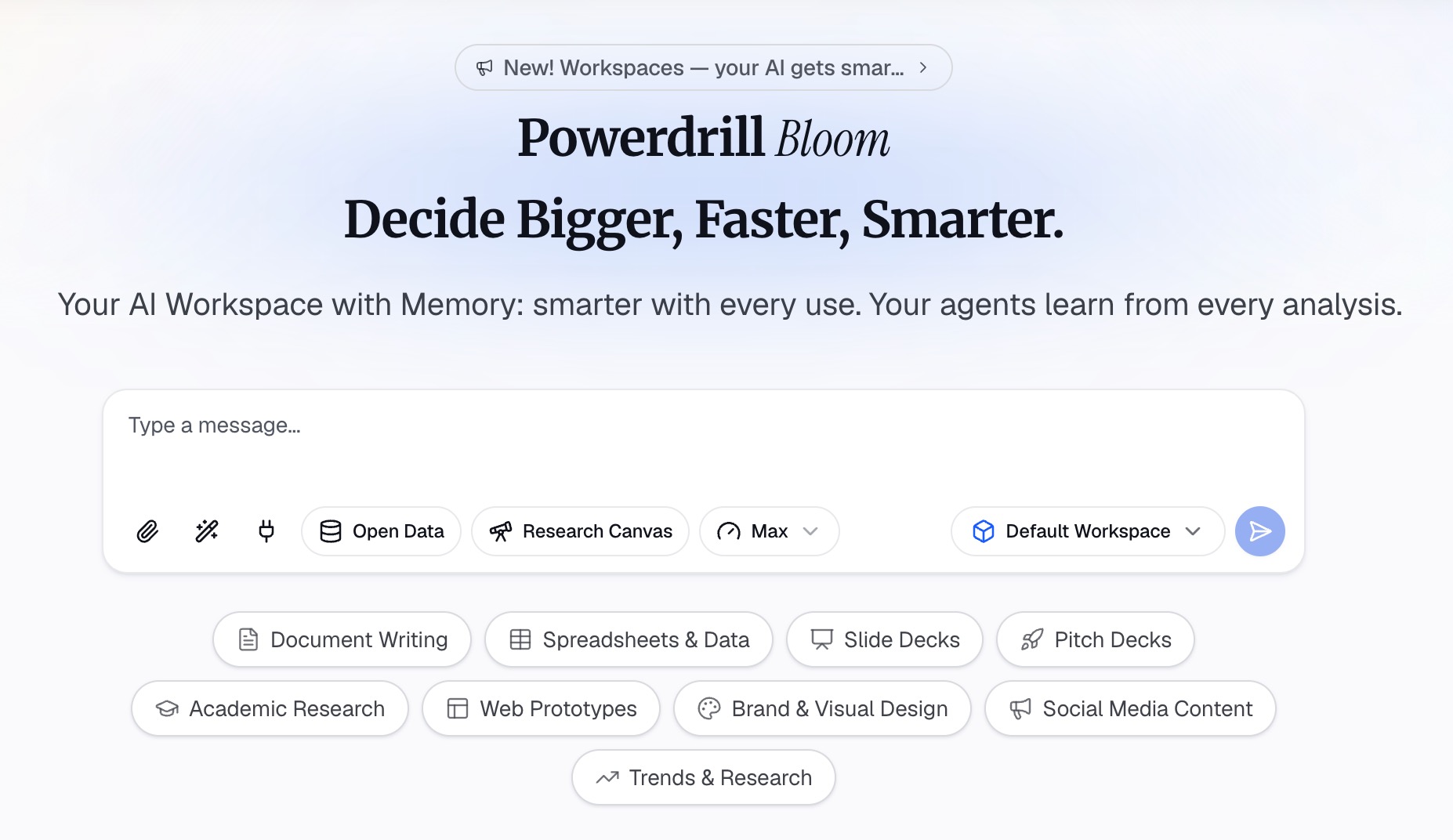
Step 2: Ask for the deck in natural language
Describe the deck in one or two sentences. For example: "Build a 10-slide business proposal presentation for Northwind. Use the call notes and our pricing sheet. Offer three pricing options."
The proposal page says you can "Tag the client vertical, deal size and key requirements." Those tags "drive tone and emphasis automatically." For a partnership deal, it lists a "Slide partnership pitch deck with mutual value and timeline."
For an RFP, it says it can "Map every RFP requirement to your capabilities and case studies automatically."
Step 3: Export the slides and check every claim
Export the deck and review it slide by slide. The proposal page says you can "Export the branded proposal PDF or PPTX, ready to send or co-edit before signing." The Excel to PPT tool also lets you "export to PowerPoint in one click."
Then check the numbers. Compare every price, date, and result with the source file. A wrong price on slide 8 can end a deal. The homepage says "Every number comes back with the page, the row and the figure behind it," so you can trace each one.
A business proposal presentation example
Here is a short example for an invented company. Clearpath Logistics offers invoice automation to mid-sized distributors. All names and numbers below are invented.
Slide 1, title: "Cutting invoice processing time for Northwind by half."
Slide 2, summary: "Automate 3,000 monthly invoices. Three options from $2,000 to $4,500 a month. Live in eight weeks."
Slide 3, problem: "Northwind's team spends 160 hours a month keying invoices. Errors delay supplier payments by six days on average."
Slide 6, proof: "A distributor of similar size cut processing time by 55% in its first quarter with us."
Slide 8, pricing: A table of three options: one warehouse, three warehouses, or all sites with supplier portal.
Slide 10, next steps: "Approve option 2 by November 20. Kickoff workshop on December 1."
Notice what the example does. Each slide carries one number, the price appears beside the problem's cost, and the request is dated.
How to present it and follow up
The deck is half the work. The other half is the meeting.
Open with their goal. Spend the first minute on the client's problem, not your history.
Pace the talk. Microsoft advises: "If there's no time limit, take less time rather than more to ensure that people stay engaged." Leave at least a third of the meeting for questions.
Speak from the slides, do not read them. Microsoft says "The text should be a cue for the presenter rather than the full message for the audience."
Welcome questions about price. They mean the buyer is weighing the deal. Have the full pricing table ready in the appendix.
Follow up the same day. Send the deck, the written proposal, and a two-line summary of what was agreed. Name the decision date again.
Common business proposal presentation mistakes
Starting with your company. Clients care about their problem first. Move your history to one slide near the end.
One price, no options. A single number invites a yes or no. Two or three options invite a choice.
Vague deliverables. "Ongoing support" means different things to different people. Name what you deliver and when.
Proof that does not match. A case from a different industry or size convinces no one. Pick the closest match you have.
No clear next step. End with a dated decision, not "Let us know."
Copy-paste errors. A previous client's name on one slide can lose the deal. Search the deck for old names before you send it.
For a deck focused on the numbers, see our guide on how to make a financial presentation.
Want a first draft from your own notes? Try Powerdrill Bloom with one discovery call note and your pricing sheet, and ask for a 10-slide proposal deck.
Frequently asked questions
What should be included in a business proposal presentation?
A business proposal presentation should include the client's problem, your proposed solution, how it works, proof, a timeline, pricing options, and next steps. Open with the client's goal and an executive summary. Keep detailed terms in the written proposal or appendix.
How many slides should a business proposal presentation have?
Most business proposal presentations work well with 8 to 12 slides. A short sales call may need six or seven. A formal RFP response may need more slides for compliance or service levels. Move detailed tables into an appendix.
How do you start a business proposal presentation?
Start with the client's goal, not your company. Put their name and the outcome they want on the first slide. Then give a short summary of the problem, your solution, the price, and the timeline before going into detail.
What is the difference between a business proposal and a business proposal presentation?
A business proposal is the full written document with scope, terms, and pricing details. A business proposal presentation is the short slide version for a meeting. It keeps the problem, solution, proof, and price, and it ends with a clear request.
Can AI make a business proposal presentation?
Yes. AI tools can read call notes, pricing sheets, and past proposals, then draft the slides. Powerdrill Bloom's AI Proposal Generator builds branded sales proposals and partnership pitch decks and exports PDF or PPTX files. Always check every price and date before you send it.
Sources: US Small Business Administration, Write your business plan · Microsoft Support, Tips for creating and delivering an effective presentation. Details read on October 28, 2026.