How to Make a Financial Presentation: Outline and Examples
A financial presentation explains how an organization is performing against its plan, why, and what happens next. To make one, start with a one-slide summary of the key messages. Follow it with results against budget, the main variances and their causes, cash, the outlook, and the decisions you need. Keep the detailed statements in an appendix.
This guide covers what a financial presentation is and who it serves. It then gives a slide-by-slide outline, a method for writing commentary, and ways to show variances and charts. The later sections cover an AI method in three steps, an example, design tips, and common mistakes.
What a financial presentation is
A financial presentation turns financial statements into a short story for decision-makers. It might be a monthly results review, a quarterly board pack, a budget proposal, or an investor update.
The ICAEW, the chartered accountants' body for England and Wales, describes the purpose of a board financial report. It is to give board members and senior management "the necessary financial information and analysis to enable informed decision-making."
The same article warns about how these packs grow. Reports are often "developed piecemeal, with additional information periodically added (and rarely thinned out)." Over time, the key messages get lost.
So a good financial presentation does three things, in the ICAEW's words:
- Show "How are we progressing against plan"
- Give "Some of the key numbers to provide context and scale"
- Provide "Analysis support for the key decisions required"
Everything else belongs in the appendix.
Who the audience is and what they ask
The same numbers need different framing for different rooms.
| Audience | What they want to know | Typical length |
|---|---|---|
| Board of directors | Are we on track, what changed, what do you need from us? | 8 to 12 slides plus appendix |
| Leadership team | Which departments are off plan, and what is the fix? | 10 to 15 slides |
| Investors | Growth, margins, cash runway, and the outlook | 10 to 15 slides |
| Department heads | Their own budget versus actual, line by line | 5 to 8 slides |
The board question is the hardest. Fathom, a financial reporting company, calls "Are we on track against plan?" the most loaded question in a board meeting. In its 2026 survey, one in five finance leaders named budget versus actual tracking as a top board question.
Know your audience's main question before you build a single slide. It decides what goes first.
What to include: a slide-by-slide outline
This outline suits a monthly or quarterly financial presentation to a board or leadership team. Adjust the length to your audience.
| # | Slide | What it shows |
|---|---|---|
| 1 | Title | Period covered, presenter, date |
| 2 | Key messages | Three to five headlines, each with one line of detail |
| 3 | Results against plan | Revenue, gross margin, operating costs, and profit versus budget and last year |
| 4 | Revenue | Trend by month or quarter, split by product or segment |
| 5 | Costs | Main cost lines versus budget, with the largest variances flagged |
| 6 | Variance bridge | A waterfall chart from budgeted to actual profit |
| 7 | Cash | Cash balance, cash flow, and runway |
| 8 | Outlook | Full-year forecast versus the original budget |
| 9 | Risks and actions | What could change the outlook, and what you are doing about it |
| 10 | Decisions required | Each decision with a recommended option |
| 11 | Appendix | Income statement, balance sheet, cash flow statement |
The ICAEW gives a format for the key messages slide: "headlines on the left and detail on the right." That lets readers who skipped the papers catch up quickly.
For slide 10, its advice is direct. "Always include a recommended course of action for each decision rather than leaving it open to the board to decide."
Write commentary that answers "why"
Commentary is where most financial presentations fail. The ICAEW gives an example of weak commentary: "We are £X,000 below budget for sales." That only repeats what the table already shows.
It proposes five levels of analysis instead:
- What has happened. The fact, in one sentence.
- Why it occurred. The cause behind the number.
- What actions you are taking. The response to the variance.
- How far those actions have got. Progress so far.
- When the actions will pay off. The timing, and the effect on the year end.
Fathom suggests a shorter three-part version for each material variance: what happened, why, and what it means. It also advises leading with the narrative rather than the numbers. A board shown a variance table first "immediately fixates on the biggest negative number."
One more distinction matters to boards. Fathom separates timing variances from structural ones. A timing variance means a deal slipped or an invoice went out late, but the annual picture holds. A structural variance means something has changed, such as a lost customer or pricing pressure.
Tag each material variance as one or the other. Then show the updated forecast next to it. In Fathom's words, "The variance tells you where you've been. The reforecast tells you where you're going."
How to show variances clearly
Variance tables are the core of most financial presentations. A few rules keep them readable.
Pick one sign convention and say it. The ICAEW describes two. In the first, positive is good news and negative is bad news. In the second, positive means bigger than budget. It says the first is the version "most non-financial people can interpret most easily."
Use traffic lights for size. The ICAEW example uses red for more than 10% worse than budget, green for more than 10% better, and amber in between. It also says to explain every red light in the commentary.
Show month, year to date, and full year. Each block can compare actual with budget and last year. A forecast column in the full-year block shows how the outlook has moved since the budget was set.
List the largest variances. The ICAEW suggests adding the five largest variances at the bottom of the table. In Excel, LARGE and SMALL find them, and XLOOKUP returns their descriptions.
Keep the columns legible. The ICAEW says about 14 columns is the maximum for a readable table.
Charts that work for financial slides
Use a chart only when it makes the message faster to read. The ICAEW's test is simple: "A chart that takes more than a minute to interpret needs simplifying and summarising."
| Message | Chart |
|---|---|
| How profit moved from budget to actual | Waterfall (bridge) chart |
| How revenue or costs changed over time | Line chart or column chart |
| How segments compare | Bar chart, sorted by size |
| How cash changed over the period | Waterfall chart or line chart |
| Detailed results by division | A table, sorted by size |
The waterfall chart is the most useful financial chart. Microsoft says it "shows a running total as values are added or subtracted." It adds that "waterfall charts are also called bridge charts." In Excel, select the data, then choose Insert, then Insert Waterfall, then Waterfall.
The ICAEW suggests building the bridge by theme rather than by line item. For example, a payroll tax increase affects every department. Show it as one block for the whole organization.
Tables still have a place. The ICAEW advises "don't be afraid of tables of data." It suggests sorting division tables by size rather than alphabetically.
How to make a financial presentation with AI
Building the deck by hand means copying numbers from spreadsheets into slides, then checking every figure. An AI tool can read the files, find the variances, and draft the slides in one pass.
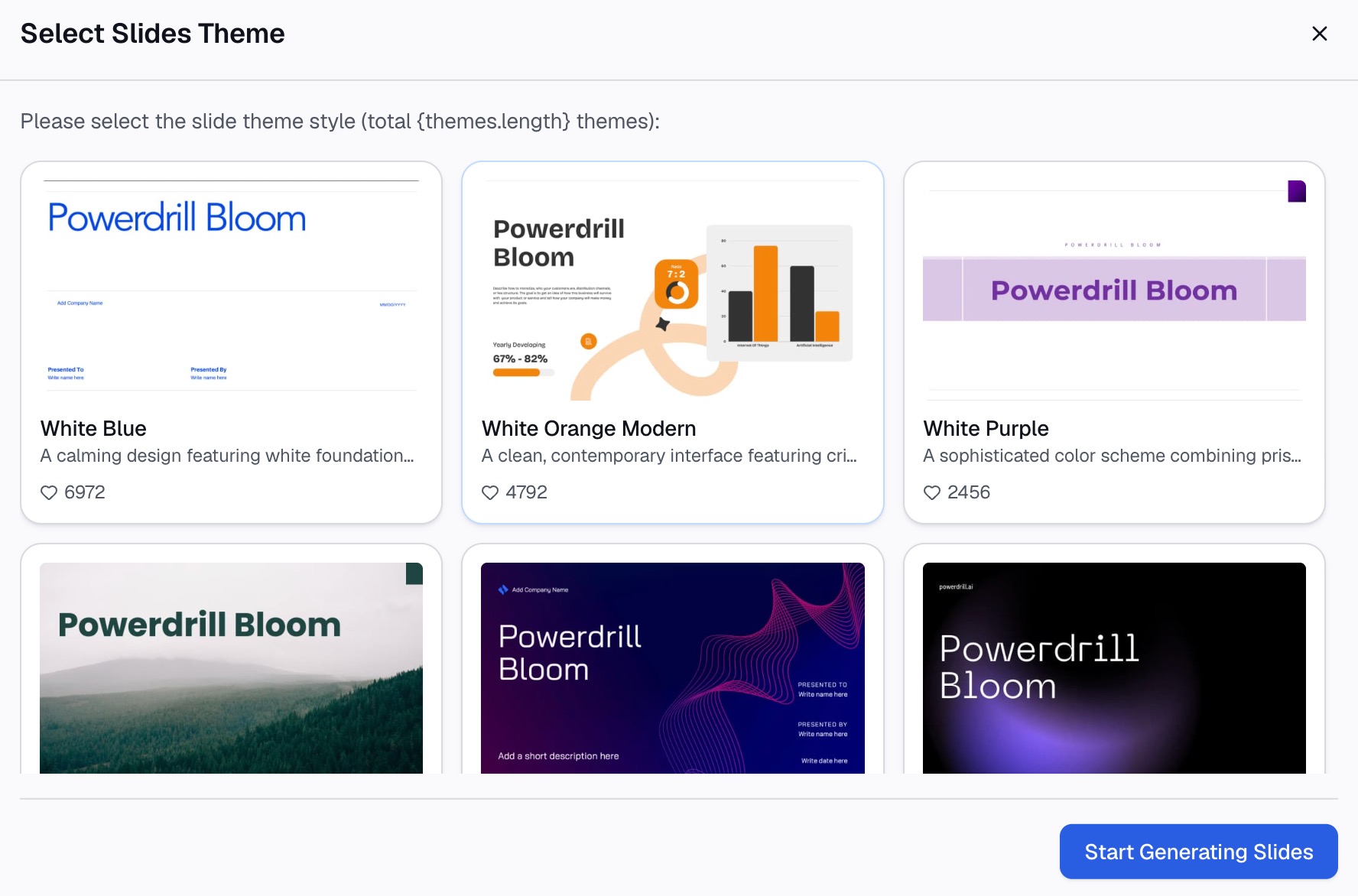
Here is the method in three steps, using Powerdrill Bloom.
Step 1: Upload the P&L, budget, and cash flow files
Start with the files your finance team already produces. The AI Financial Report Generator page lists the inputs: "P&L, balance sheet, cash flow and any KPI tracker." Add the budget file so the tool can compare actual with plan.
Upload the raw exports rather than a cleaned-up copy. If a workbook has several sheets, name the ones that hold this period's results in your first request.

Step 2: Ask for the storyline in natural language
Describe the presentation you need in one or two sentences. For example: "Build a 10-slide quarterly financial presentation for the board. Compare actual with budget and last year, explain the three largest variances, and end with two decisions."
Then ask follow-up questions before any slides are drafted. "Which variances are timing, and which are structural?" or "What is the full-year outlook if the two delayed deals close in January?" The answers become your commentary.
Step 3: Build the slides, charts, and speaker notes
Ask for the deck once the storyline looks right. The AI Financial Report Generator page lists a "Quarterly board financial deck with KPIs, segment view and asks." The Excel to PPT page says you can "export to PowerPoint in one click."
Ask for a variance bridge and a cash slide by name, and request speaker notes for each slide. Then check two or three figures against the source files. The Powerdrill Bloom homepage says "Every number comes back with the page, the row and the figure behind it."
A financial presentation example
Here is a short example for a quarterly board meeting. The company and numbers are invented to show the structure.
- Key messages. "Q3 revenue is 6% below plan because two enterprise deals moved to Q4. Costs are on budget. Cash runway is 20 months. Full-year revenue is forecast within 2% of plan."
- Results against plan. Revenue $4.7M against a $5.0M budget. Gross margin 71% against 70%. Operating costs $3.9M, on budget.
- Variance bridge. Budgeted profit, minus $300K from delayed deals, plus $40K from lower hosting costs, equals actual profit.
- Cash. Cash balance $9.2M, monthly net burn $460K, runway 20 months.
- Outlook. Full-year revenue forecast $19.6M against a $20.0M budget. Both delayed deals have signed letters of intent.
- Decision required. "Approve hiring two account executives in Q4. Recommended: approve, funded by the hosting savings and the delayed deals."
Each slide title states the point. A reader who sees only the titles still gets the story. For a one-page version of the same numbers, see our guide to a board-ready financial summary.
Design tips for financial slides
Financial slides carry more numbers than most, so readability matters more.
- Use readable fonts. Microsoft suggests simple fonts such as Arial or Calibri. It adds "Try to avoid using font sizes smaller than 18 pt."
- Round the headline numbers. The ICAEW recommends "a few significant digits rather than having detailed numbers" on the front page.
- Label charts clearly. Microsoft advises using "only enough text to make label elements in a chart or graph comprehensible."
- Keep backgrounds plain. A subtle, consistent theme keeps attention on the figures.
- Use landscape for statements. The ICAEW says a landscape pack fits the many columns of an income statement or cash flow.
How to present it in the meeting
The deck is only half the job. How you run the meeting decides whether the numbers lead to decisions.
Send it ahead. Share the deck as a pre-read a few days before the meeting. Many board members will skim it, so the key messages slide must stand on its own. The ICAEW notes that board members "may not have read the papers in detail – or at all."
Spend the time on the why. Do not read the numbers aloud. Walk through the key messages, the variance bridge, and the outlook. Leave the detailed statements in the appendix and go there only when asked.
Prepare for the obvious questions. For each material variance, know whether it is timing or structural, and what the forecast now shows. Keep a backup slide for each one.
Check the room. Microsoft's first delivery tip is to "Show up early and verify that your equipment works properly." It also suggests checking that the projector's resolution matches your computer.
Ask for feedback afterward. The ICAEW suggests asking the board or senior managers what they find most helpful. Ask which parts they don't read, too. Use the answers to trim the next financial presentation.
Common financial presentation mistakes
Watch for these before you present.
- Opening with the full table. Start with the key messages, then show the numbers that support them.
- Commentary that repeats the numbers. Explain why, what you are doing, and when it will be fixed.
- No outlook. A variance without a reforecast leaves the board guessing about the year end.
- Mixed sign conventions. State the convention once and use it on every slide.
- Too many charts. Replace any chart that takes more than a minute to read with a short table.
- Decisions without a recommendation. Give the board an option to approve, not an open question.
- Unchecked figures. Tie every headline number back to the statements before the meeting.
Want a first draft from this quarter's files? Try Powerdrill Bloom with your P&L and budget, and ask for a 10-slide financial presentation.
Frequently asked questions
What should be included in a financial presentation?
Start with a key messages slide and results against budget and last year. Then cover the main variances and their causes, cash, the full-year outlook, risks, and the decisions required. Put the detailed income statement, balance sheet, and cash flow statement in an appendix.
How many slides should a financial presentation have?
Most board and leadership financial presentations run 8 to 15 slides, plus an appendix. Keep the main section short enough to present in the time you have. Move detailed statements and supporting schedules to the appendix.
How do you explain a budget variance in a presentation?
Say what happened, why it happened, and what it means for the year. Tag the variance as timing or structural, and show the updated forecast next to it. Explain what actions you are taking and when they should work.
What charts are best for a financial presentation?
A waterfall chart shows how profit moved from budget to actual. Line or column charts show trends over time, and sorted bar charts compare segments. Use a table when readers need exact figures by division.
Can AI make a financial presentation?
Yes. AI tools can read P&L, budget, and cash flow files and draft the slides, charts, and commentary. Powerdrill Bloom's AI Financial Report Generator describes a quarterly board financial deck with KPIs, a segment view, and asks. Check the figures against your source files before you present.
Sources: ICAEW, Bringing financial reports alive in Excel with visualisation: building the report · Fathom, How to answer "Are we on track?" · Microsoft Support, Create a waterfall chart · Microsoft Support, Tips for creating and delivering an effective presentation.