How to Do Market Research Faster with Agent Skills in 2026 (Tested & Compared)
Introduction
In 2026, the speed at which a business can gather, analyze, and act on market intelligence is a defining competitive advantage. Yet, despite the widespread adoption of AI, many strategy and growth teams still find their market research workflows bogged down by repetitive setup, tool switching, and manual data synthesis.
The industry has shifted. The most efficient teams are no longer relying on generic AI chat tools; they are adopting skill-based workflows. By leveraging AI agent skills, professionals can transform raw data into structured insights, charts, and reports in a fraction of the time.
This guide explores how to do market research faster using agent skills, compares the top workflow methodologies, and provides a step-by-step tutorial on automating trend research using Powerdrill Bloom.
Why Market Research Is Still Too Slow
Even with modern AI market research tools, analysts and founders frequently run into bottlenecks that slow down the research cycle:
Scattered Information Sources: Analysts waste hours jumping between news aggregators, financial terminals, search engines, and internal documents.
Repetitive Setup (The "Blank Prompt" Problem): Starting from scratch in a generic AI chat interface requires you to rewrite instructions, specify formatting, and set context every single time you need a weekly market outlook.
Time-Consuming Synthesis: Gathering data is only step one. Reading through raw data to identify patterns, discourse shifts, and sector rotations takes hours of cognitive labor.
The Output Gap: Most AI tools return a wall of text. Converting that text into presentation-ready charts, summaries, or downloadable reports requires manual formatting and tool-switching.
What Are Agent Skills?
Agent skills are pre-configured, specialized capabilities given to an AI agent to execute a specific, multi-step workflow.
Think of them as executable standard operating procedures (SOPs) for your AI. Instead of giving an AI a general instruction like "research the market," you trigger a specific "skill" (e.g., Recent 30 Days Trend Analysis or Competitor Discourse Synthesis). The AI already knows the best practices, the necessary data sources to check, and the exact output format required.
Unlike standard AI chatbots, which require extensive prompt engineering for every new session, agent skills offer a reusable AI workflow. They bridge the gap between a simple prompt interface and a fully fledged market research automation system.
How Agent Skills Speed Up Market Research
Implementing an agent workflow for market analysis fundamentally changes how fast a team can move from question to insight.
Lower Setup Friction: You skip the prompt engineering phase entirely. The AI already knows how to research; you just tell it what to research.
Reusable Workflows: Once a skill is configured, it can be run daily or weekly with consistent, predictable results.
Faster Time-to-Insight: By automating the data collection and initial synthesis phases, strategy teams can focus on strategic decision-making rather than data entry.
More Consistent Outputs: Skill-based workflows ensure that reports follow the same structure every time, making period-over-period comparisons much easier.
Easier Onboarding: Non-technical team members don't need to learn advanced prompt engineering to get high-quality research. They simply select a skill and input their query.
Tested & Compared: Manual vs. Blank Prompting vs. Skill-Based Workflows
To understand the actual workflow advantage, we compared three common approaches to compiling a standard monthly market trend report. Here is a practical workflow comparison based on setup speed, repeatability, and output quality.
Feature | Manual Research | Blank AI Prompting (Generic Chat) | Agent Skills Workflow |
Setup Time | High (Hours of reading/searching) | Medium (Requires complex prompt engineering) | Low (Select skill, type keyword) |
Repeatability | Low (Varies by analyst) | Medium (Prompts often break or drift) | High (Locked-in workflow logic) |
Output Consistency | High (If using strict templates) | Low (AI may change format dynamically) | High (Pre-defined output structures) |
Tool Context Switching | High (Browser, Excel, PowerPoint) | Medium (Chat UI to Document/Slides) | Low (All-in-one workspace) |
Best For | Deep primary research, interviews | Quick one-off ad-hoc questions | Recurring market monitoring, trend analysis |
The Verdict: While manual research remains necessary for bespoke primary data, and blank prompting is fine for quick definitions, skill-based workflows dramatically outperform both when it comes to recurring market monitoring and no-code market research automation.
How to Use "Start from Skills" in Powerdrill Bloom
To see this in action, we can look at Powerdrill Bloom. Powerdrill Bloom is not just a generic AI chat tool or a basic spreadsheet analyzer; it is a workflow-oriented AI agent workspace that helps users move seamlessly from raw inputs to analysis, insights, charts, and presentation-ready outputs.
Recently, Powerdrill Bloom introduced a feature called Start from Skills. This feature allows users to begin their work from reusable, best-practice workflows instead of a blank canvas.
Here is how you can use it to automate a 30-day market outlook report in minutes.
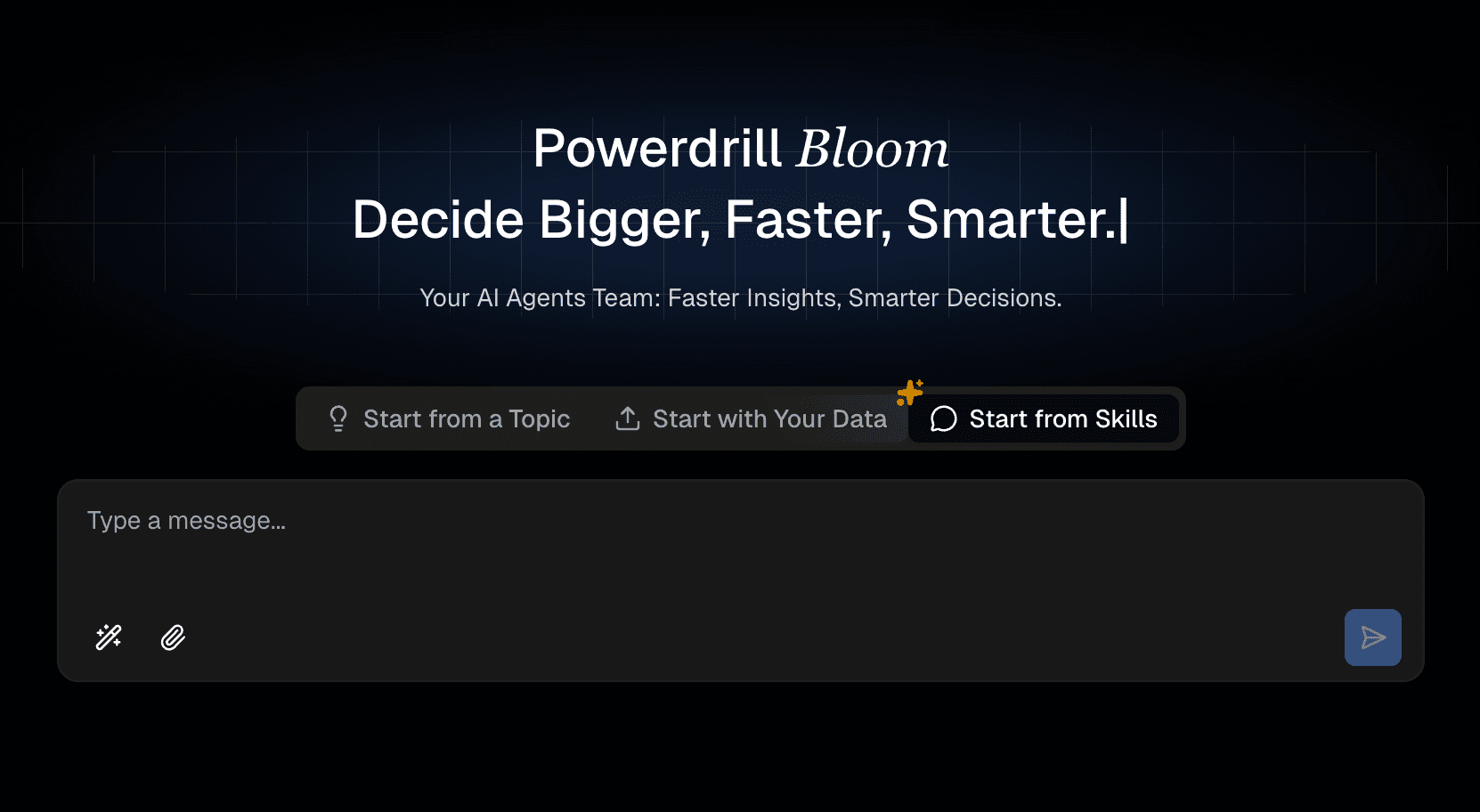
Step 1: Navigate to the Workspace and Select "Start from Skills"
Log into Powerdrill Bloom. Instead of typing into the default chat box, look for the new workflow toggle and select Start from Skills.
Why this matters: This immediately shifts your workspace from a reactive "one-shot prompt" interface into a structured, workflow-driven environment, bypassing the friction of setting up context.
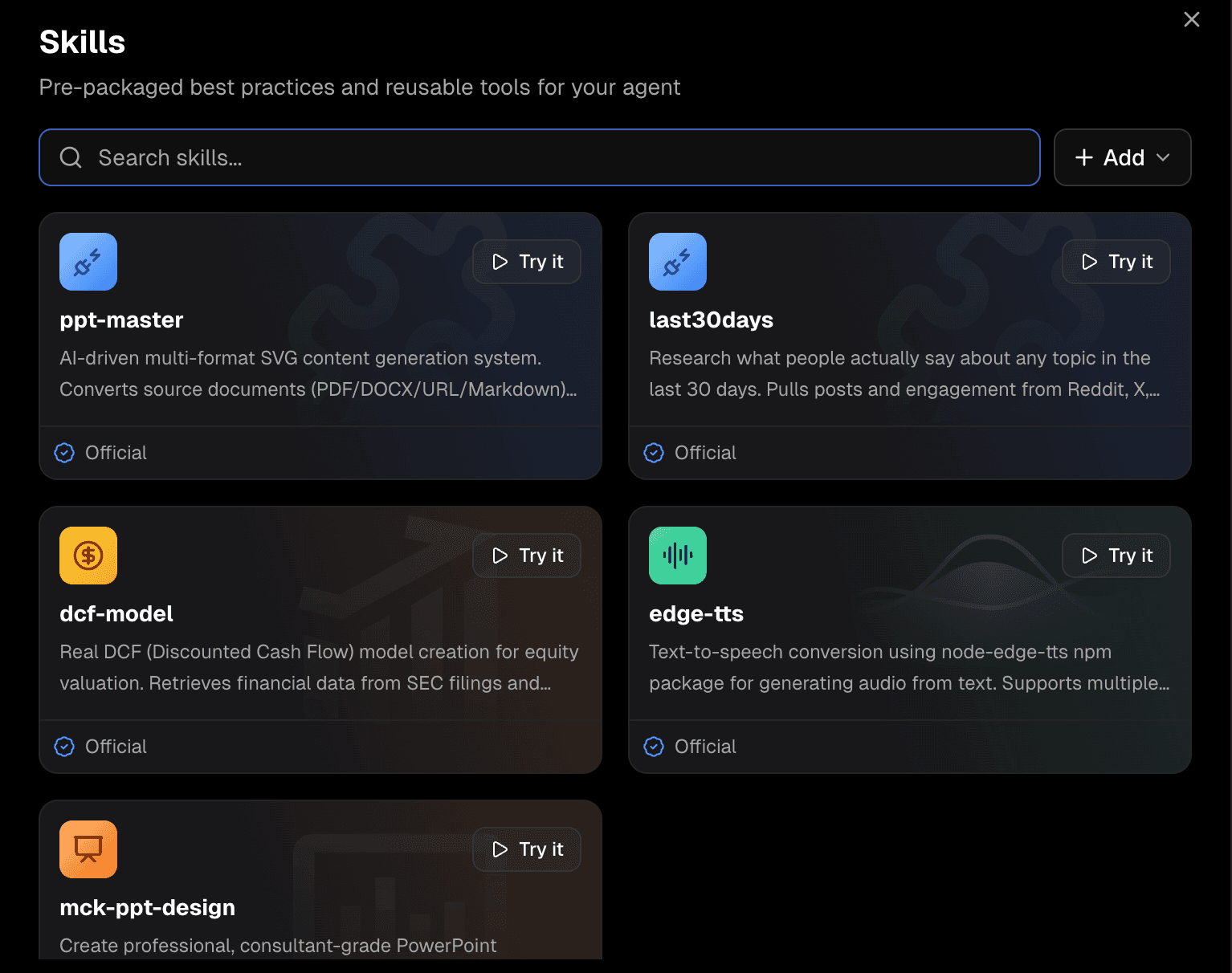
Step 2: Choose the Research-last30days Skill
From the Recommended Skills dashboard (or via Manage Skills if you are organizing a custom library), select the skill named Research-last30days.
Why this matters: This specific skill is pre-engineered for temporal market research. It inherently understands that it needs to look at recent news, financial data, and market sentiment over exactly the last month, structure the findings, and format them for business consumption.
Step 3: Input Your Natural Language Request
Now that the skill is active, you only need to provide the target subjects. You don't need to explain how to format a report. Simply enter your specific market query.
For example, type:
"S&P 500, Nasdaq 100, Dow Jones 30 recent 30 days trend, volatility, sector rotation and market outlook."
Why this matters: You are treating the AI like a trained junior analyst. Because the skill handles the "how," you only need to define the "what." This makes complex financial and trend research accessible even to those who aren't power users.
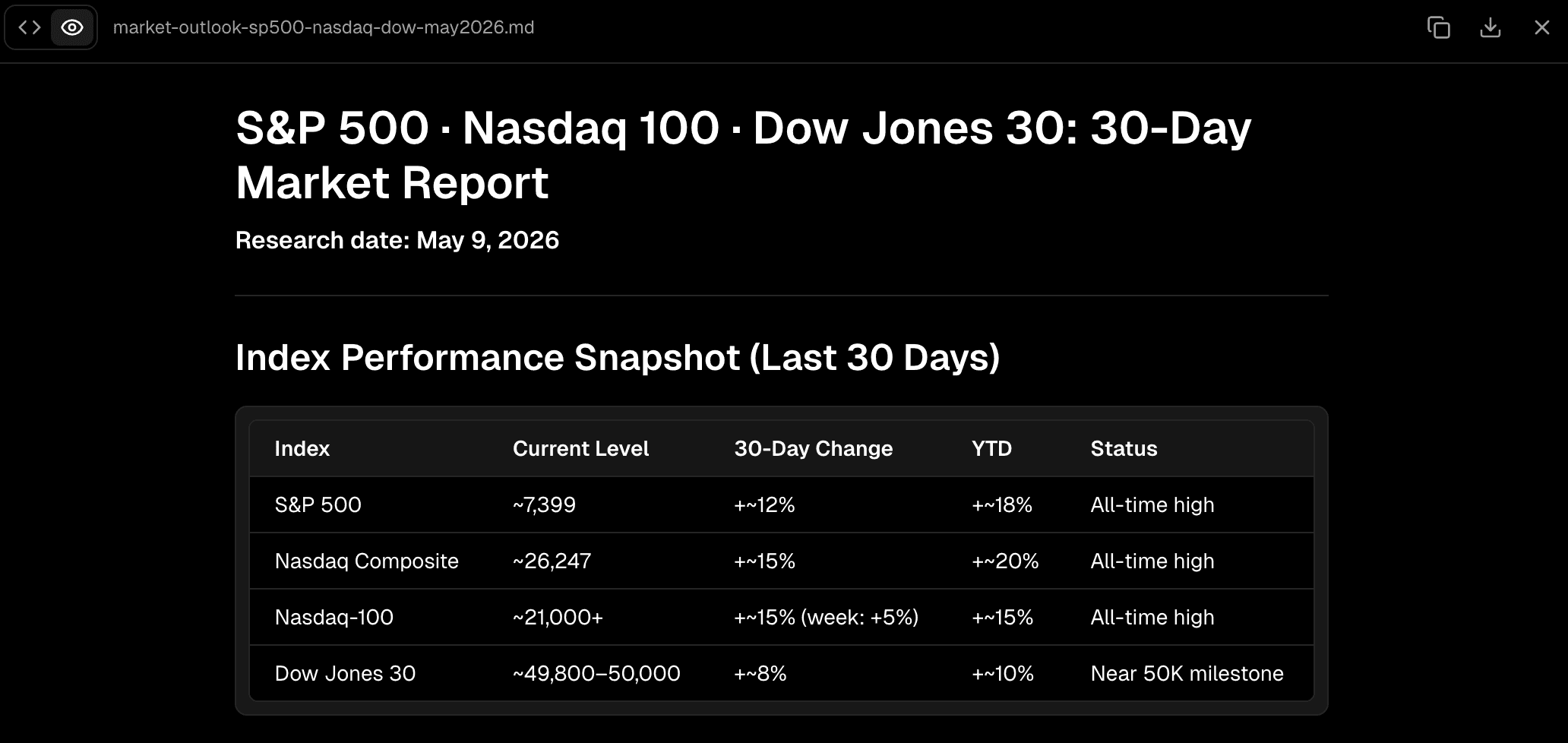
Step 4: Generate, Preview, and Download Results
Hit enter and let the agent execute the workflow. Powerdrill Bloom will process the request, synthesize the last 30 days of data across those indices, and generate structured insights.
Once the analysis is complete, you can preview the generated charts, summaries, and structured data directly within the workspace. Finally, use the native export features to download the outputs for your presentation or team handoff.
Why this matters: The research workflow for strategy teams doesn't end with reading text on a screen. By providing downloadable, presentation-ready outputs, Powerdrill Bloom eliminates the tedious final step of copy-pasting AI text into slide decks or reports.
Best Use Cases for Teams
Skill-based AI workflows are particularly useful when you have recurring data needs. This approach is a strong option for teams that want to scale their intelligence gathering:
Market Research Teams: Automating weekly competitor discourse analysis and audience research.
Strategy & Growth Teams: Running quick sector rotation checks and identifying emerging market trends before planning quarterly OKRs.
Founders & Executives: Getting rapid, digestible market outlooks without waiting days for an internal analyst to compile a report.
Content & GTM Teams: Researching the recent 30 days of industry news to inform highly relevant thought leadership or product marketing campaigns.
Finance Teams: Streamlining routine market monitoring scenarios.
Common Mistakes / What to Watch Out For
While agent skills are incredibly powerful for secondary research and data synthesis, it is important to know their limits:
Over-reliance for Primary Research: Agent skills cannot conduct customer interviews or gather proprietary, non-public data. Deeply custom or offline primary research still requires human effort.
Highly Regulated Compliance: If you are operating in highly regulated financial or medical sectors, use skill-based workflows for initial synthesis and trend spotting, but ensure a "human-in-the-loop" verifies the data before making binding regulatory decisions.
Ignoring the Source Material: A good AI research assistant should provide citations. Always spot-check the underlying sources if a trend seems surprisingly anomalous.
Conclusion
The era of writing massive, complex prompts every time you need to check a market trend is ending. In 2026, efficiency is driven by reusability. By transitioning from manual searches and blank AI chat boxes to skill-based workflows, teams can drastically reduce setup time, guarantee output consistency, and move from raw data to actionable insights faster than ever.
If your team is struggling with scattered information and slow reporting cycles, shifting to a workflow-oriented workspace is the logical next step. Powerdrill Bloom, with its new Start from Skills feature, is well worth evaluating if your team needs to automate recurring market research. It helps reduce setup friction, turning what used to be a multi-hour synthesis project into a few clicks—allowing you to focus on the strategy that actually drives growth.
Frequently Asked Questions
What are agent skills in AI workflows?
Agent skills are pre-configured, reusable workflow templates given to an AI. Instead of relying on a user to write complex instructions from scratch, a skill comes pre-loaded with the necessary logic, data-gathering methods, and formatting rules to complete a specific task consistently.
How do agent skills help with market research?
They eliminate the setup time of traditional AI prompting. By using a specialized market research skill, the AI automatically knows where to look, what trends to highlight, and how to format the data, allowing analysts to get insights in minutes rather than hours.
Is skill-based research faster than prompting from scratch?
Yes. Prompting from scratch requires you to define the role, task, constraints, and output format every single time. Skill-based research bypasses this entirely; you simply select the skill and input your target keywords, reducing execution time by up to 80%.
What is the difference between an AI research agent and a reusable skill workflow?
An AI research agent is the overarching system or workspace (like Powerdrill Bloom), while a reusable skill workflow is the specific "program" or "SOP" that the agent runs (like "Research last 30 days trends"). The agent uses skills to execute tasks efficiently.
What is Start from Skills in Powerdrill Bloom?
"Start from Skills" is a feature in the Powerdrill Bloom workspace that allows users to bypass the blank prompt box. It lets users select a pre-built, best-practice workflow (such as trend analysis or report generation) to immediately start structured, highly effective market research.