Comment générer un résumé financier prêt pour le conseil d'administration à partir d'un feuille de calcul (Guide complet)
Introduction
Présenter des données financières aux membres du conseil d'administration et aux dirigeants exige de trouver un équilibre délicat entre précision rigoureuse et clarté stratégique. Pour les directeurs financiers et les responsables de la finance investis de strictes responsabilités fiduciaires, la traduction de feuilles de calcul comptables denses en un récit exploitable repose souvent sur des heuristiques mentales — des raccourcis utilisés pour filtrer le bruit et mettre en lumière la santé fondamentale de l'entreprise.
Cependant, la rédaction manuelle de ces synthèses de haut niveau pour la direction est notoirement fastidieuse, chronophage et sujette aux erreurs humaines. Heureusement, l'intelligence artificielle a redéfini ce flux de travail.
Aujourd'hui, les agents de présentation IA permettent aux équipes financières de s'affranchir totalement de la mise en forme manuelle des diapositives, transformant des données financières brutes en analyses prêtes pour le conseil d'administration en quelques minutes.
Qu'est-ce qu'un résumé financier prêt pour le conseil d'administration ?
Un résumé financier prêt pour le conseil d'administration est une synthèse de haut niveau destinée aux dirigeants, qui distille des données comptables complexes en conclusions stratégiques claires pour les décideurs. Plutôt que d'afficher des registres bruts, il se concentre sur la vue d'ensemble. Les éléments clés comprennent généralement :
- Les indicateurs financiers clés (KPI) essentiels : Des mesures de premier plan telles que la croissance trimestrielle du chiffre d'affaires, les marges brutes, l'EBITDA, la consommation nette de trésorerie et la réserve de trésorerie restante.
- Des récits contextuels : Des explications écrites concises détaillant pourquoi les chiffres réels ont divergé des prévisions projetées ou des budgets historiques.
- Une analyse visuelle des tendances : Des graphiques et des diagrammes clairs et intuitifs qui illustrent les trajectoires au fil du temps, aidant les dirigeants à saisir les performances en un coup d'œil.
- Des perspectives d'avenir : Des recommandations stratégiques et des mesures d'action claires basées sur l'efficacité actuelle du capital et les indicateurs de liquidité.
Défis courants liés aux rapports financiers basés sur des feuilles de calcul
S'en remettre strictement aux feuilles de calcul traditionnelles pour préparer manuellement les présentations du conseil d'administration introduit des frictions importantes au sein des départements financiers :
- Le cauchemar du contrôle des versions : Retrouver l'ensemble de données définitif parmi des versions confuses telles que
Q3_P&L_Final_v3_edit.xlsxfait perdre des heures précieuses. - Un risque élevé d'erreur humaine : Copier et coller manuellement des points de données entre Excel et PowerPoint entraîne fréquemment des formules brisées, des chiffres obsolètes ou des inversions de chiffres.
- Une surcharge de données critique : Les feuilles de calcul standard manquent de hiérarchie visuelle, ce qui amène souvent les membres du conseil à s'enliser dans des détails mineurs plutôt qu'à se concentrer sur la stratégie globale.
- Des décalages temporels importants : Les jours ou les semaines nécessaires pour consolider manuellement les rapports signifient que les dirigeants prennent fréquemment des décisions cruciales sur la base de clichés financiers obsolètes.
Le flux de travail traditionnel par rapport aux rapports basés sur l'IA (exemple de Powerdrill Bloom)
Le passage à l'automatisation par l'IA transforme fondamentalement le fonctionnement de la finance d'entreprise. Voici comment le flux de travail fastidieux des rapports traditionnels se compare à l'utilisation d'un agent IA avancé comme Powerdrill Bloom :
- Nettoyage manuel des données vs analyse instantanée : Les équipes traditionnelles passent des heures à nettoyer et à formater des fichiers CSV bruts ; Powerdrill Bloom ingère, cartographie et comprend instantanément des feuilles de calcul complexes à onglets multiples.
- Graphiques statiques vs analyses dynamiques : Les analystes construisent manuellement des graphiques PowerPoint rigides ; Bloom évalue automatiquement la structure de vos données pour générer les visualisations les plus percutantes.
- Textes déconnectés vs récit unifié : Les directeurs financiers rédigent généralement les synthèses de manière distincte de l'analyse des données ; Bloom intègre des commentaires intelligents et contextuels directement à côté de vos graphiques financiers.
- Refonte linéaire vs mémoire persistante : La mise à jour d'une présentation traditionnelle nécessite de recommencer le processus de conception ; les espaces de travail persistants de Bloom mémorisent vos fichiers historiques d'une session à l'autre pour des mises à jour trimestrielles rapides et continues.
Comment générer un résumé financier prêt pour le conseil d'administration à partir d'une feuille de calcul avec Powerdrill Bloom
Suivons le processus exact, étape par étape, pour transformer une feuille de calcul financière brute en une présentation pour la direction à l'aide de Powerdrill Bloom.
Étape 1 : Charger la feuille de calcul dans Powerdrill Bloom
Commencez par naviguer vers votre espace de travail dédié Powerdrill Bloom. Glissez et déposez simplement vos fichiers financiers bruts .xlsx ou .csv directement dans la plateforme. Comme Bloom utilise des espaces de travail persistants, vos modèles financiers sous-jacents restent stockés en toute sécurité d'une session à l'autre. Cela vous permet de vous référer sans effort aux données trimestrielles historiques lors des futurs cycles de reporting, sans avoir à recharger tout votre historique financier chaque mois.

Étape 2 : Définir les objectifs de l'analyse
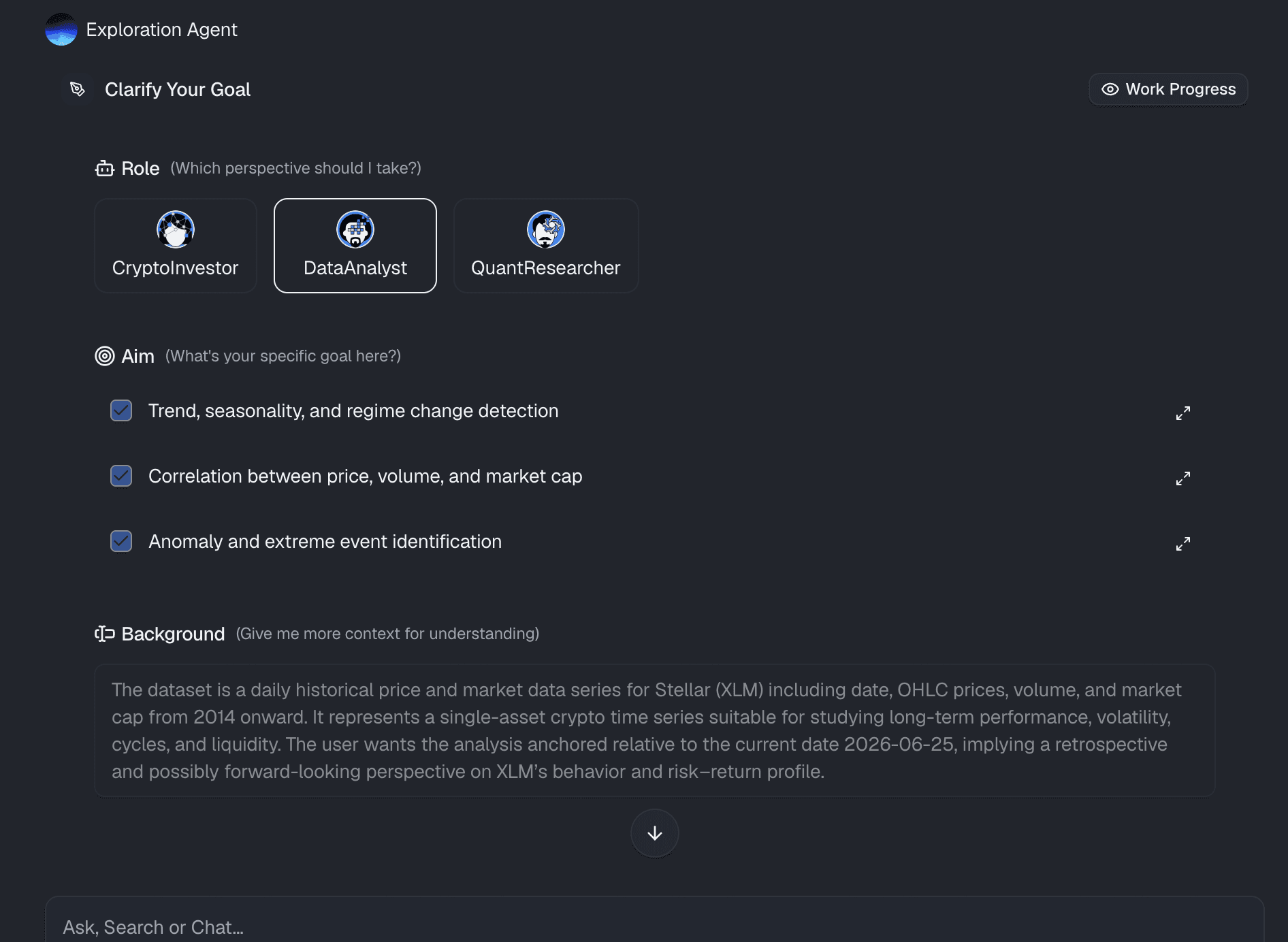
Une fois votre feuille de calcul connectée, indiquez à Bloom ce dont vous avez besoin en utilisant un langage naturel conversationnel. Vous n'avez pas besoin d'écrire des requêtes SQL complexes ou des macros de feuille de calcul compliquées. Saisissez simplement des instructions en langage clair telles que : « Analyse notre compte de résultat du T3, calcule notre consommation nette de trésorerie et mets en évidence les trois principaux écarts de dépenses d'exploitation par rapport à notre budget prévisionnel. »
Étape 3 : Générer automatiquement des analyses financières
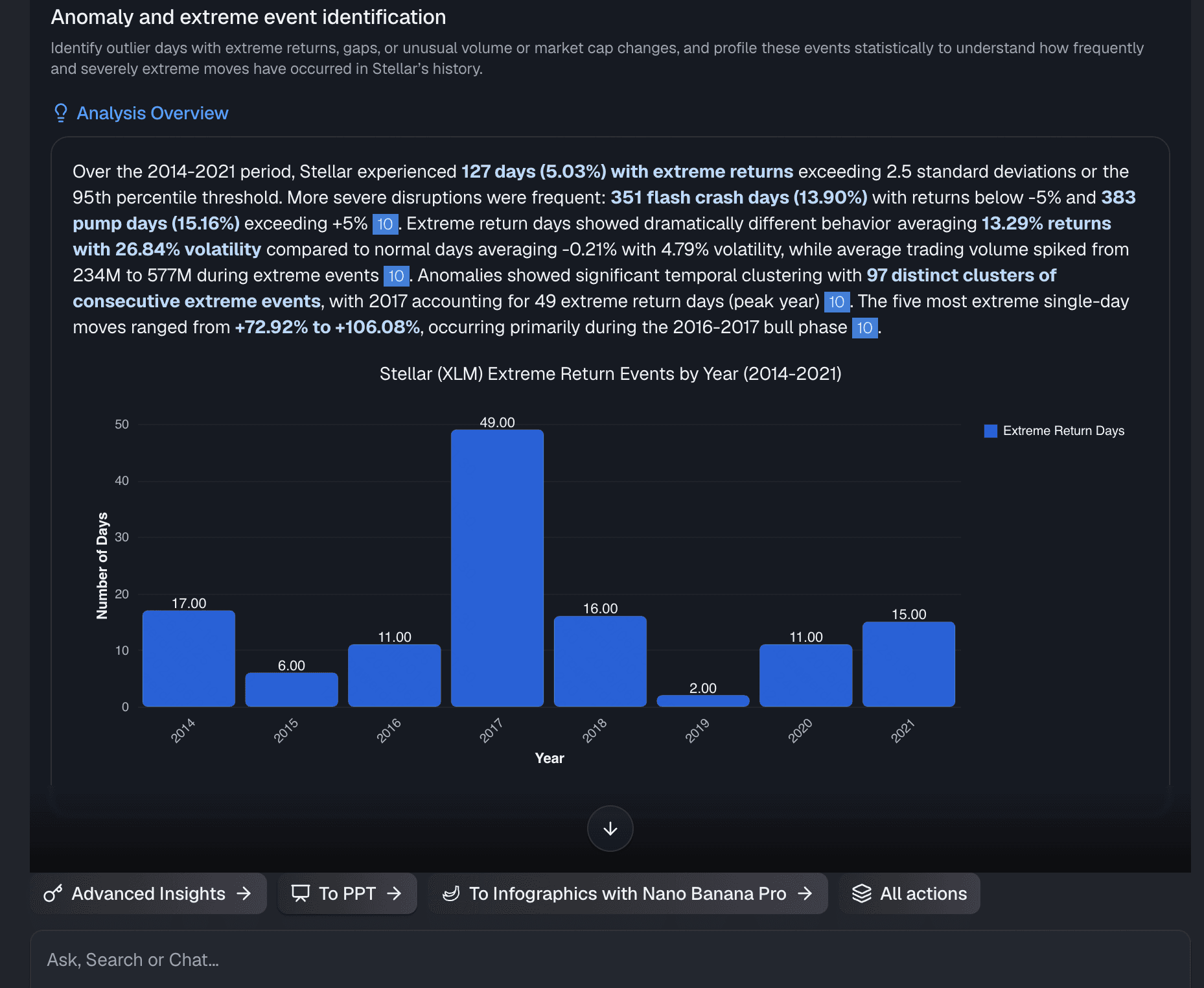
Powerdrill Bloom agit comme un analyste financier spécialisé en IA. Il traite les données brutes de la feuille de calcul, exécute des compétences analytiques spécialisées et produit immédiatement des analyses complètes. Il identifie les tendances financières sous-jacentes, signale les risques potentiels de liquidité et structure les résultats sous forme de puces soignées, prêtes pour la direction, qui articulent clairement l'histoire derrière vos chiffres.
Étape 4 : Exportation en un clic
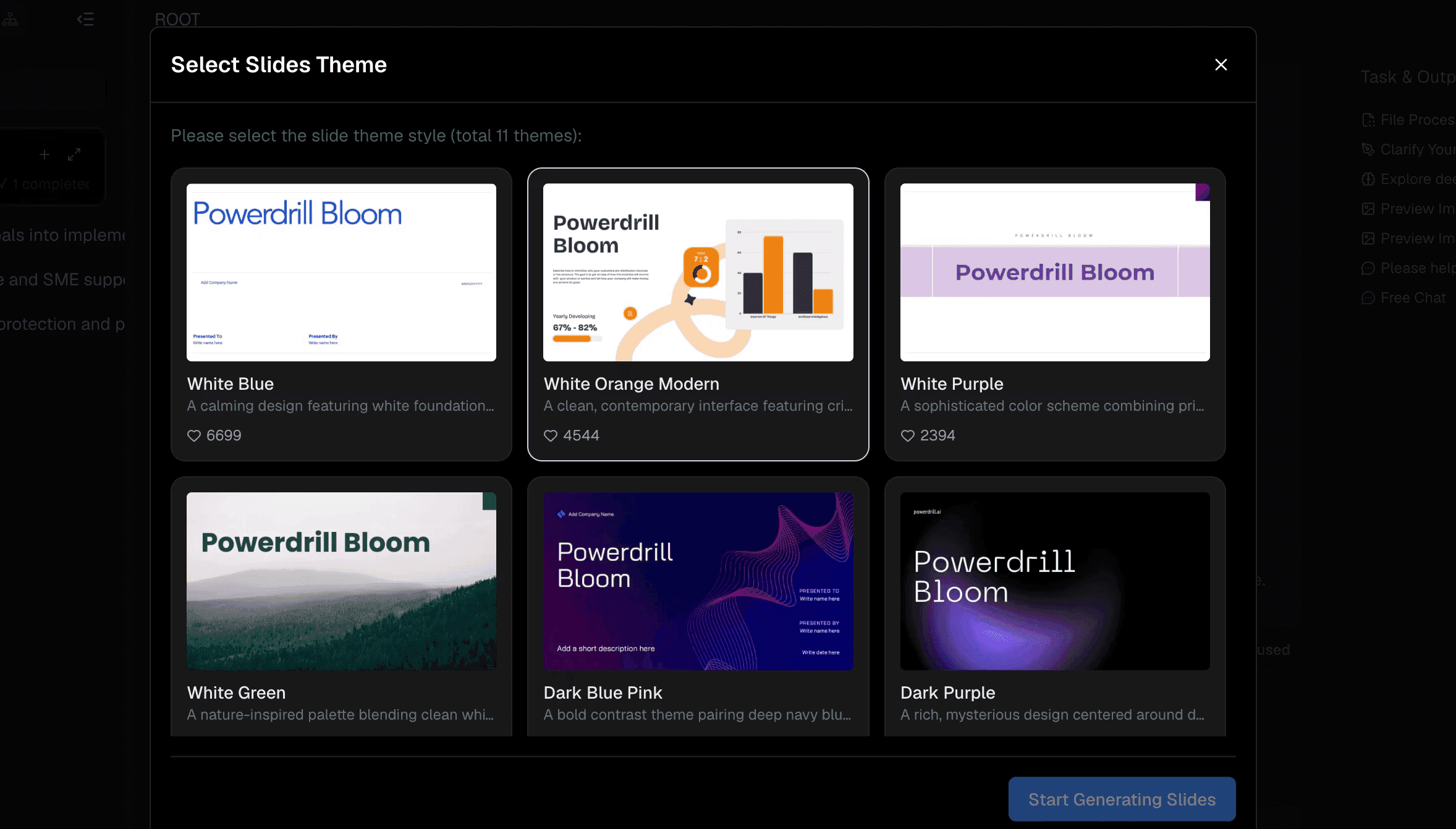
Une fois que vous êtes satisfait des analyses et des graphiques générés par l'IA, utilisez la fonctionnalité phare de présentation en un clic de Bloom. Transformez instantanément l'analyse financière complète en un support de présentation clair et magnifiquement conçu. La mise en page, la typographie, la hiérarchie visuelle et les graphiques sont automatiquement optimisés pour une lecture par les dirigeants — vous offrant instantanément une présentation prête pour le conseil d'administration, sans aucun travail de conception manuel.
Pourquoi les équipes financières modernes adoptent les rapports par IA
Les départements financiers tournés vers l'avenir abandonnent rapidement le traitement manuel des données au profit de flux de travail de reporting pilotés par l'IA :
- Une rapidité sans précédent : Les cycles de reporting de fin de mois et de fin de trimestre passent de plusieurs semaines à seulement quelques minutes.
- Élimination du surmenage : L'automatisation de la consolidation fastidieuse des données maintient l'engagement des professionnels de la finance, réduisant le taux de rotation pendant les périodes de reporting à fort stress.
- Autonomie stratégique : Les comptables et les analystes financiers passent du rôle de manipulateurs de données de routine à celui de conseillers stratégiques de confiance et de grande valeur pour la direction.
- Agilité en temps réel : Les équipes de direction peuvent demander des résumés financiers ad hoc à la volée pour s'adapter rapidement aux changements soudains de l'économie ou du marché.
Pourquoi Powerdrill Bloom se démarque
Alors que de nombreux outils d'IA générale offrent des interfaces de discussion basiques, Powerdrill Bloom est conçu sur mesure pour exécuter des tâches complexes de manière fluide :
- Une véritable exécution sans code : Les utilisateurs peuvent réaliser des modélisations financières approfondies et concevoir des présentations sans écrire une seule ligne de code.
- Intégration profonde des outils MCP : Connectez facilement des sources de données externes et des outils Model Context Protocol (MCP) pour une analyse financière multi-sources hautement enrichie.
- Flux de travail de bout en bout : Il comble totalement le fossé entre la manipulation de feuilles de calcul brutes et les supports de présentation finalisés au sein d'un environnement unique et unifié.
- Contexte persistant : Contrairement aux LLM standards qui perdent le contexte dès que vous fermez un onglet, Bloom conserve la connaissance des fichiers d'une session à l'autre pour un reporting continu et sans friction.
Conclusion
La génération d'un résumé financier prêt pour le conseil d'administration ne devrait pas nécessiter des nuits blanches à se débattre avec des formules de feuilles de calcul et des alignements de diapositives. En comblant le fossé entre les données comptables brutes et le récit destiné aux dirigeants, l'automatisation par l'IA permet aux responsables financiers de présenter leurs chiffres avec une confiance absolue et une clarté stratégique.
Entrez dans l'avenir du reporting financier moderne, connectez vos feuilles de calcul à Powerdrill Bloom dès aujourd'hui et découvrez la puissance simplifiée de la génération instantanée de présentations en un clic.
FAQ
Powerdrill Bloom peut-il gérer des modèles financiers complexes ?
Oui, Powerdrill Bloom traite facilement les feuilles de calcul complexes, en identifiant les indicateurs clés et les ratios financiers sans nécessiter d'ajustements manuels des formules.
Mes données financières sont-elles sécurisées dans Powerdrill Bloom ?
Absolument. Powerdrill Bloom utilise des protocoles de sécurité de niveau entreprise, garantissant que vos feuilles de calcul financières sensibles restent strictement protégées au sein d'espaces de travail persistants.
Ai-je besoin de compétences en programmation pour utiliser Powerdrill Bloom ?
Aucune compétence en programmation n'est requise. Powerdrill Bloom fonctionne via de simples invites en langage naturel pour analyser les feuilles de calcul et concevoir des synthèses de présentation.
À quelle vitesse Powerdrill Bloom peut-il générer une présentation financière ?
Powerdrill Bloom transforme des feuilles de calcul brutes en diapositives de présentation entièrement mises en forme et prêtes pour le conseil d'administration en quelques secondes seulement.
Powerdrill Bloom peut-il comparer plusieurs périodes financières ?
Oui ! Chargez simplement plusieurs feuilles de calcul ou données historiques, et Powerdrill Bloom calculera automatiquement les écarts et mettra en évidence les tendances à long terme.