How to Convert Excel to PowerPoint Slides with Nano Banana (Step-by-Step Guide)
Introduction
On February 26, 2026, Google fundamentally altered the landscape of data visualization by officially launching Nano Banana 2, powered by the robust Gemini 3.1 Flash image and multimodal model. For years, business professionals have struggled with the tedious, time-consuming process of manually turning rows of boring Excel data into visually compelling, boardroom-ready presentations.
This guide will show you exactly what AI Excel analysis is, what it means to convert Excel to PowerPoint slides automatically, and the critical differences between the Nano Banana 2 and Nano Banana Pro models. More importantly, we will outline an automated, end-to-end workflow utilizing these AI tools to exponentially accelerate your data analysis and slide-deck creation. Before diving into the deep data workflows, if you are looking to generate presentations from more generalized documents, I highly recommend checking out our foundational guide to Create PPT Slides from Any Topic or File with AI.
Ultimately, the goal is seamless integration: transforming raw Excel data analysis directly into automated PPT visual presentations with zero friction.
What Is Converting Excel to PowerPoint Slides Using AI?
Converting Excel to PowerPoint slides using AI is the fully automated process of utilizing artificial intelligence to read raw spreadsheet data, clean the dataset, extract core actionable business insights, and map those findings directly into professional, visually striking slide layouts.
Unlike traditional "copy and paste" methods or basic macro integrations, modern AI presentation workflows do not just move numbers from a cell to a text box. They act as a virtual data scientist and designer. The AI comprehensively understands the context of the metrics, chooses the optimal chart types (e.g., converting sales trends into line graphs or market share into pie charts), and generates a structured, narrative-driven presentation ready for immediate business use.
What Are Nano Banana 2 and Nano Banana Pro?
Understanding the distinction between Google’s latest multimodal releases is crucial for optimizing your workflow.
Nano Banana 2 (Powered by Gemini 3.1 Flash): This is the lightning-fast, lightweight iteration designed for speed. It excels at rapid, basic chart generation and handling simple, straightforward datasets. It is the go-to model when you need a quick visual representation of a clean table in seconds.
Nano Banana Pro: This is the flagship, enterprise-grade multimodal model. It possesses unparalleled data reasoning capabilities, complex logic processing, and advanced layout generation. It can interpret messy datasets, cross-reference multiple data sheets, and construct highly sophisticated slide aesthetics.
Who Should Use Which? If you need a quick draft or a single basic chart, choose Nano Banana 2. If you are preparing a serious commercial data report, conducting deep AI Excel analysis, or need boardroom-level slide layouts, Nano Banana Pro is the definitive choice.
Why Use Nano Banana Pro To Create Presentations?
When it comes to high-stakes data-driven presentations, Nano Banana Pro offers five distinct advantages over traditional software:
Deep Data Comprehension
It doesn't just read headers; it understands complex correlations within massive datasets, identifying anomalies, trends, and KPIs that a human might miss.
Professional Visual Layouts
It autonomously designs high-end aesthetic layouts, ensuring the spatial arrangement of text, charts, and negative space aligns with top-tier consulting firm standards.
Accurate Chart Generation
The model intelligently selects the exact chart format (waterfall, scatter plot, dynamic bar) that best visualizes the specific data intent with zero distortion.
Narrative Storytelling
Instead of just dumping data on a slide, it structures the deck with a logical flow—executive summary, supporting metrics, and actionable conclusions.
Seamless Export
It generates output in widely adopted, native presentation formats, allowing for immediate download and minor human tweaking if necessary.
Quick Summary: Nano Banana 2 vs Pro
Model | Best For | Key Advantage | Key Limitation | Speed | Text Accuracy |
Nano Banana 2 | Quick drafts, single charts, simple datasets | Extreme processing speed and low latency | Struggles with highly complex, multi-layered data reasoning | Ultra-Fast | High |
Nano Banana Pro | End-to-end commercial reports, complex analysis | Deep data reasoning and premium layout aesthetics | Slower generation time compared to the Flash variant | Moderate | Supreme |
Where to Access Nano Banana
Nano Banana is being integrated across various AI ecosystems, but platform capabilities vary wildly.
Platform | Availability | Best For |
Freemium / Subscription | End-to-end automated Excel analysis & full PPT slide creation without coding. | |
Free + Paid | One-off prompt testing and general multimodal queries. | |
Freemium / Paid | Creating standalone graphical illustrations from data points. | |
Freemium / Paid | Advanced data scientists looking to script custom Python data pipelines. | |
Freemium / Subscription | Rapid generation of text-heavy slides with basic visual support. |
Best Nano Banana Pro Workflows by Use Case
After thoroughly testing various methods, here are the best, most efficient workflows depending on your specific needs.
For New Presentations From Scratch (End-to-End)
When you need to turn a raw Excel file into a complete deck, Powerdrill Bloom is undeniably the ultimate agent. It requires zero SQL or Python skills.
Step 1: Upload Excel/CSV: Simply drop your raw data file into the Powerdrill Bloom interface.
Step 2: AI Data Cleansing & Exploration: The AI automatically cleans messy data, fills missing values, and identifies core metrics and trends.
Step 3: Natural Language Prompting: Ask the AI a simple question, such as "Analyze Q4 regional sales and create a performance summary deck."
Step 4: Nano Banana Pro Generation & Export: Powerdrill seamlessly routes the insights through Nano Banana Pro to generate a highly visual, multi-slide PPT featuring accurate bar charts, pie charts, and text summaries, ready for one-click download.
For One-Off Visuals
If you just need a single chart for an existing presentation:
Step 1: Open the Gemini Official interface and upload your specific data snippet.
Step 2: Use a prompt like "Generate a sleek line chart showing these 5 data points over time," and copy the generated visual into your slide.
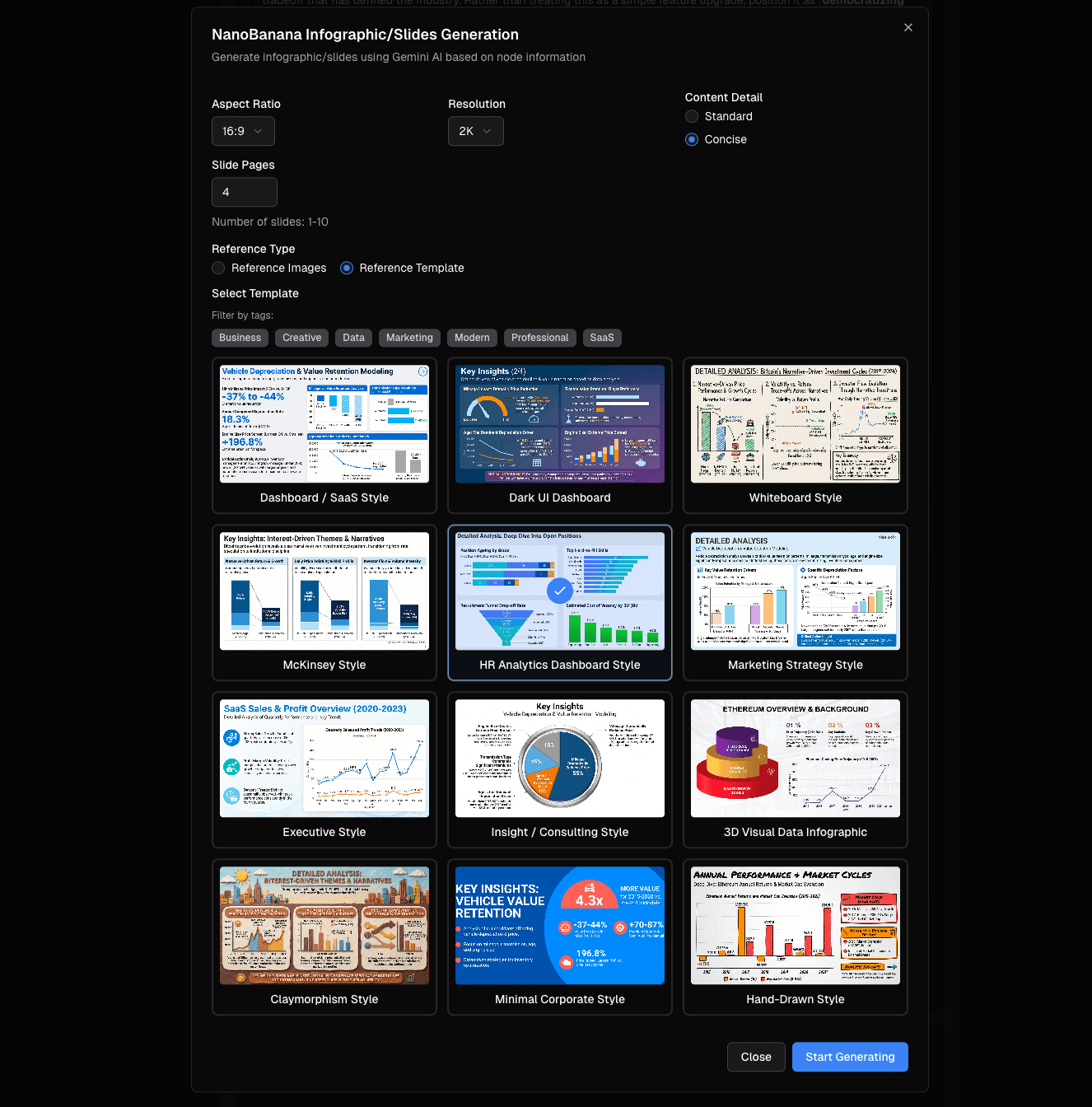
Nano Banana Pro Slide Templates in Powerdrill
Once Powerdrill Bloom has conducted a deep analysis of your Excel data, it leverages Nano Banana Pro to offer premium slide template styles suited for your specific audience:
Business
Clean, minimalist, and corporate. Focuses on high-level executive summaries, strategic roadmaps, and key takeaways.
Finance
High-density data layouts prioritizing exact numerical accuracy, waterfall charts for revenue breakdowns, and ROI projections.
Data Analysis
Highly visual layouts focusing on multi-variable comparisons, scatter plots, and deep statistical correlations.
SaaS Dashboard
A modern, dark-mode-friendly aesthetic mimicking live UI dashboards, perfect for showcasing MRR, churn rates, and user growth.
Final Verdict
The launch of Nano Banana 2 and the immense power of Nano Banana Pro have created a paradigm shift in how we handle data-driven presentations. The days of manually pivoting tables and struggling with PowerPoint chart formatting are over. By combining deep data understanding with high-end aesthetic generation, these AI models allow marketing, finance, and operations teams to focus on strategy rather than slide formatting.
Ready to use AI to go from raw data to graphs and presentations without the manual work? Try Powerdrill Bloom for free today.
Frequently Asked Questions
Is Nano Banana Pro & 2 free?
Nano Banana 2 is often accessible via Google's free tiers, but Nano Banana Pro typically requires a premium subscription. However, platforms like Powerdrill Bloom offer a freemium pricing model, allowing you to test Pro capabilities at no initial cost.
Can Nano Banana Pro generate full PPT slides automatically?
Yes. While the model itself generates the multimodal output, using an AI agent like Powerdrill Bloom structures this output into a full, automated, downloadable PPT deck complete with charts and layouts.
What is the difference between Nano Banana 2 and Nano Banana Pro?
Nano Banana 2 is built for speed and lightweight, basic chart generation. Nano Banana Pro is designed for complex data reasoning, deep insights extraction, and premium commercial visual aesthetics.
Do I need to learn prompt engineering to use Nano Banana Pro?
No. Modern integration platforms support natural language instructions. You can simply talk to the AI as if you were speaking to a human data analyst.
Why is Powerdrill Bloom the best way for using Nano Banana Pro for presentations?
Powerdrill Bloom creates a perfect end-to-end closed loop: it automatically cleans the raw data, extracts insights, and seamlessly connects to Nano Banana Pro to render professional PPTs, completely eliminating the need for SQL or Python skills.