كيفية تنظيف بيانات Excel وإزالة التكرارات منها بالذكاء الاصطناعي بنقرة واحدة (دليل من 5 دقائق)

مقدمة
إذا كنت تعمل مع البيانات، فأنت تعرف بالفعل ذلك الشعور المحبط عند فتح ملف Excel ضخم لتجده مليئًا بتنسيق غير متسق وقيم مفقودة وإدخالات مكررة. كنت أقضي ساعات في تمييز الصفوف يدويًا وكتابة صيغ معقدة والتحقق من عملي ثلاث مرات لمجرد إعداد مجموعة بيانات جاهزة للتحليل. لكن أيام المعالجة اليدوية للبيانات قد ولّت.
اليوم، يمكنك تنظيف بيانات Excel وإزالة التكرارات منها في ثوانٍ باستخدام الذكاء الاصطناعي. في هذا الدليل المكوّن من 5 دقائق، سأوضح لك بالضبط كيفية أتمتة هذه العملية المملة باستخدام وكيل الذكاء الاصطناعي المفضّل لديّ، Powerdrill Bloom.
ماذا يعني تنظيف بيانات Excel وإزالة التكرارات منها؟
قبل الغوص في «كيف»، دعنا نوضّح «ماذا».
تنظيف البيانات هو عملية تحديد وتصحيح الأجزاء غير الدقيقة أو غير المكتملة أو غير ذات الصلة في مجموعة بياناتك. ويشمل ذلك إصلاح الأخطاء الإملائية وتوحيد تنسيقات التاريخ (مثل تغيير «12/01/24» إلى «1 ديسمبر 2024») وملء الخلايا الفارغة أو إزالتها.
إزالة التكرارات هي جزء محدد من عملية التنظيف تقوم فيه بتحديد السجلات المكررة وإزالتها. على سبيل المثال، إذا أرسل عميل نموذج عملاء محتملين مرتين عن طريق الخطأ، أو إذا كان «John Smith» و«J. Smith» يشتركان في نفس عنوان البريد الإلكتروني، فإن إزالة التكرارات تضمن احتساب هذا الشخص مرة واحدة فقط. البيانات النظيفة هي أساس الرؤى التجارية الدقيقة؛ فإذا كانت بياناتك فوضوية، ستكون مخططاتك وتقاريرك خاطئة.
Excel التقليدي مقابل تنظيف البيانات بالذكاء الاصطناعي
| الميزة / القدرة | Excel التقليدي | تنظيف البيانات بالذكاء الاصطناعي (Powerdrill Bloom) |
|---|---|---|
| الواجهة والتشغيل | يتطلب صيغًا معقدة (مثل =TRIM و=PROPER) ووحدات ماكرو. | حواري: يستخدم اللغة الطبيعية لتنفيذ الأوامر. |
| إزالة التكرارات | يلتقط التطابقات التامة فقط. يفوّت الأخطاء الإملائية والاختلافات الطفيفة. | مطابقة سياقية وتقريبية: يلتقط بذكاء الأخطاء الإملائية والاختلافات والتكرارات بناءً على السياق. |
| منحنى التعلّم | حاد: يتطلب معرفة واسعة بالدوال والتنقل بين القوائم. | معدوم: بدون أي برمجة بنسبة 100%. إذا كنت تستطيع كتابة رسالة، فأنت تستطيع تنظيف البيانات. |
| السرعة والكفاءة | بطيء: عملية يدوية متعددة الخطوات تستغرق ساعات لمجموعات البيانات الكبيرة. | فوري: ينظّف الملفات الضخمة وينسّقها ويزيل تكراراتها في ثوانٍ بأمر واحد. |
| معالجة الأخطاء | يعتمد كليًا على المستخدم لاكتشاف الخلايا الفارغة أو أخطاء التنسيق يدويًا. | يحدد تلقائيًا الشذوذ والقيم المفقودة ويوحّد التنسيقات فورًا. |
| من البيانات إلى الرؤى | يتطلب إنشاء جداول محورية يدويًا وتصميم المخططات من الصفر. | الكل في واحد: ينشئ فورًا مخططات رائعة وعروضًا تقديمية بنقرة واحدة من البيانات النظيفة. |
خطوة بخطوة: تنظيف بيانات Excel باستخدام Powerdrill Bloom
الخطوة 1. ارفع ملف Excel الخاص بك
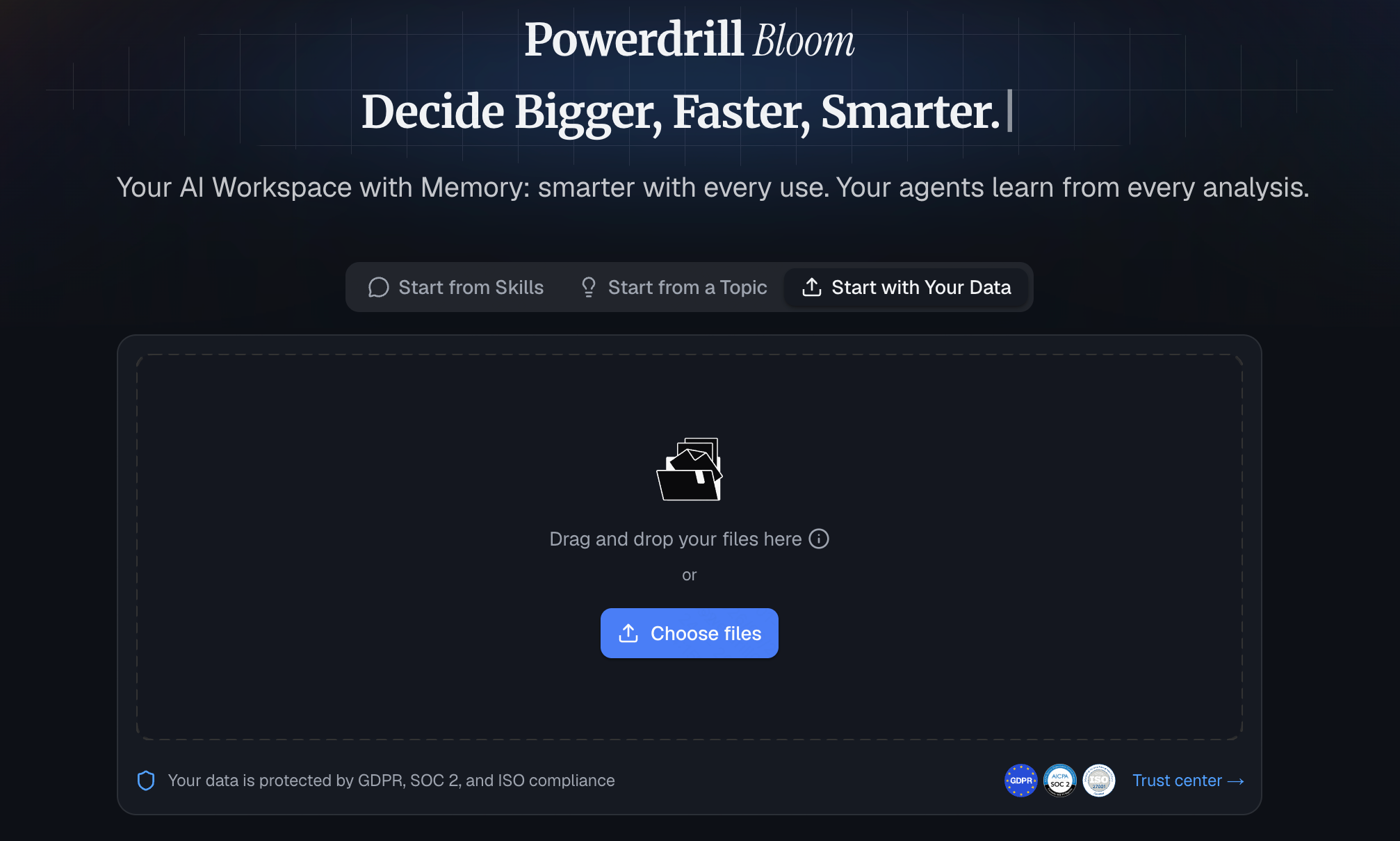
ابدأ بتسجيل الدخول إلى Powerdrill Bloom. وبفضل ميزة مساحات العمل الدائمة (Workspaces)، سيتذكر الذكاء الاصطناعي ملفاتك عبر الجلسات، لذا لن تضطر إلى إعادة رفع جدول البيانات الرئيسي نفسه في كل مرة تسجّل فيها الدخول. ما عليك سوى سحب ملف Excel (.xlsx) أو CSV الفوضوي وإفلاته مباشرة في واجهة الدردشة. يستوعب النظام البيانات في ثوانٍ، بغض النظر عن عدد الصفوف لديك.
الخطوة 2. اطلب من الذكاء الاصطناعي تنظيف مجموعة البيانات
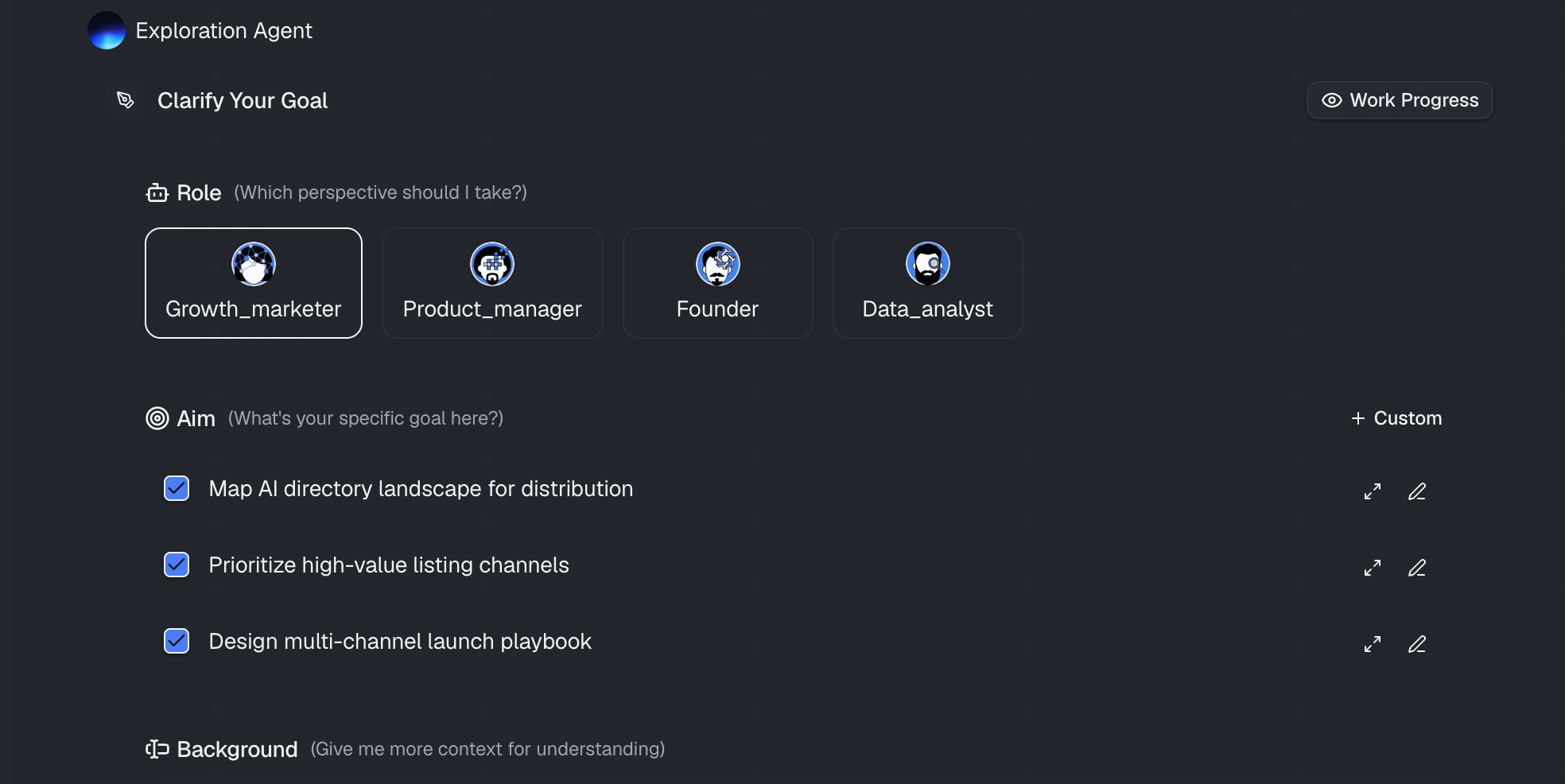
بمجرد رفع الملف، لا تحتاج إلى النقر عبر قوائم معقدة. ما عليك سوى كتابة أمر باللغة الطبيعية. على سبيل المثال، يمكنك كتابة:
«ابحث عن جميع الإدخالات المكررة وأزلها بناءً على عمود ‹عنوان البريد الإلكتروني›.»
سيعالج Powerdrill Bloom الطلب، ويطبّق خوارزميات التنظيف اللازمة، ويعرض لك معاينة لمجموعة البيانات النظيفة، موضّحًا بالضبط التغييرات التي أجراها.
الخطوة 3. أنشئ المخططات فورًا
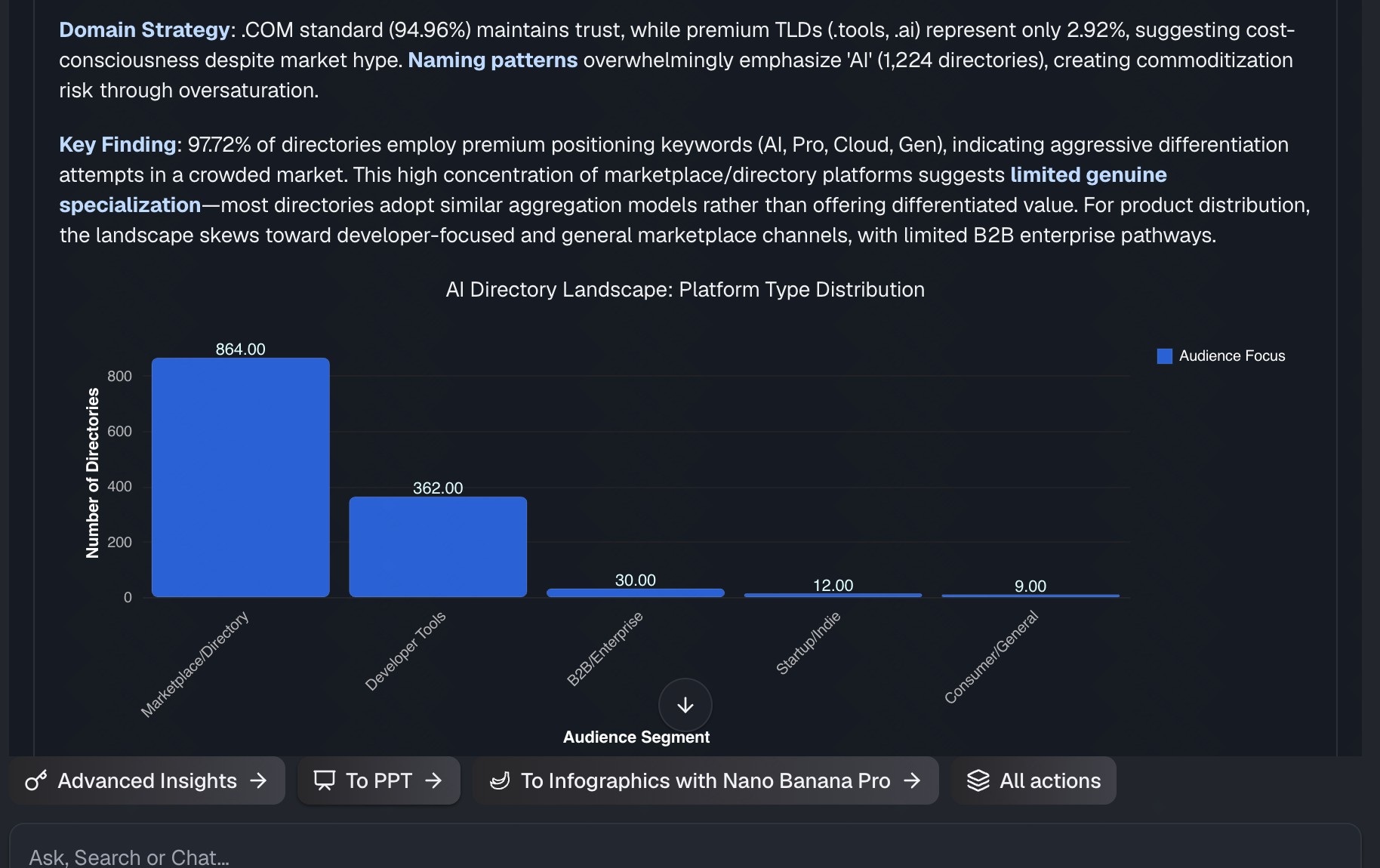
هنا يتفوّق Powerdrill Bloom حقًا على أدوات التنظيف الأساسية. تكمن قوته الأبرز في تحويل البيانات الأولية التي جرى تنظيفها للتو إلى رؤى فورية. فبدلًا من تصدير البيانات لإنشاء جداول محورية في مكان آخر، يمكنك الكتابة على الفور: «الآن بعد أن أصبحت البيانات نظيفة، أنشئ مخططًا شريطيًا يوضّح الإيرادات حسب المنطقة.» وسينشئ الذكاء الاصطناعي مخططات رائعة ودقيقة في الحال. بل يمكنك أن تطلب منه تجميع هذه الرؤى في عرض تقديمي بنقرة واحدة.
الخطوة 4. صدّر البيانات النظيفة والعروض المرئية
بمجرد رضاك عن النتائج، يصبح إخراج أصولك من المنصة أمرًا سهلاً للغاية. يمكنك تنزيل مجموعة البيانات النقية الخالية من التكرارات كملف Excel أو CSV جديد. كما يمكنك تصدير المخططات المُنشأة أو العرض التقديمي الكامل لمشاركته مع فريقك أو أصحاب المصلحة، ما يوفّر لك قدرًا هائلاً من وقت التنسيق.

لماذا تستخدم Powerdrill Bloom بدلاً من Excel التقليدي
في حين يظل Excel التقليدي عنصرًا أساسيًا للإدخال اليدوي للبيانات، فإن الاعتماد عليه في تنظيف البيانات المعقّدة وتحليلها أمر عفا عليه الزمن. وبصفتي شخصًا أمضى وقتًا طويلاً في مصارعة جداول البيانات المعطوبة، إليك بالضبط سبب استبدالي سير عملي التقليدي في Excel بـ Powerdrill Bloom:
- أتمتة بدون برمجة بنسبة 100%: لست بحاجة إلى حفظ صيغ معقدة مثل VLOOKUP وINDEX/MATCH، أو كتابة وحدات ماكرو VBA. ما عليك سوى إخبار الذكاء الاصطناعي بما تريد فعله باللغة الطبيعية، وهو ينفّذ الأمر فورًا.
- إزالة تكرارات «تقريبية» ذكية: تلتقط أداة «إزالة التكرارات» المدمجة في Excel التطابقات التامة حرفًا بحرف فقط. أما Powerdrill Bloom فيفهم السياق الدلالي، ما يعني أنه يستطيع بسهولة تحديد ودمج اختلافات مثل «Jon Doe» و«Jonathan Doe» أو التقاط أخطاء إملائية دقيقة يفوّتها Excel.
- من البيانات الأولية إلى عروض تقديمية بنقرة واحدة: يجبرك Excel على إنشاء الجداول المحورية يدويًا وتنسيق المخططات من الصفر بعد تنظيف بياناتك. أما قوة Powerdrill Bloom الأبرز فهي تحويل تلك البيانات التي جرى تنظيفها للتو إلى رؤى فورية ومخططات رائعة وعروض تقديمية كاملة بنقرة واحدة.
- مساحات عمل دائمة (Workspaces): على عكس ملف Excel الثابت الذي يجب عليك إعادة فتحه وإعادة تهيئته باستمرار، يوفّر Powerdrill Bloom مساحات عمل دائمة. فهو يتذكر ملفاتك المرفوعة وسياق عملك عبر جلسات مختلفة، ما يوفّر عليك أعمال الإعداد المتكررة.
- يزيل الخطأ البشري: إن التمرير يدويًا عبر آلاف الصفوف لاكتشاف الخلايا الفارغة أو التناقضات في التنسيق يؤدي حتمًا إلى أخطاء مكلفة. يعمل Powerdrill Bloom كمحلل بيانات متمرّس، إذ يفحص مجموعة بياناتك بالكامل ويوحّدها بدقة في ثوانٍ دون كلل.
خلاصتي
توقّف عن إهدار وقتك الثمين في تنظيف جداول البيانات يدويًا ومصارعة دوال VLOOKUP. ينبغي أن يكون تنظيف البيانات خطوة قصيرة، لا أن يستغرق بعد ظهيرتك بأكمله. بالاستعانة بـ Powerdrill Bloom، يمكنك تنظيف ملفات Excel وإزالة تكراراتها وعرضها بصريًا ببضعة أوامر حوارية فقط.
جرّب Powerdrill Bloom اليوم واختبر أسهل طريقة لتحويل جداول البيانات الفوضوية إلى رؤى احترافية قابلة للتنفيذ.
الأسئلة الشائعة
هل يستطيع الذكاء الاصطناعي إزالة التكرارات تلقائيًا في Excel؟
نعم. تستخدم أدوات مثل Powerdrill Bloom الذكاء الاصطناعي لتحديد التكرارات التامة والتقريبية وإزالتها فورًا باستخدام أوامر بسيطة باللغة الطبيعية.
هل أحتاج إلى معرفة صيغ Excel لاستخدام Powerdrill Bloom؟
إطلاقًا. Powerdrill Bloom منصة بدون برمجة بنسبة 100%. ما عليك سوى كتابة ما تريد فعله باللغة الطبيعية.
ماذا لو كانت بياناتي تحتوي على أسماء بها أخطاء إملائية أو تنسيقات تاريخ مختلفة؟
الذكاء الاصطناعي ممتاز في التنظيف السياقي. يستطيع Powerdrill Bloom التعرّف على اختلافات الإملاء وتوحيد تنسيقات التاريخ والعملة والنص تلقائيًا عبر مجموعة بياناتك بالكامل.
هل يمكنني إنشاء مخططات من بياناتي النظيفة؟
بالتأكيد. بمجرد أن ينظّف Powerdrill Bloom بياناتك، يمكنك أن تطلب منه إنشاء مخططات ورؤى، بل وحتى عروض تقديمية كاملة فورًا بنقرة واحدة.