วิธีสร้างรายงานกรวยการตลาด (Marketing Funnel) จากข้อมูลดิบโดยไม่ต้องใช้ SQL (คู่มือสำหรับผู้เริ่มต้น)
บทนำ
นักการตลาดยุคใหม่กำลังนั่งอยู่บนขุมทรัพย์ข้อมูลดิบขนาดมหึมา ไม่ว่าจะเป็น Facebook Ads, Google Analytics, Shopify และ CRM ของคุณ ข้อมูลทั้งหมดอยู่ที่นั่นแล้ว แต่การเชื่อมโยงข้อมูลเหล่านั้นเข้าด้วยกันกลับเป็นอีกเรื่องหนึ่ง อุปสรรคที่ใหญ่ที่สุดคืออะไร? นักการตลาดส่วนใหญ่ขาดทักษะทางเทคนิคด้าน SQL ที่จำเป็นในการเชื่อมโยงชุดข้อมูลที่กระจัดกระจายเหล่านี้เข้าด้วยกันเป็นกรวยการตลาด (Marketing Funnel) ที่ชัดเจนและสอดคล้องกัน
การพึ่งพาทีมวิศวกรรมข้อมูลที่งานยุ่งอาจต้องใช้เวลาหลายสัปดาห์ ในขณะที่การดิ้นรนกับ VLOOKUP และ Pivot Table ที่ซับซ้อนใน Excel มักจะทำให้สเปรดชีตค้าง และได้รายงานที่นิ่งเฉยและล้าสมัย โชคดีที่ยุคของการทำให้ข้อมูลเป็นประชาธิปไตย (Data Democratization) มาถึงแล้ว ด้วยการเติบโตของเครื่องมือระบบวิเคราะห์ข้อมูลอัจฉริยะ (BI) ที่ขับเคลื่อนด้วย AI คุณไม่จำเป็นต้องเขียนโค้ดแม้แต่บรรทัดเดียวเพื่อวิเคราะห์ประสิทธิภาพการทำงานของคุณอีกต่อไป
ในคู่มือสำหรับผู้เริ่มต้นนี้ เราจะแสดงวิธีเปลี่ยนข้อมูลดิบที่ยุ่งเหยิงให้กลายเป็นรายงานกรวยการตลาดที่สวยงามและนำไปใช้งานได้จริงภายในไม่กี่นาที และวิธีที่ Powerdrill Bloom ทำให้กระบวนการทั้งหมดนี้กลายเป็นเรื่องง่ายอย่างสมบูรณ์แบบ
รายงานกรวยการตลาดคืออะไร (และทำไมต้องใช้ข้อมูลดิบ)
ก่อนที่จะเจาะลึกถึง "วิธีการ" เรามาทำความเข้าใจกับ "อะไร" และ "ทำไม" กันก่อน รายงานกรวยการตลาดจะแสดงภาพเส้นทางของลูกค้า (Customer Journey) โดยติดตามว่าผู้ใช้เคลื่อนไหวอย่างไรตั้งแต่การรับรู้แบรนด์ในตอนแรก ไปจนถึงการซื้อขั้นสุดท้ายและการรักษาลูกค้าไว้
ขั้นตอนมาตรฐานของกรวยการตลาดมักประกอบด้วย:
- การรับรู้ (ส่วนบนของกรวย): การแสดงผลโฆษณา, การเข้าชมเว็บไซต์ และการเข้าถึงบนโซเชียลมีเดีย
- การพิจารณา (ส่วนกลางของกรวย): การคลิก, การลงทะเบียนอีเมล และการดาวน์โหลดเอกสารข้อมูล
- การเปลี่ยนเป็นลูกค้า (ส่วนล่างของกรวย): การสร้างรายชื่อผู้สนใจ (Lead), การลงทะเบียนทดลองใช้งานฟรี และการซื้อที่เสร็จสมบูรณ์
- การรักษาลูกค้า: การซื้อซ้ำและการต่ออายุสมาชิก
ทำไมคุณควรสร้างสิ่งนี้โดยใช้ข้อมูลดิบ แทนที่จะพึ่งพาแดชบอร์ดสำเร็จรูปของแพลตฟอร์ม
- รายละเอียดขั้นสุด: ข้อมูลดิบ (เช่น ไฟล์ CSV ที่ไม่ได้กรองซึ่งส่งออกจาก CRM ของคุณ) จะบันทึกทุกการกระทำของผู้ใช้ แดชบอร์ดสำเร็จรูปจะรวมข้อมูลเข้าด้วยกัน ซึ่งอาจซ่อนรายละเอียดที่สำคัญไว้
- การปรับแต่งข้ามแพลตฟอร์ม: ข้อมูลดิบช่วยให้คุณสามารถรวมยอดคลิกโฆษณา Facebook เข้ากับยอดขายจริงใน Shopify ทำให้คุณเห็นภาพรวมตั้งแต่ต้นจนจบอย่างแท้จริง ซึ่งไม่มีแพลตฟอร์มเดี่ยวใดสามารถให้ได้
- ค้นพบจุดที่ลูกค้าหลุดหายที่ซ่อนอยู่: การวิเคราะห์บันทึกเหตุการณ์ดิบ (Raw Event Logs) จะช่วยให้คุณระบุขั้นตอนย่อยที่ผู้ใช้ละทิ้งกระบวนการได้อย่างแม่นยำ (เช่น การหลุดหายที่หน้าชำระเงิน เทียบกับหน้ากรอกที่อยู่จัดส่ง)
วิธีแบบเก่า vs. วิธีแบบใหม่ (ทำไมต้องข้าม SQL?)
เป็นเวลาหลายทศวรรษที่การสร้างรายงานกรวยการตลาดแบบกำหนดเองจากข้อมูลดิบหมายถึงการต้องเรียนรู้ SQL (Structured Query Language) วันนี้ การวิเคราะห์เชิงสนทนาที่ขับเคลื่อนด้วย AI ได้เปลี่ยนโฉมหน้าไปอย่างสิ้นเชิง นี่คือการเปรียบเทียบสั้นๆ ว่าทำไมนักการตลาดจึงละทิ้งวิธีแบบเก่าเพื่อหันมาใช้วิธีแบบใหม่:
| คุณสมบัติ | วิธีแบบเก่า (SQL & BI แบบดั้งเดิม) | วิธีแบบใหม่ (AI & Powerdrill Bloom) |
|---|---|---|
| ทักษะที่จำเป็น | SQL ขั้นสูง (JOINs, GROUP BYs), การสร้างแบบจำลองข้อมูล | ภาษาอังกฤษทั่วไป / ภาษาพูดที่เป็นธรรมชาติ |
| เวลาในการตั้งค่า | หลายสัปดาห์ (ต้องใช้ท่อส่งข้อมูล & คลังข้อมูล) | ไม่กี่นาที (อัปโหลดไฟล์โดยตรง) |
| วิธีการสอบถามข้อมูล | การเขียนโค้ดไวยากรณ์ที่ซับซ้อนหลายบรรทัด | การถามคำถามเหมือนกำลังคุยกับเพื่อนร่วมงาน |
| ความยืดหยุ่น | ปรับเปลี่ยนยาก การแก้ไขรายงานต้องเขียนโค้ดใหม่ | ยืดหยุ่นสูง เพียงพิมพ์คำสั่งใหม่เพื่อเปลี่ยนแผนภูมิได้ทันที |
| อัตราความผิดพลาด | สูง หากลืมเครื่องหมายจุลภาคเพียงตัวเดียวก็ทำให้การสอบถามข้อมูลล้มเหลวทั้งหมด | เป็นศูนย์ AI จะจัดการคำนวณเบื้องหลังทั้งหมดโดยอัตโนมัติ |
4 ขั้นตอนในการสร้างรายงานกรวยการตลาดโดยไม่ต้องใช้ SQL
พร้อมที่จะสร้างรายงานของคุณหรือยัง? ลืมบทเรียนที่ซับซ้อนไปได้เลย ด้วยเครื่องมือ AI ที่เหมาะสม การวิเคราะห์ข้อมูลการตลาดโดยไม่ต้องใช้ SQL นั้นง่ายเหมือนกับการส่งข้อความ
ขั้นตอนที่ 1: อัปโหลดข้อมูลไปยังเครื่องมือ BI ที่ขับเคลื่อนด้วย AI (เข้าสู่ Powerdrill Bloom)
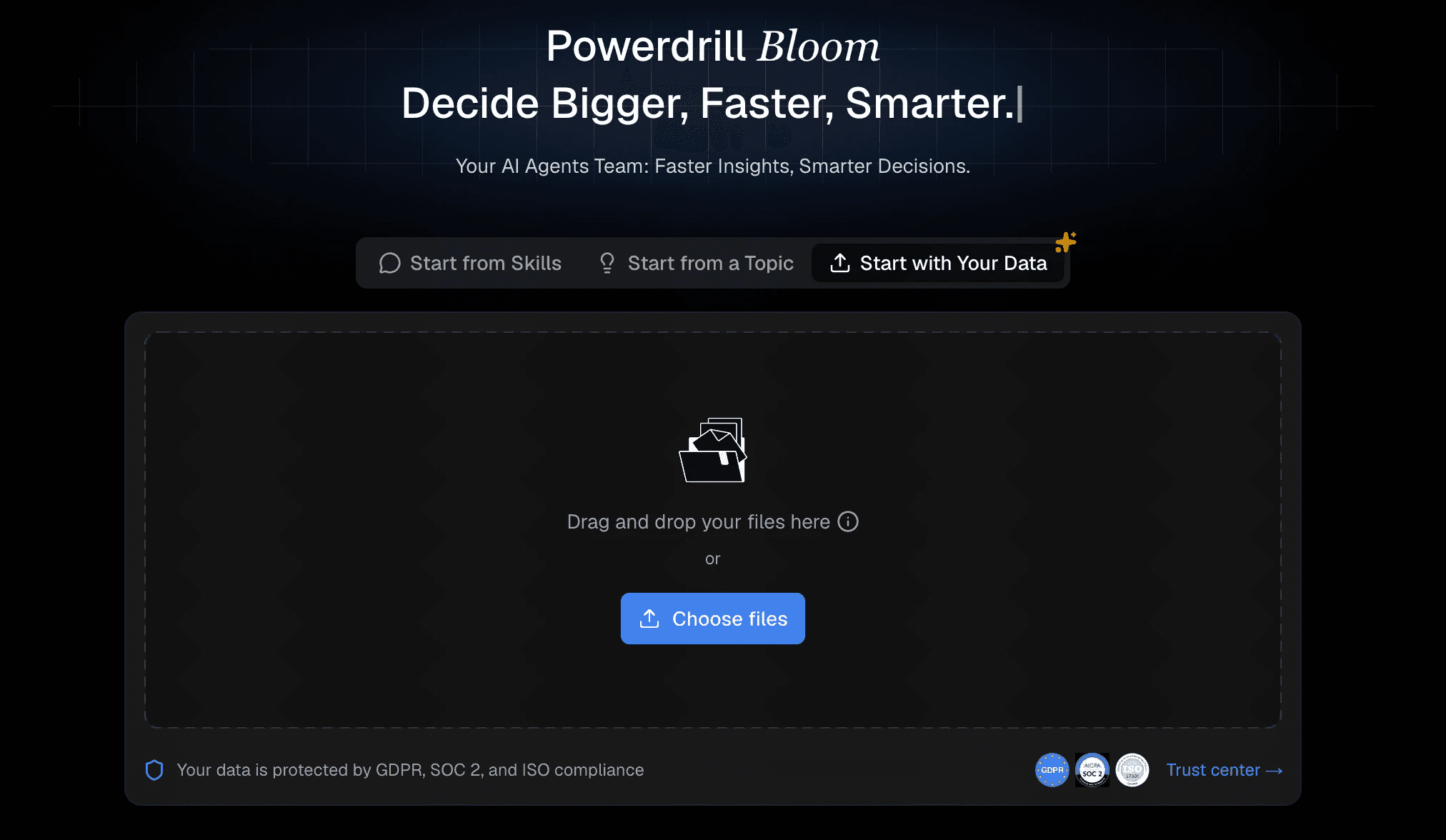
ส่วนที่ยากที่สุดของการวิเคราะห์ข้อมูลแบบดั้งเดิมคือการสร้างท่อส่งข้อมูลเพื่อเชื่อมต่อแหล่งข้อมูล ด้วย Powerdrill Bloom คุณสามารถข้ามแผนกไอทีไปได้เลย เพียงส่งออกข้อมูลดิบของคุณจากแพลตฟอร์มการตลาด (เช่น ไฟล์ CSV หรือ Excel ของประสิทธิภาพโฆษณาหรือรายชื่อผู้สนใจจาก CRM) จากนั้นลากและวางไฟล์เหล่านี้ลงในอินเตอร์เฟสของ Powerdrill Bloom โดยตรง ระบบจับคู่ข้อมูล AI อัจฉริยะของแพลตฟอร์มจะอ่านไฟล์ของคุณทันที และทำความเข้าใจโดยอัตโนมัติว่าคอลัมน์ใดแสดงถึงวันที่, ต้นทุนแคมเปญ, ยอดคลิก และการเปลี่ยนเป็นลูกค้า โดยไม่ต้องตั้งค่าฐานข้อมูลใดๆ
ขั้นตอนที่ 2: กำหนดเป้าหมายของคุณให้ชัดเจนเพื่อสำรวจข้อมูล
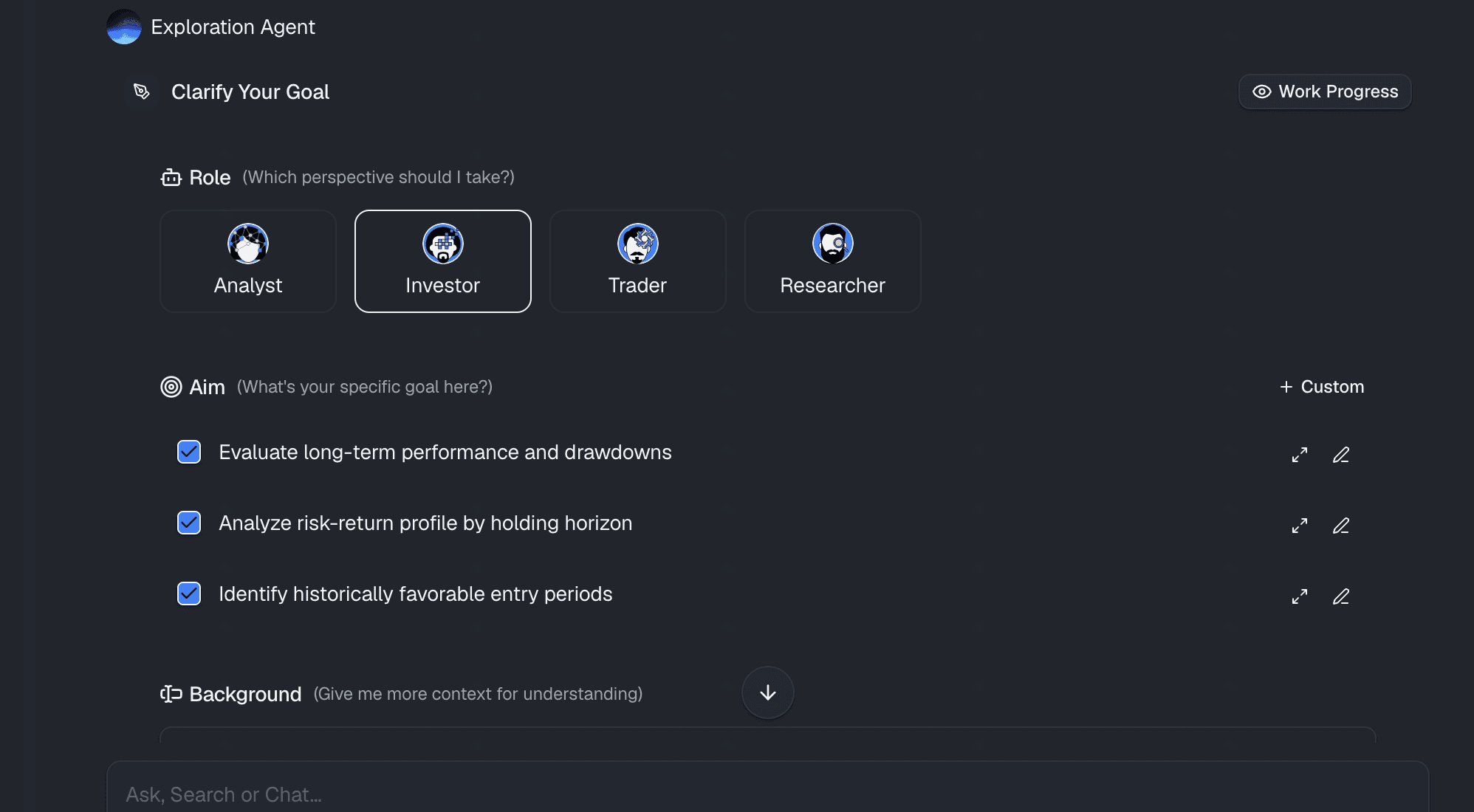
ก่อนที่คุณจะเริ่มสร้างแผนภูมิ คุณต้องมีวัตถุประสงค์ที่ชัดเจน ข้อมูลเชิงลึกเฉพาะเจาะจงใดที่คุณพยายามค้นหาจากข้อมูลดิบของคุณ? คุณกำลังพยายามหาอัตราการเปลี่ยนเป็นลูกค้าจากผู้เข้าชมหน้าแลนดิ้งเพจไปเป็นผู้สมัครรับจดหมายข่าวหรือไม่? หรือคุณกำลังมองหาอัตราการหลุดหายระหว่างการเพิ่มสินค้าลงในรถเข็นและการชำระเงินเสร็จสิ้น? การรู้เป้าหมายจะช่วยให้ AI มีบริบทที่เหมาะสม ความสวยงามของ Powerdrill Bloom คือหากคุณไม่แน่ใจว่าจะเริ่มต้นอย่างไร ผู้ช่วย AI สามารถสแกนข้อมูลที่คุณอัปโหลดและแนะนำเป้าหมายการตลาดรวมถึงตัวชี้วัดที่มีค่าให้คุณสำรวจได้อย่างกระตือรือร้น
ขั้นตอนที่ 3: กำหนดขั้นตอนของกรวยการตลาดของคุณโดยใช้ภาษาทั่วไป
นี่คือจุดที่ความมหัศจรรย์เกิดขึ้น แทนที่จะต้องเขียน SQL ที่ซับซ้อน คุณเพียงแค่ใช้หน้าต่างแชท พิมพ์เป้าหมายของคุณด้วยภาษาทั่วไป
AI จะวิเคราะห์ความต้องการของคุณทันที อ้างอิงข้อมูลดิบของคุณ และทำการคำนวณเบื้องหลังทั้งหมดในพริบตา มันช่วยขจัดอุปสรรคทางเทคนิคระหว่างความอยากรู้ของคุณกับข้อมูลออกไปอย่างสิ้นเชิง
ขั้นตอนที่ 4: สร้างและแชร์รายงานแบบภาพ
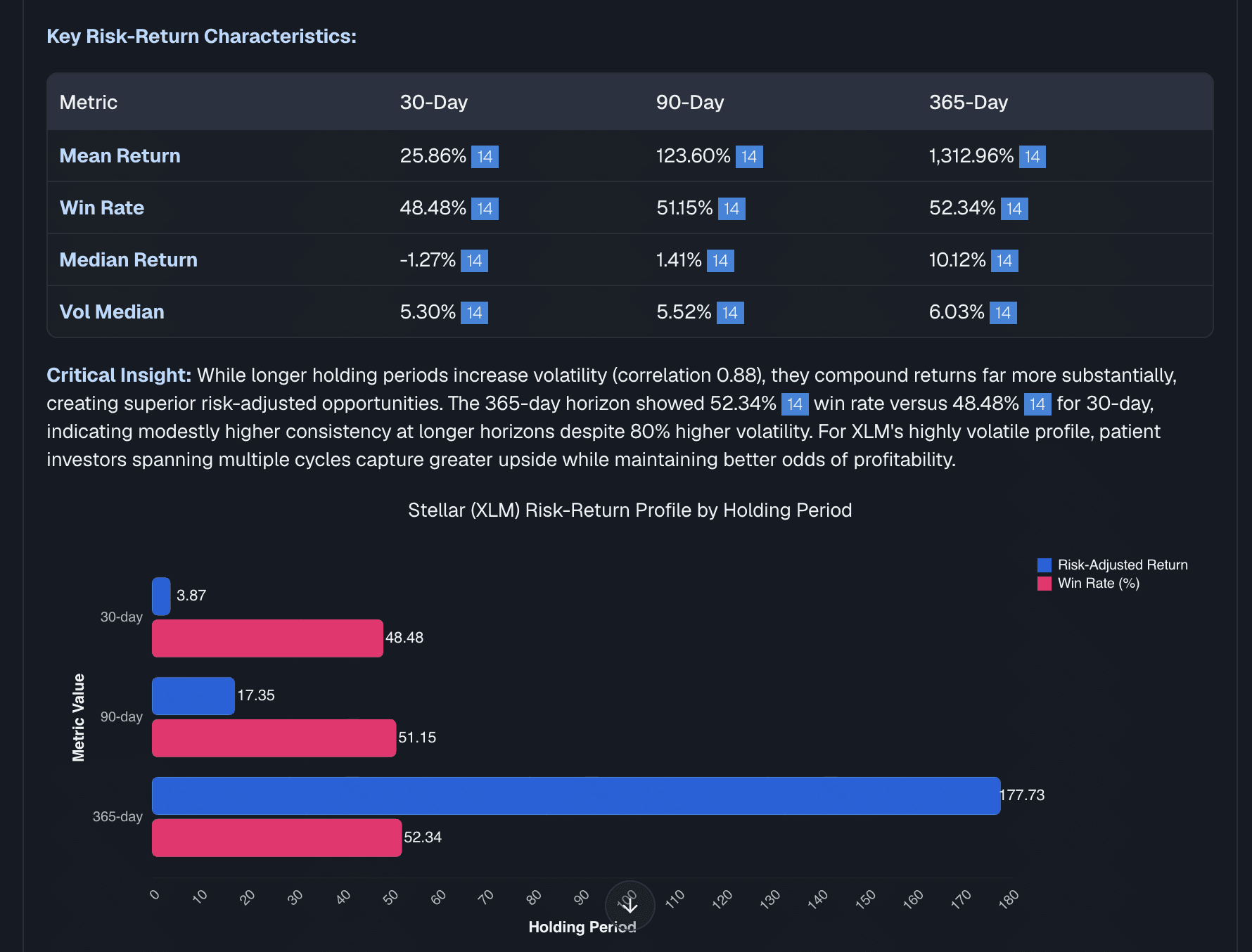
ภายในไม่กี่วินาทีหลังจากกดส่ง Powerdrill Bloom จะสร้างแผนภูมิกรวยการตลาดที่มีความแม่นยำสูงและพร้อมสำหรับการนำเสนอ คุณจะเห็นภาพอย่างชัดเจนว่าจุดรั่วไหลทางการตลาดของคุณอยู่ที่ใด แต่กระบวนการไม่ได้หยุดอยู่แค่นั้น เมื่อ AI สร้างรายงานแบบภาพแล้ว คุณสามารถปักหมุดไว้ที่แดชบอร์ดแบบเรียลไทม์ ส่งออกเป็นรูปภาพคุณภาพสูงสำหรับการนำเสนอของคุณ หรือแชร์ลิงก์แบบโต้ตอบที่ปลอดภัยกับทีมการตลาดของคุณ คุณยังสามารถตั้งค่าให้ AI อัปเดตข้อมูลนี้โดยอัตโนมัติทุกสัปดาห์ ทำให้การรายงานของคุณทำงานได้เองโดยอัตโนมัติอย่างสมบูรณ์
ทำไม Powerdrill Bloom จึงเป็นเครื่องมือที่ดีที่สุดสำหรับนักการตลาด
หากคุณต้องการหยุดต่อสู้กับสเปรดชีตและเริ่มเพิ่มประสิทธิภาพให้กับแคมเปญของคุณ Powerdrill Bloom คือคำตอบสุดท้าย นี่คือเหตุผลที่ทำให้เครื่องมือนี้โดดเด่นในฐานะเครื่องมือวิเคราะห์การตลาดแบบไม่ต้องเขียนโค้ดที่ดีที่สุด:
- ไม่ต้องใช้ SQL เลย: มีอินเตอร์เฟสผู้ใช้แบบสนทนาอย่างแท้จริงซึ่งสร้างขึ้นบน AI ขั้นสูง คุณเพียงแค่ถามคำถาม และระบบจะส่งคำตอบให้คุณ
- ได้ข้อมูลเชิงลึกทันที: ลดเวลาในการสร้างมูลค่าได้อย่างมาก คุณสามารถเปลี่ยนจากไฟล์ CSV ดิบที่ยุ่งเหยิงไปเป็นแดชบอร์ดกรวยการตลาดที่สวยงามและใช้งานได้จริงในเวลาเพียงไม่กี่วินาที
- การรายงานอัตโนมัติ: คุณตั้งค่ากรวยการตลาดเพียงครั้งเดียวเท่านั้น แล้วปล่อยให้ AI สรุปประสิทธิภาพการตลาดของคุณและส่งข้อมูลเชิงลึกให้คุณทุกวันหรือทุกสัปดาห์
- คุ้มค่าคุ้มราคาอย่างยิ่ง: มอบความสามารถในการวิเคราะห์ด้วย AI และวิทยาศาสตร์ข้อมูลระดับองค์กรในราคาเพียงเศษเสี้ยวของเครื่องมือ BI แบบดั้งเดิม และยังมีเวอร์ชันฟรีสำหรับผู้เริ่มต้นเพื่อเริ่มทดลองใช้งานได้ทันที
บทสรุป
การสร้างรายงานกรวยการตลาดแบบกำหนดเองจากข้อมูลดิบไม่ได้เป็นงานเฉพาะสำหรับวิศวกรข้อมูลและผู้เชี่ยวชาญด้าน SQL อีกต่อไป ด้วยการใช้ประโยชน์จากเครื่องมือ BI ที่ขับเคลื่อนด้วย AI คุณสามารถข้ามอุปสรรคทางเทคนิคและมุ่งเน้นไปที่สิ่งสำคัญโดยตรง นั่นคือ การค้นหาข้อมูลเชิงลึก การแก้ไขจุดรั่วไหลของกรวยการตลาด และการขยายขนาดแคมเปญการตลาดของคุณ
หยุดปล่อยให้ข้อมูลดิบที่มีค่าสูญเปล่าในสเปรดชีตที่นิ่งเฉย เปลี่ยนข้อมูลของคุณให้เป็นข้อมูลอัจฉริยะเพื่อการเติบโตตั้งแต่วันนี้ และทดลองใช้งาน Powerdrill Bloom ฟรีเพื่อสัมผัสอนาคตของการวิเคราะห์การตลาดแบบไม่ต้องเขียนโค้ด
คำถามที่พบบ่อย (FAQs)
ฉันสามารถสร้างแดชบอร์ดการตลาดโดยไม่รู้ SQL ได้หรือไม่?
ได้ ด้วยการใช้เครื่องมือที่ขับเคลื่อนด้วย AI อย่าง Powerdrill Bloom คุณสามารถสร้างแดชบอร์ดการตลาดที่ครอบคลุมได้ง่ายๆ เพียงพิมพ์คำถามของคุณเป็นภาษาอังกฤษทั่วไป โดยข้ามขั้นตอนการเขียน SQL ไปได้เลย
รูปแบบไฟล์ที่ดีที่สุดสำหรับข้อมูลดิบทางการตลาดคืออะไร?
รูปแบบมาตรฐานอย่าง CSV หรือ Excel (.xlsx) นั้นเหมาะสมที่สุด คุณสามารถลากและวางไฟล์เหล่านี้ลงใน Powerdrill Bloom ได้อย่างง่ายดายเพื่อเริ่มวิเคราะห์ข้อมูลของคุณทันที
ฉันจะติดตามอัตราการหลุดหายของกรวยการตลาดโดยอัตโนมัติได้อย่างไร?
อัปโหลดข้อมูลการเข้าชมและการเปลี่ยนเป็นลูกค้าดิบของคุณไปยัง Powerdrill Bloom แล้วขอให้ AI "คำนวณอัตราการหลุดหายระหว่างขั้นตอน" ระบบจะสร้างแผนภูมิกรวยการตลาดที่แม่นยำให้กับคุณ
เครื่องมือวิเคราะห์ข้อมูลด้วย AI ปลอดภัยสำหรับข้อมูลของบริษัทฉันหรือไม่?
ปลอดภัยอย่างแน่นอน แพลตฟอร์มชั้นนำอย่าง Powerdrill Bloom ใช้ระบบรักษาความปลอดภัยระดับองค์กรและโปรโตคอลความเป็นส่วนตัวของข้อมูลที่เข้มงวด เพื่อให้มั่นใจว่าข้อมูลดิบทางการตลาดของคุณจะปลอดภัยและเป็นความลับ