How to Turn Excel Data Into an Investor Pitch Deck With Agent Skills (Step-by-Step)

You have the numbers. You know the story. But getting from a raw Excel export to a polished investor deck? That's usually where the headache starts.
Exporting charts. Copying them into PowerPoint. Adjusting fonts. Realigning boxes. Fixing broken legends. By the time the deck looks halfway decent, half your day is gone, and you haven't even touched the narrative yet.
It doesn't have to be that way. With Powerdrill Bloom, the journey from spreadsheet to presentation-ready investor deck is almost entirely automated. Drop in your file. Let the AI explore and clean the data. Pick the insights that matter. Generate a professionally designed deck. Export to PowerPoint. Done.
Here's exactly how it works, step by step. No coding. No design skills. No repeating yourself across five different tools.
Why Excel Data Alone Is Not Enough for Investor Presentations
Excel is great for modeling, terrible for storytelling. Investors evaluate dozens of decks every week. They don't have time to decode your spreadsheet formatting or interpret your color-coded cells. A pitch deck needs to translate complex data into simple, visual narratives that anyone can understand at a glance.
Investors look for patterns, not raw numbers. Revenue growth, unit economics, and market opportunity need to be visualized—not buried in spreadsheets.
Excel doesn't communicate trust. A clean, professionally designed deck signals that you've thought through your numbers and can present them with confidence.
Time spent formatting is time not spent on strategy. Every hour you wrestle with PowerPoint is an hour you could be refining your narrative or talking to investors.
The bar is higher than ever. In a competitive funding environment, a polished deck is table stakes. Data alone won't close the round—storytelling will.
Why Powerdrill Bloom for Investor Pitch Decks?
Investor decks demand more than just pretty slides. They need clean data, clear visuals, a compelling narrative, and professional design—all backed by numbers that tell a credible story.
Powerdrill Bloom is built for exactly this use case. It's a general-purpose AI agent and action engine that executes tasks, automates workflows, and extends what one person can do. Drop in your Excel file, and Bloom auto-cleans the data, suggests smart exploration paths, surfaces trends and anomalies on a visual canvas, recommends the right charts, and turns any canvas into a presentation-ready deck—exportable to PowerPoint.
Here's how to do it, step by step.
Step 1: Upload Your Excel Data to Bloom
Start by opening your Powerdrill Bloom workspace. This is your persistent memory environment—everything you upload here stays indexed and accessible across every future session.
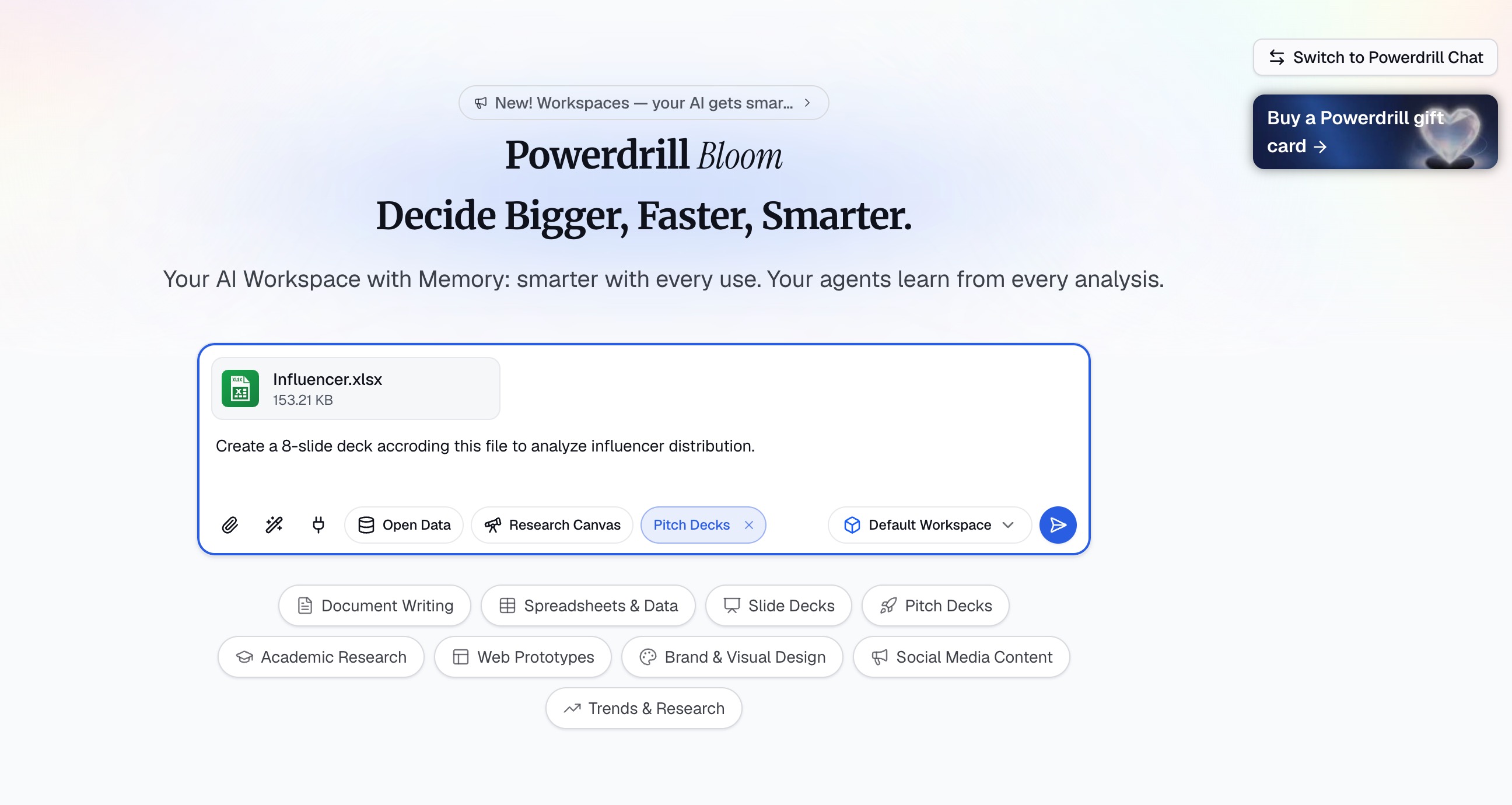
Click the upload button and select your Excel file. Bloom supports Excel, CSV, TSV, and even PDF files, so you can work with whatever format your data is in.
Step 2: Let Bloom Auto-Clean and Explore Your Data
This is where the magic begins.
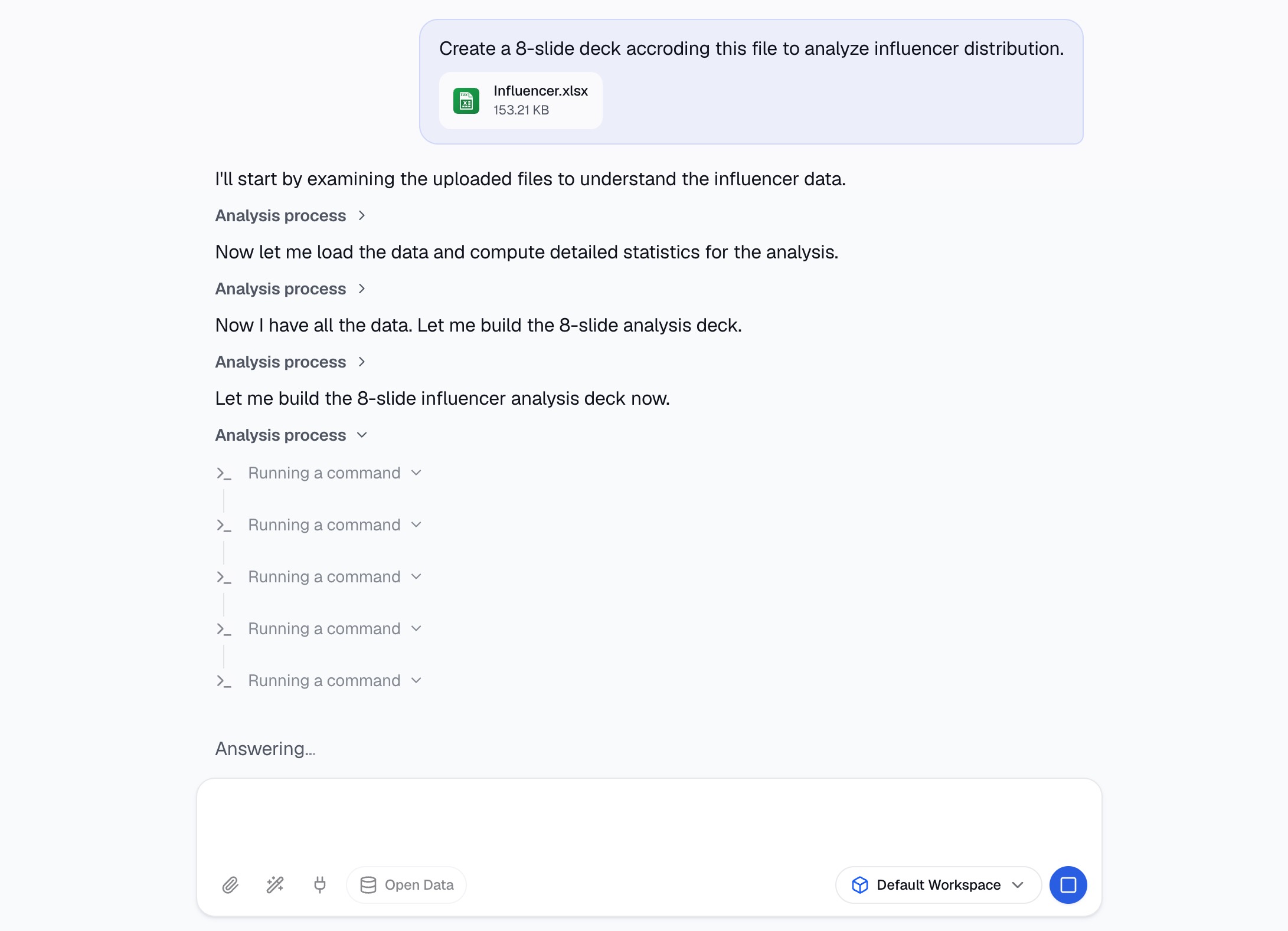
Once your file is uploaded, Bloom automatically:
Cleans your data: Detects and handles missing values, inconsistencies, and formatting issues
Suggests smart exploration paths: Proposes analytical angles you might not have considered
Surfaces trends and anomalies: Visual canvas displays patterns and outliers automatically
Recommends the right charts: Based on your data structure, Bloom suggests the most effective visualizations
You don't need to tell Bloom what to look for—it proactively explores your data and presents findings as nodes on a visual canvas.
Step 3: Generate the Deck With Agent Skills
Now for the payoff. With your insights favorited, it's time to turn them into a professional investor pitch deck. Describe what you need: "Create a 8-slide deck accroding this file to analyze influencer distribution.". The AI automatically formats your data into charts, structures your narrative, and applies consistent visual branding—all without you touching a single design tool.

Step 4: Refine and Edit With Office Skills
Your generated deck is ready, but you might want to make some final tweaks—reorder slides, add a custom section, or integrate content from another source.

Bloom's officecli-pptx skill gives you direct read/write access to .pptx files. You can:
Extract text and data from existing presentations
Edit slide content and structure
Merge or split slides
Repurpose deck content for emails, summaries, or reports
Simply describe what you want to change in natural language: "Insert a slide highlighting the pricing information about the English influencer."
Step 5: Export and Deliver
Once you're satisfied with the deck, export it with one click. Bloom generates a production-ready PowerPoint file (.pptx) that you can download and share immediately.

No manual reformatting. No broken charts. No last-minute design panic. Just a polished investor deck, ready to present.
Why This Beats the Traditional Approach
The traditional approach to pitch deck creation is a mess of context-switching. Export charts from Excel. Paste into PowerPoint. Adjust formatting. Realign objects. Realize the source data changed. Start over. By the time the deck looks professional, you've lost hours—sometimes days—of valuable time.
One workspace, not five tools. Bloom handles data cleaning, analysis, visualization, slide generation, and export in one place. No switching between Excel, PowerPoint, and design tools.
AI remembers your work. Upload a file once and Bloom keeps it indexed across every session. No re-uploading, no re-explaining your data.
Automatic insights, not manual discovery. Bloom proactively surfaces trends, anomalies, and charts—you don't have to know what you're looking for in advance.
Professional design with zero effort. No design skills required. Choose a template and Bloom applies consistent branding across every slide.
Speed that closes the gap. What used to take 1-3 days now takes 15-30 minutes. That's not just faster—it's a completely different way of working.
Final Thoughts
Turning Excel data into a polished investor deck used to cost you days. With Powerdrill Bloom, it costs minutes—and zero design skills. The platform handles the dirty work: cleaning data, surfacing insights, generating charts, and assembling a presentation-ready deck that looks like it came from a consulting firm. What matters most is you stay in control of the narrative while the AI executes the rest. If you're preparing for a funding round or just want to spend less time on slides and more time on strategy, give Bloom a try. The free beta is open, and you can be up and running with your first deck in under an hour. Visit Powerdrill Bloom and see for yourself.
FAQs
1. Do I need technical skills to use this?
No. Bloom requires no SQL, Python, or design skills—just upload your data and follow the workflow.
2. What file formats does Bloom support?
Excel, CSV, TSV, PDF, Word, PowerPoint, images, audio, and video.
3. How long does it take to generate a deck?
From upload to downloadable deck, expect 15-30 minutes for a standard investor pitch.
4. Can I customize the visual style?
Yes. Choose from Professional, Business, or Fancy themes, or use mck-ppt-design.
5. Is there a free version available?
Yes. Bloom offers a free beta with full feature access. Pro plans start at $13.27/month.