How to Summarize a 50-Page PDF Report Into Key Insights Automatically (Free & Fast)
A 50-page PDF report can contain valuable information, but finding the information that actually matters is often harder than it sounds. Market research reports, financial reports, industry studies, academic papers, and business reports may include dozens of pages of text, tables, charts, statistics, and conclusions. Reading everything from beginning to end can take hours, especially when you only need the most important findings for a meeting, presentation, research project, or business decision.
AI-powered document analysis makes this process much faster. Instead of manually scanning every page and copying important information into your notes, you can upload the report, ask AI to identify the key findings, and turn a long document into a concise insight summary. However, a useful workflow should go beyond simply shortening the original text. The goal is to understand what the report says, identify important numbers and trends, and turn those findings into information that you can actually use.
In this guide, we will show you how to summarize a 50-page PDF automatically and quickly with Powerdrill Bloom, from uploading the document to generating an organized report. The analysis and examples in this article are created with Powerdrill Bloom.
Why Summarizing a 50-Page PDF Manually Takes So Long
The biggest problem with manually summarizing a long PDF is not simply the number of pages. It is the amount of information that needs to be processed at the same time. A typical report may contain background information, methodology, survey results, market statistics, charts, tables, recommendations, and supporting evidence. While all of these sections may be useful, they rarely have the same level of importance.
Manual reading also makes it easy to overlook important details. A key statistic may appear in the middle of a long section, while an important trend may only become obvious after comparing information from several different pages. Readers need to remember previous figures, connect related findings, and decide which information deserves attention, which can make the process surprisingly time-consuming.
There is also a difference between summarizing and understanding a report. A basic summary may tell you what each section discusses, but it may not explain which findings are most significant or how different pieces of information relate to each other. For data-heavy reports, the most useful result is often not a shorter version of the PDF, but a structured overview of its key insights, supporting data, trends, and implications.
The Fastest Way to Summarize a 50-Page PDF Automatically
With an AI-powered workflow, you can reduce a long report into its most useful information in just a few steps. Instead of reading every page first, you can let AI process the document and then use natural-language questions to guide the analysis. This approach is especially useful when the PDF contains both narrative content and quantitative information.
Powerdrill Bloom provides a straightforward workflow for this process. You upload your report, choose the appropriate AI model, ask questions about the document, and then turn the resulting analysis into a structured report. The important advantage is that you can continue asking follow-up questions rather than relying on a single generic summary.
Step 1. Upload Your PDF
Start by uploading your 50-page PDF report to Powerdrill Bloom. You can simply bring the document into your workspace instead of manually copying its content page by page. Once the file is uploaded, Powerdrill Bloom can work with the information in the document as the basis for your analysis.
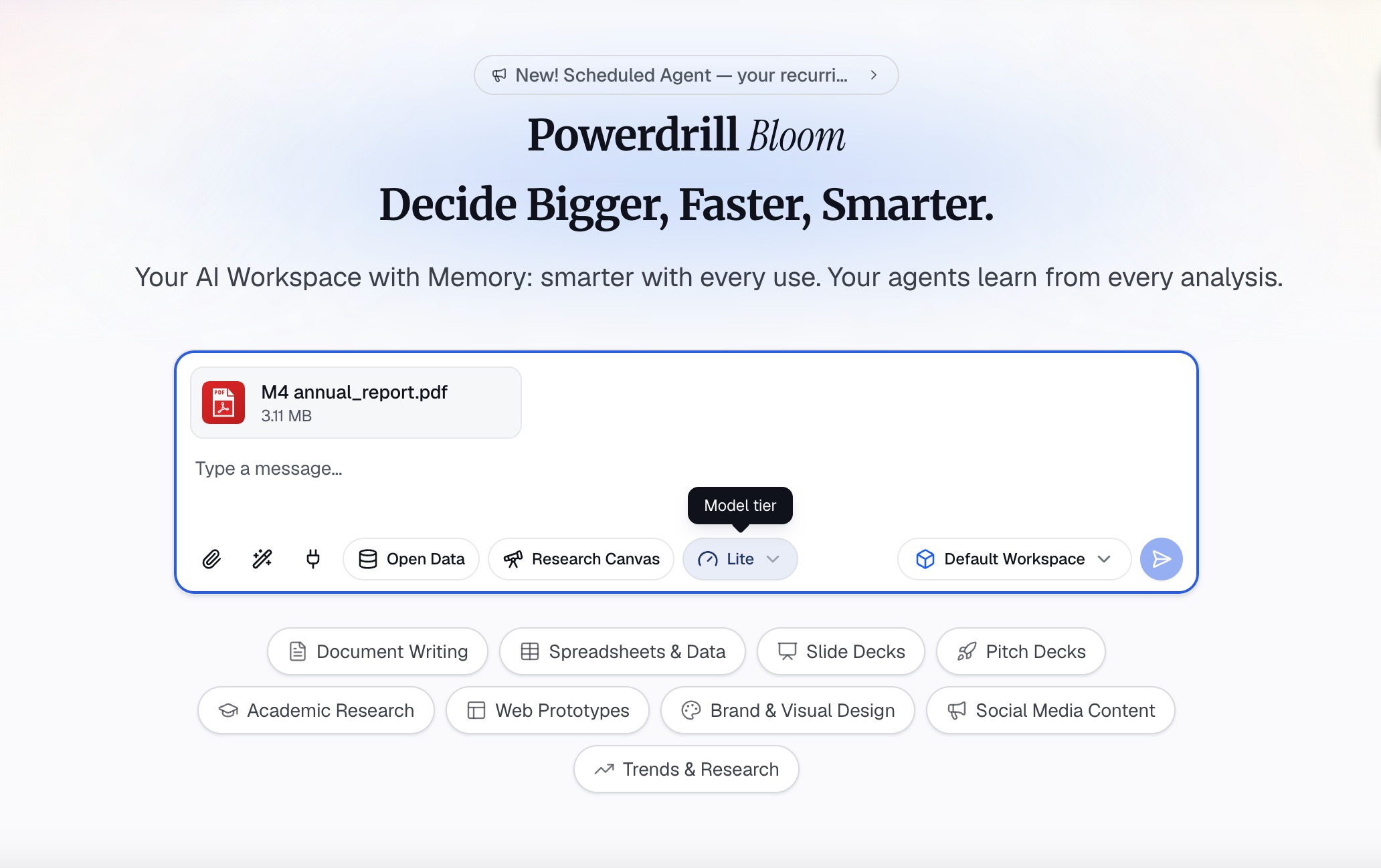
One useful part of this step is that you can choose between different AI models, including Lite, Standard, and Max. This gives you more flexibility depending on the complexity of your task. For a straightforward document summary, a lighter model may be sufficient, while a more detailed report containing extensive data, tables, or complex analysis may benefit from a more capable model.
Choosing a model before starting the analysis also gives you more control over how you approach different documents. You do not necessarily need the most powerful option for every PDF, so you can select the model that fits the depth of analysis you need.
Step 2. Ask AI to Extract the Key Insights
Once your PDF is uploaded, the next step is to tell AI exactly what you want to learn from it. Rather than simply asking, “Summarize this PDF,” provide instructions that define the type of information you need. A more specific prompt can help the AI focus on the report's most meaningful findings instead of producing a general page-by-page overview.
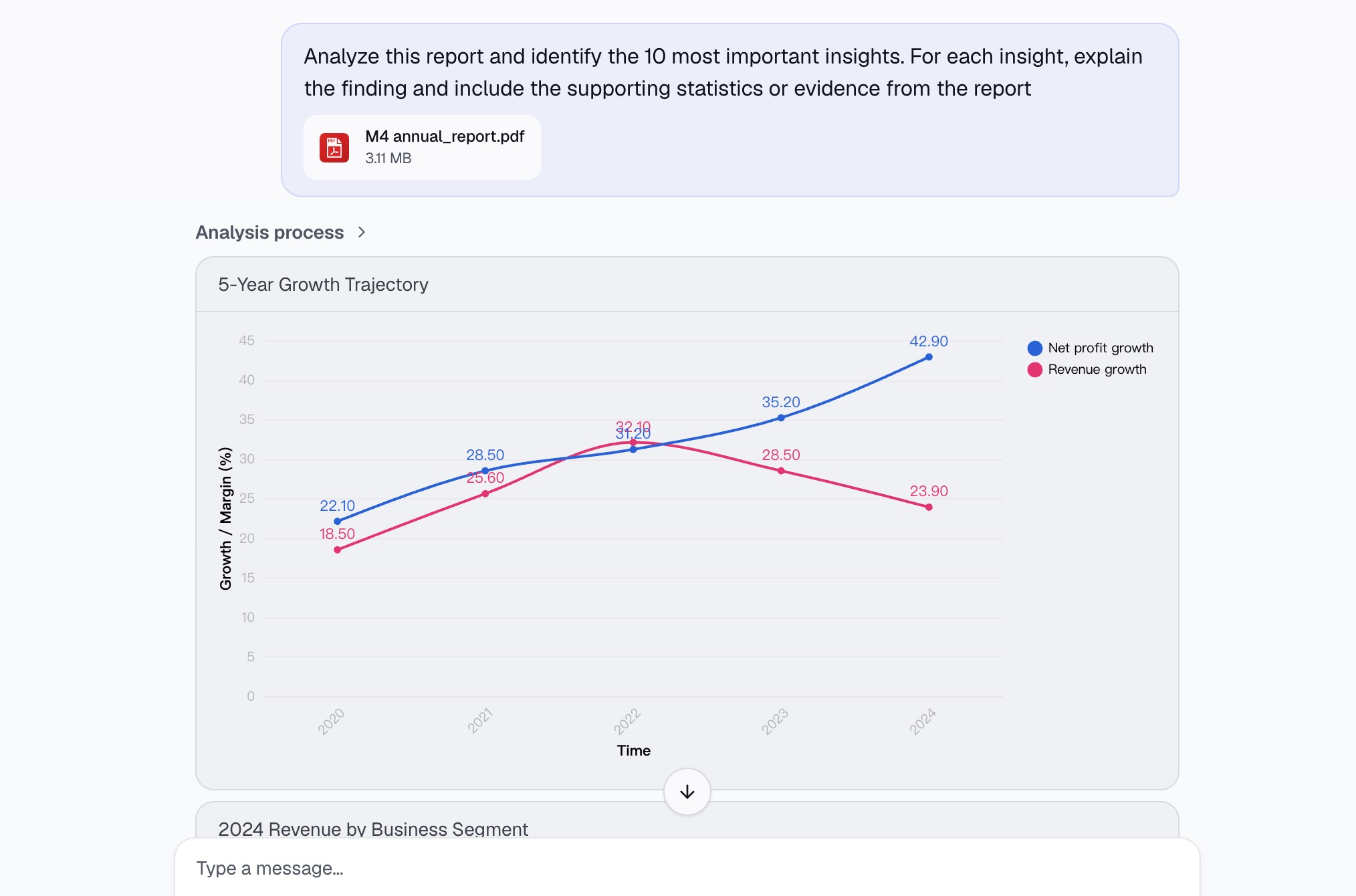
For example, you can ask: “Analyze this report and identify the 10 most important insights. For each insight, explain the finding and include the supporting statistics or evidence from the report.”
This approach helps you extract both the conclusion and the evidence behind it. If the report contains market data, you can also ask Powerdrill Bloom to identify the most important numbers, growth rates, changes over time, and unexpected findings.
You can then continue with follow-up questions based on the first analysis. For example, you might ask, “What are the three most surprising findings in this report?” or “Which statistics would be most important for an executive presentation?” You can also ask AI to identify risks, opportunities, trends, or recommendations. Instead of starting over with every question, you can build on the existing analysis and progressively explore the report.
For data-heavy PDFs, this conversational workflow is particularly useful because the first summary may reveal questions that were not obvious when you initially opened the document. AI can help you move from a broad understanding of the report to a more focused analysis of the information that matters most.
Step 3. Generate and Export Report
After identifying the key findings, you can turn the analysis into a more structured report. Rather than keeping useful insights buried inside a conversation, organize them into an output that is easier to share, review, or use in a presentation.
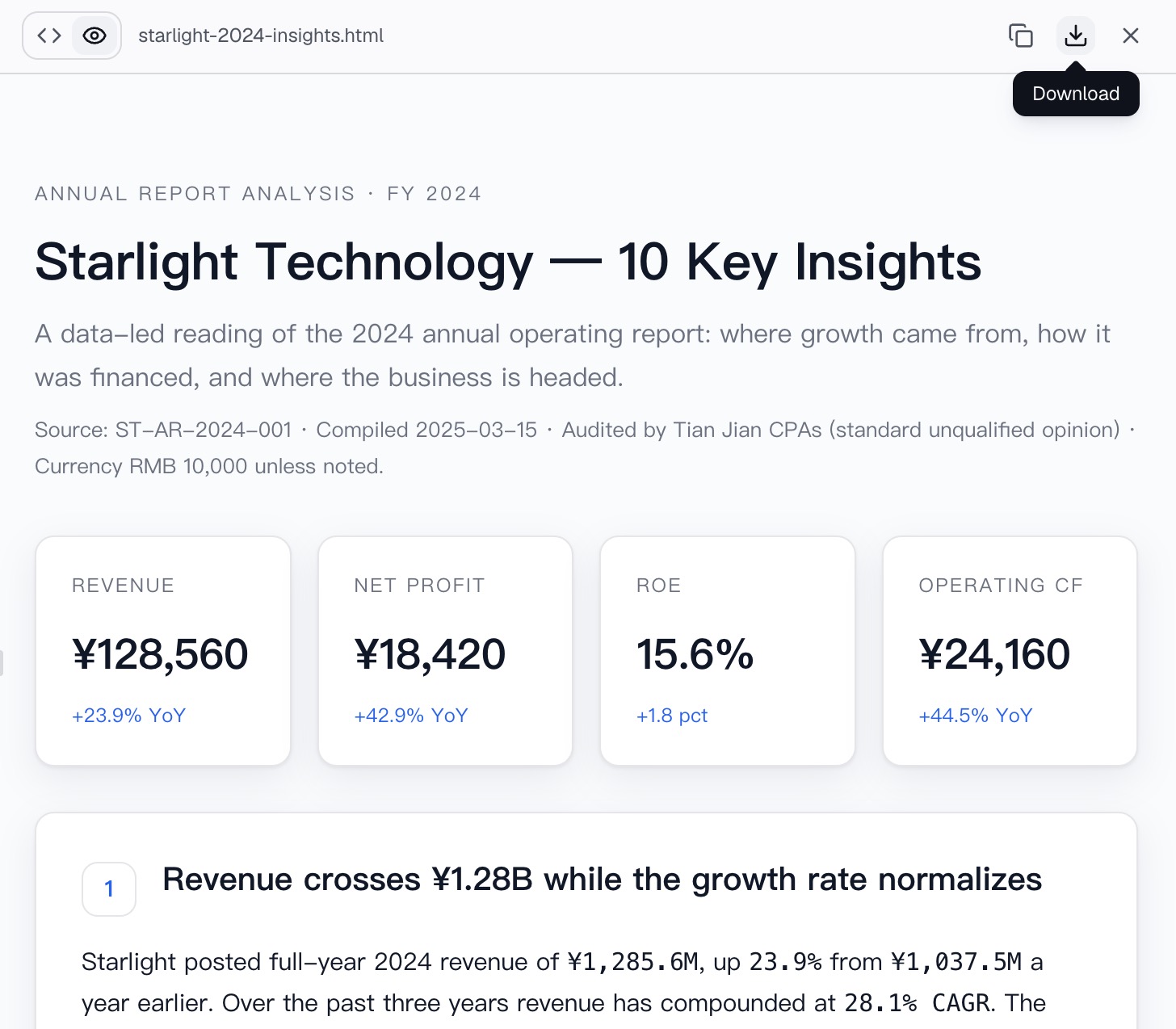
A useful report can include an executive summary, key findings, important statistics, major trends, and actionable takeaways. For example, instead of presenting ten pages of extracted text, you could create a concise document that explains the report's main conclusions and supports each conclusion with relevant data.
This is also where the workflow moves beyond basic PDF summarization. If the report contains quantitative information, visualizing important findings can make the final result easier to understand. Charts can help readers recognize changes, comparisons, and patterns without having to interpret every number themselves.
What Types of 50-Page PDFs Can You Summarize?
The same workflow can be applied to many different types of long-form documents. Market research reports are a natural fit because they often contain large amounts of survey data, industry statistics, customer behavior information, and competitive analysis. Instead of reading dozens of pages to find the most important market trends, you can ask AI to identify the findings that have the greatest impact.
Financial and annual reports are another useful application. These documents often contain revenue figures, growth rates, financial comparisons, business segments, and management commentary. AI can help extract the numbers that matter most and explain the broader trends behind them.
You can also use this approach for academic research papers, consulting reports, industry studies, white papers, government reports, business proposals, survey reports, and competitor research. The exact questions will vary depending on the document, but the basic process remains the same: upload the report, define what you want to know, analyze the evidence, and organize the results into a useful output.
Powerdrill Bloom: More Than a PDF Summarizer
A conventional PDF summarizer is mainly designed to make a long document shorter. That can be useful when you need a quick overview, but it may not be enough when your goal is to understand data, discover patterns, or make decisions based on a report.
Powerdrill Bloom takes a broader approach by combining document analysis with AI-powered data analysis. Instead of treating a PDF as nothing more than a block of text, you can use natural-language questions to investigate the information inside it. This makes it possible to move from “What does this report say?” to more useful questions such as “What changed?”, “Which trend matters most?”, and “What should I pay attention to?”
The workflow also extends beyond text. When your report contains tables, statistics, or other structured information, Powerdrill Bloom can help turn those findings into visual analysis and presentation-ready outputs. This means you can start with a 50-page report and finish with a much more concise collection of insights, charts, and conclusions.
For professionals, researchers, students, and anyone who regularly works with long documents, this can significantly reduce the time spent searching for information while making the final analysis easier to communicate.
Conclusion
Summarizing a 50-page PDF does not have to mean spending an entire afternoon reading, highlighting, and rewriting the document. AI can process a long report quickly, identify important findings, surface supporting statistics, and help you understand the broader trends hidden across multiple sections.
The most effective workflow, however, goes beyond generating a shorter version of the original document. By combining AI summarization with follow-up analysis, data extraction, visualization, and report generation, you can turn a long PDF into insights that are easier to understand and act on.
With Powerdrill Bloom, the process is simple: upload your PDF, choose the AI model that fits your task, ask questions about the information you need, and generate a structured report from the results. Instead of spending hours searching through 50 pages, you can spend your time deciding what the insights actually mean.
FAQs
1. Can AI summarize a 50-page PDF?
Yes. AI can process long PDFs and extract key findings, statistics, trends, and conclusions within minutes.
2. What is the fastest way to summarize a PDF?
Upload the PDF to an AI analysis tool, provide a focused prompt, and ask follow-up questions about important findings.
3. Can Powerdrill Bloom analyze PDF reports?
Yes. Powerdrill Bloom can analyze uploaded documents and answer questions about their content using natural-language prompts.
4. Can I choose an AI model for PDF analysis?
Yes. Powerdrill Bloom offers Lite, Standard, and Max models, allowing you to select based on your analysis needs.
5. Can AI turn PDF insights into a report?
Yes. AI can organize extracted findings, statistics, and analysis into a structured report that is easier to review and share.