How to Run Claude Skills Outside Claude (2026 Guide)

You have likely heard about Claude's incredible analytical capabilities, but actually getting access can be incredibly frustrating. Many users are blocked from registering due to regional restrictions, while others find the monthly subscription too expensive just to test it out. Or maybe you simply want to experience Claude's advanced features without jumping through endless phone verification hoops.
You are not alone. These barriers prevent countless professionals from leveraging "Claude Skills"—the AI's ability to autonomously execute code, analyze datasets, and use external tools.
The good news? You do not need a native Anthropic account to unlock this power. Running Claude Skills outside of the official Claude interface is the ultimate workaround. In this guide, we will explore what these skills are and how platforms like Powerdrill Bloom let you bypass these hurdles, giving you instant, hassle-free access to automated data analysis workflows.
What Are Claude Skills
Definition: Claude Skills are reusable packages that capture your expertise, procedures, best practices, and institutional knowledge so Claude can apply them automatically and consistently.
Format: A skill is simply a folder containing a
SKILL.mdfile with instructions in Markdown. You can also include reference files, executable scripts, or code—whatever Claude needs to perform the task.Core benefits:
Consistent, expert-level output – Skills give Claude detailed guidance on how you want documents created, data analyzed, or workflows automated.
Build once, use everywhere – The same skill works across Claude.ai, Claude Code, and the API without modification.
Stackable – Multiple skills can be combined for complex, multi-step workflows; Claude uses what’s needed without manual selection.
Capture organizational knowledge – Package company procedures, brand guidelines, and industry-specific practices so every team member gets consistent results from day one.
Types of skills:
Built-in skills – Pre-made for common tasks: creating Excel/PowerPoint files, data analysis, and file conversion.
Company-specific skills – Custom skills like applying brand guidelines, financial modeling (DCF, comps), healthcare documentation, or compliance procedures.
Individual skills – Personal workflows such as custom note-taking systems, development processes, or research methods.
Why Claude Skills Matter for AI Agents in 2026
The AI landscape in 2026 is entirely focused on "Agentic AI"—systems that can plan, execute, and iterate on complex tasks autonomously. Claude Skills are the foundational building blocks of these AI agents. Here is why they are indispensable today:
Eradicating Hallucinations: Large Language Models (LLMs) inherently lack real-time knowledge. By using skills to pull live data from trusted sources, Claude grounds its answers in reality, practically eliminating hallucinations.
Autonomous Automation: With skills, AI agents can run on a schedule. Imagine an agent that wakes up at 8:00 AM, uses an API skill to fetch sales data, uses a coding skill to generate a chart, and emails it to your team.
Enterprise Customization: Every business has unique internal software. Claude Skills allow developers to build bridges between Claude’s brilliant reasoning engine and a company's proprietary tech stack.
How Powerdrill Bloom Run Claude Skills
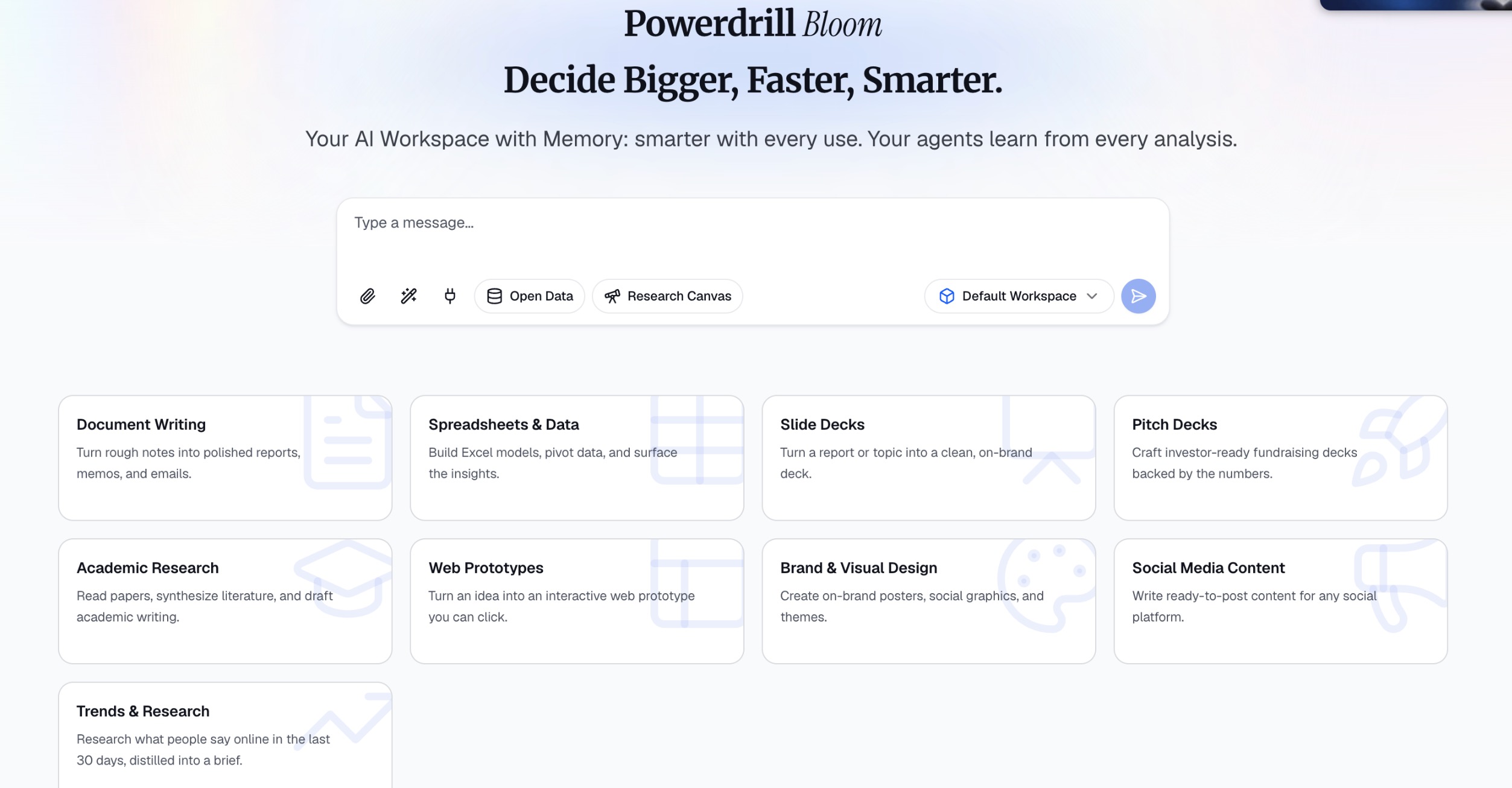
Step 1. Define What You Want to Do
Bloom packages complex AI capabilities into nine specific task scenarios—document writing, data analysis, slide deck creation, pitch deck production, academic research, web prototyping, brand & visual design, social media content, and trend research. You don't need to understand which Claude Skill is being called behind the scenes. All you need to ask yourself is one simple question: "What do I need to produce right now?" Is it a meeting report, or a growth analysis based on data? Each scenario corresponds to a clear work objective, and choosing the right direction is already half the battle.
Step 2. Provide Your Materials
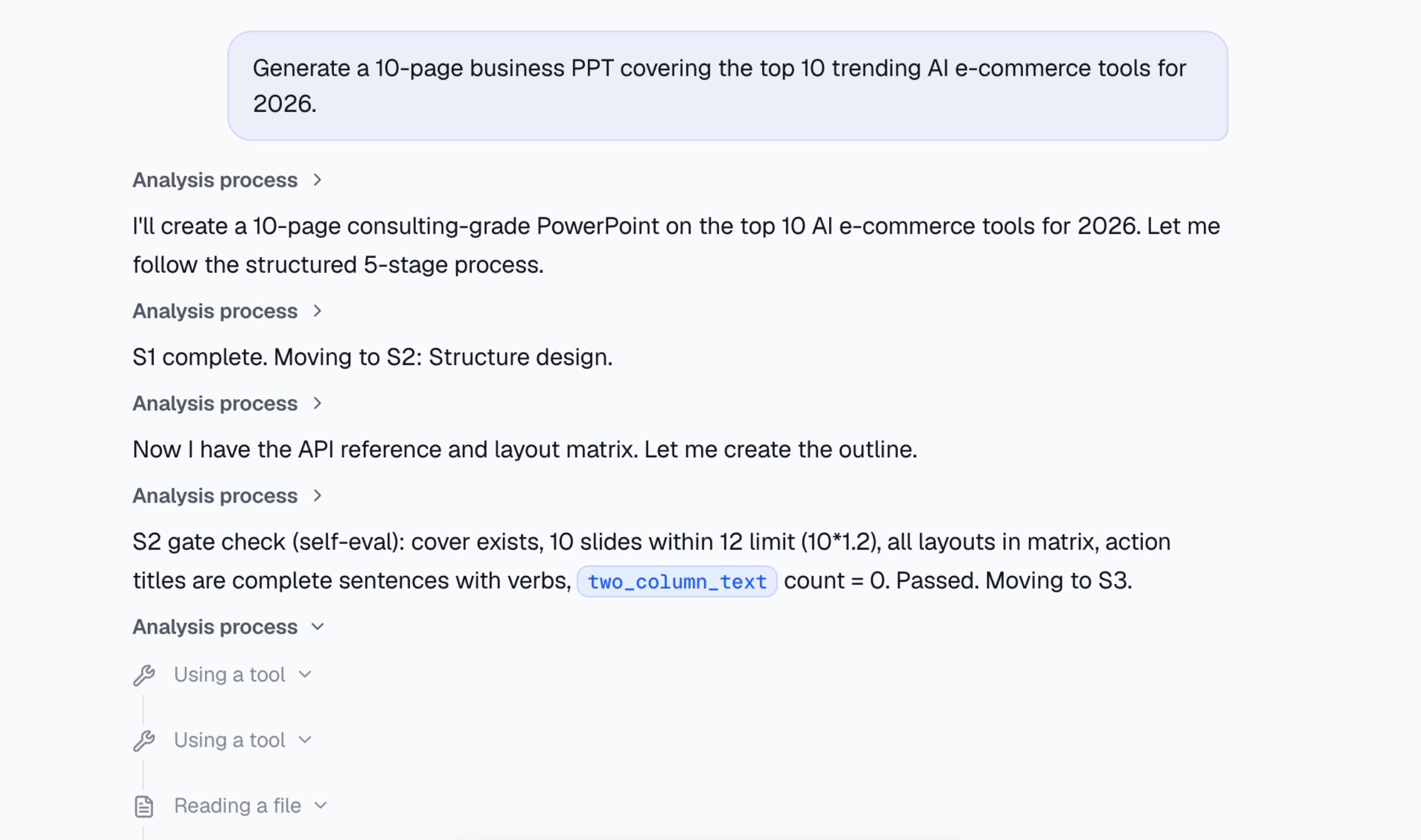
Once you've selected a task, you need to tell Bloom what content to work with. You can describe your needs purely through text—for example, "Generate a 10-page business PPT covering the top 10 trending AI e-commerce tools for 2026."or upload data files such as Excel, PDF, Word, or CSV. You can even combine both approaches by uploading files while providing specific instructions. For more precise outputs, it's recommended to include key details in your description: what the topic is, how many pages you need, who the target audience is, and what visual style you prefer. The clearer your instructions, the more closely the results will match your expectations.
Step 3. AI Executes Automatically
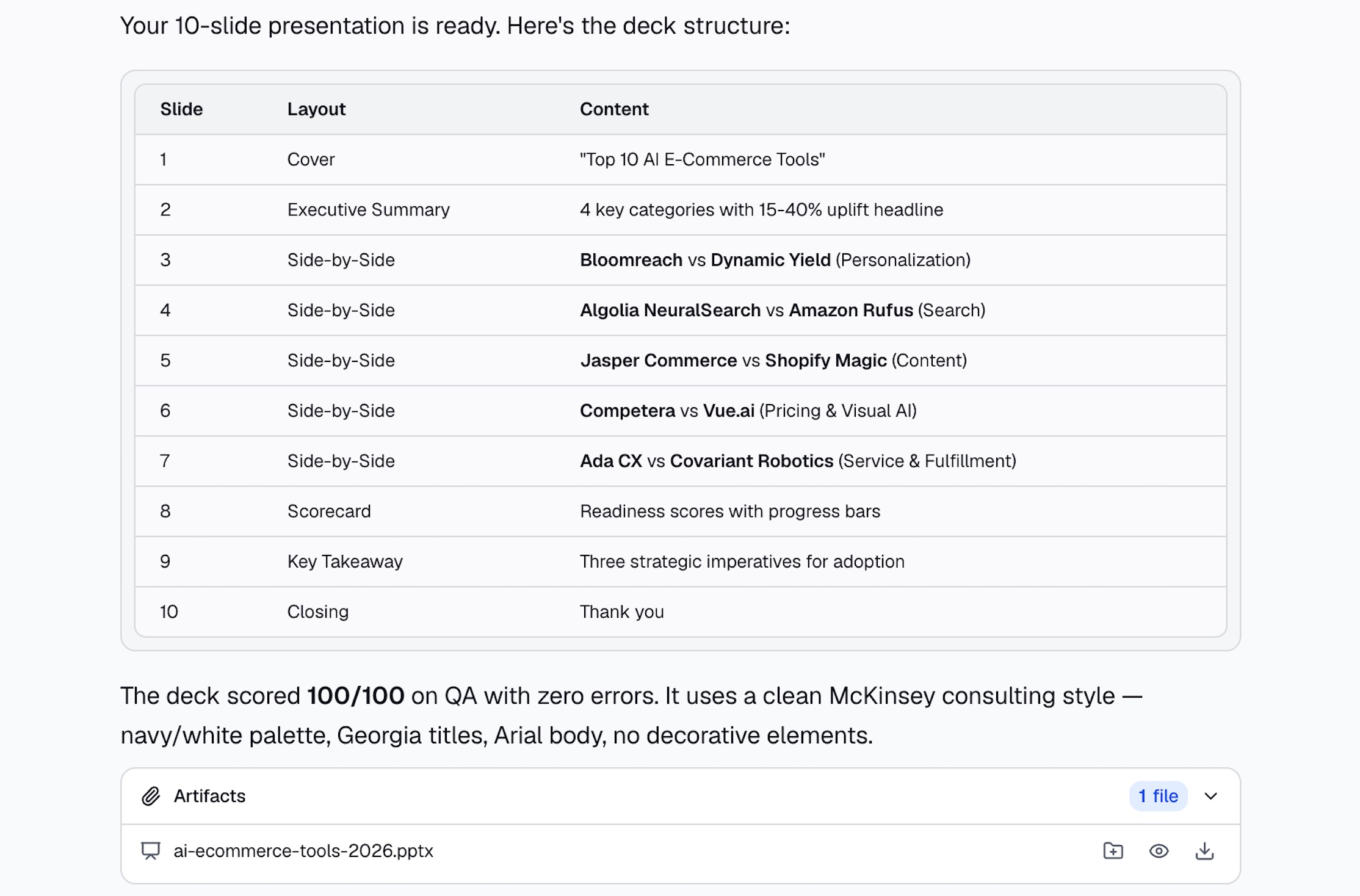
Once you submit your request, Bloom initiates a complete workflow behind the scenes. It first interprets your intent, breaking down a vague instruction like "create a PPT" or "write a report" into structured steps—including content planning, data extraction, and page design. If you uploaded data files, the system automatically handles cleaning, analysis, and insight extraction. The entire process leverages capabilities like Claude Skills, but you remain completely unaware of these technical details. There's no coding required, no need to tweak prompts repeatedly—everything runs silently in the background.
Step 4. Preview and Refine
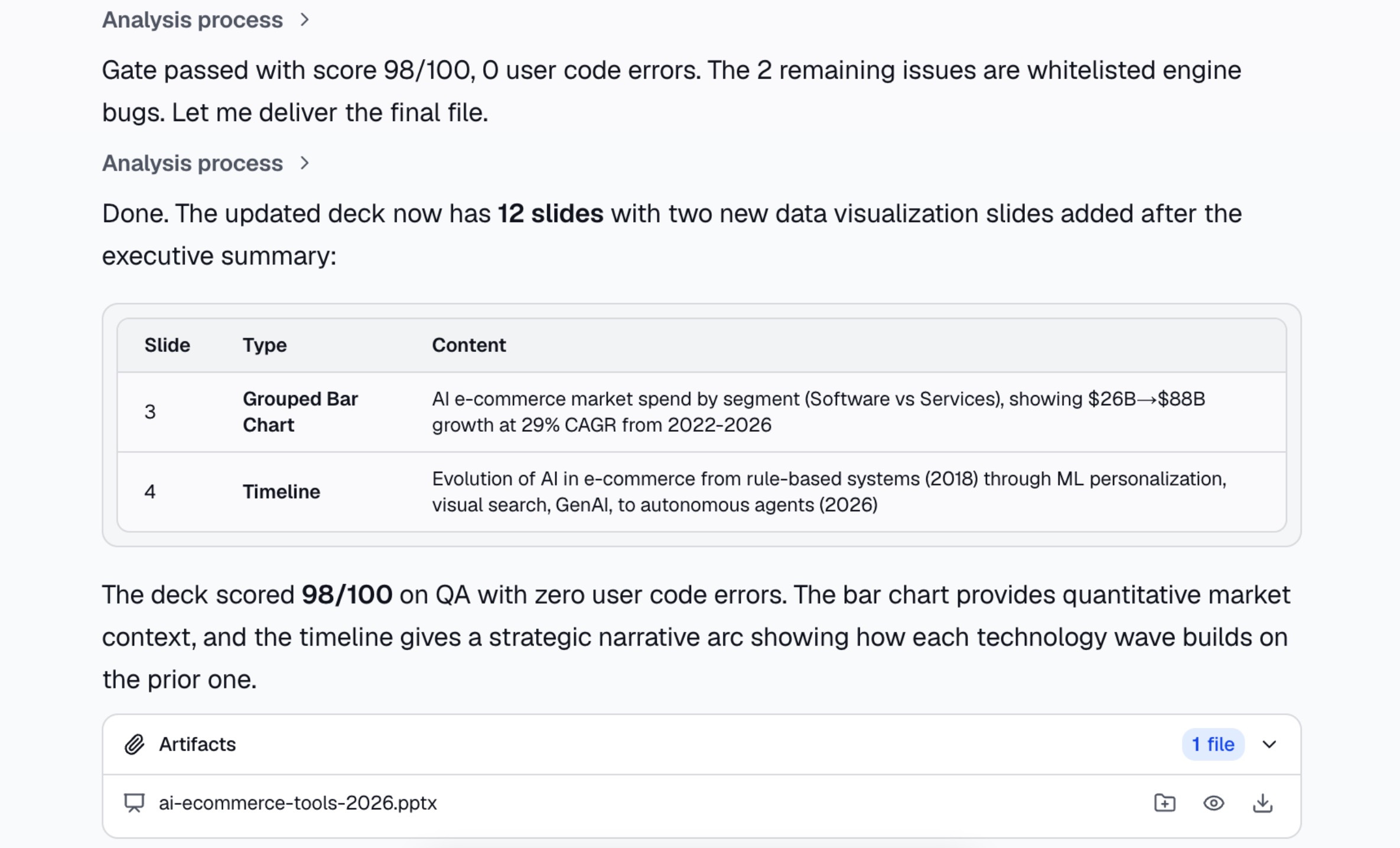
After the AI finishes generating the output, you can preview the results directly on the canvas. For PPTs, you can flip through each page to review structure and layout; for documents, you can read and annotate them directly; and for data analysis, automatically generated visualizations are included. If certain parts don't meet your expectations, there's no need to start over—simply provide modification requests in natural language through the chat, such as "Add data charts or a timeline slide showing the AI e-commerce market growth trajectory." Bloom iterates within the same workspace while remembering your preferences. This conversational refinement process ensures the final output more closely aligns with your actual needs.
Step 5. Export and Deliver
Once you've confirmed that the content and formatting meet your requirements, you can export the final deliverable with a single click. PPTs download as .pptx files, documents export as .docx, and data analysis results can be exported as .xlsx. What you get is a fully formatted, production-ready deliverable—not an outline or draft that requires manual polishing. This means the path from idea to final output is compressed to the shortest possible length, eliminating the lengthy intermediate steps of "AI generates an outline → manually copy into PPT → adjust formatting page by page → beautify the design." The efficiency gain is tangible.
Step 6. Build Memory Through Continuous Use
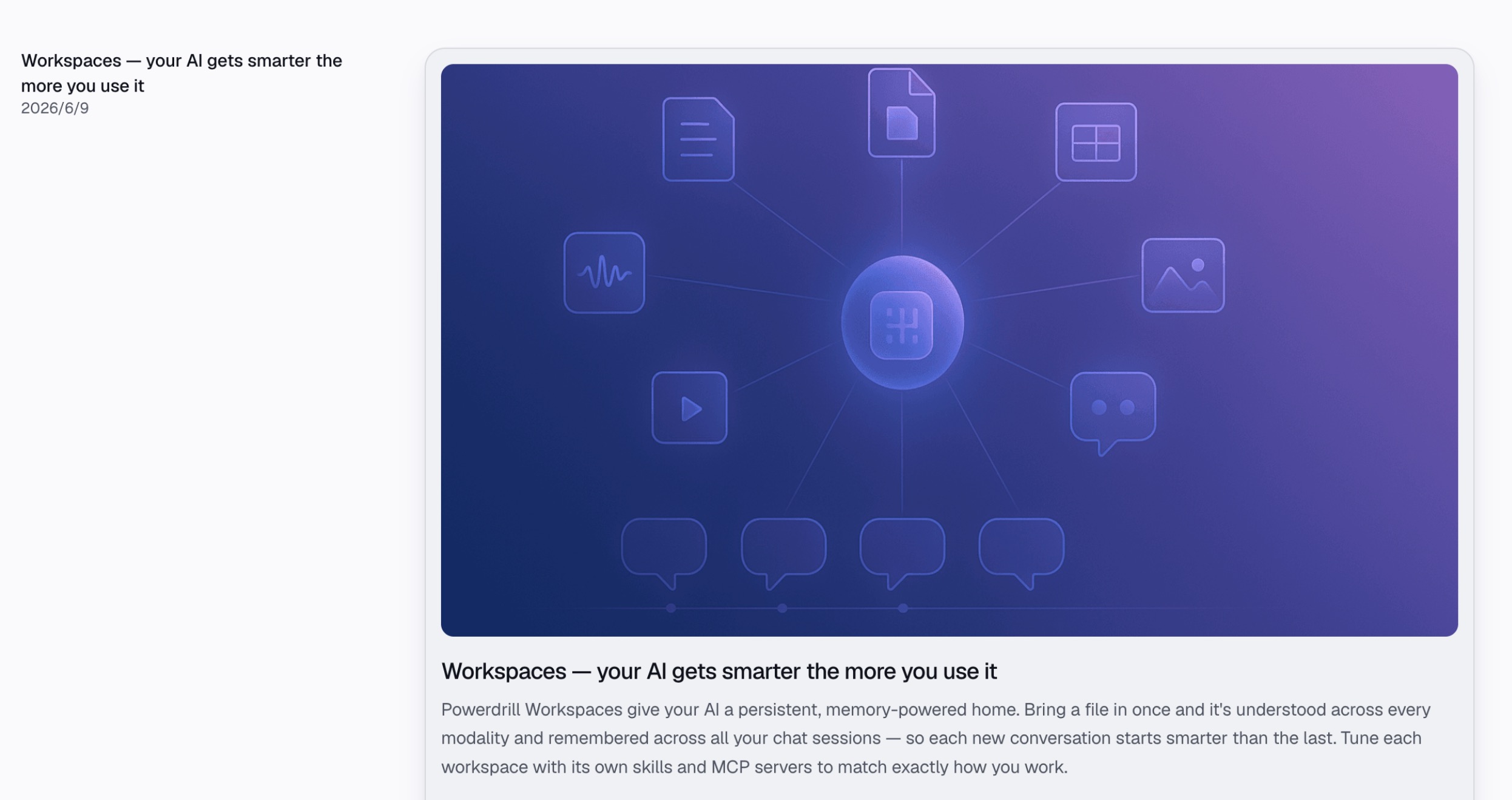
Bloom's most distinctive value lies in its "workspace memory" mechanism. All analysis records, files, preference settings, and revision history within the same workspace are preserved. This means that when you tackle similar tasks in the future, the AI remembers the style you preferred last time, the data dimensions you commonly use, and the PPT templates you're accustomed to. You don't need to "retrain" the AI from scratch each time—it understands you better with every use. This cumulative effect continuously lowers the starting cost for each new task. The longer you use it, the smoother the experience becomes, and the more consistent the output quality.
Who Benefits Most from Powerdrill Bloom’s Claude Integration?
Instead of looking at hypothetical scenarios, let’s look at who actually needs to run Claude outside its native interface and why Powerdrill Bloom is their ideal solution:
Users Facing Registration & Geo-Blocks: If you are frustrated by phone verifications, regional restrictions, or the high cost of a native monthly subscription, Powerdrill Bloom is your bypass. It grants you immediate, unrestricted access to Claude’s underlying analytical skills without the typical sign-up hurdles.
Non-Technical Business Professionals: Marketers, HR managers, and sales leaders often drown in complex Excel sheets but lack the programming skills to analyze them. Powerdrill Bloom acts as an equalizer. Because it wraps Claude's Python and SQL skills in a plain-English interface, non-technical users can perform advanced data analysis effortlessly.
Consultants and Analysts: For professionals who spend hours formatting client reports, raw data insights are not enough. By chaining Claude's data storytelling skills directly into Powerdrill Bloom’s one-click PPT export, analysts can skip the tedious slide-formatting process and go straight from data upload to a presentation-ready deck in minutes.
Conclusion
The future of AI is agentic, and Claude Skills are the engine driving this revolution. While the native Claude interface is excellent for conversational tasks, the true power of AI in 2026 lies in running these skills outside of Claude to automate complex, data-driven workflows.
By leveraging Powerdrill Bloom, you eliminate the engineering overhead of building custom API integrations. Powerdrill Bloom provides the perfect ecosystem for Claude’s skills to thrive, transforming natural language into powerful, executable data analysis. Stop just chatting with your data and start acting on it. Try Powerdrill Bloom today and experience the ultimate AI data analyst.
FAQs
Can I use Claude Skills without knowing how to code?
Yes. Powerdrill Bloom provides a no-code interface where Claude automatically runs data queries and Python scripts for you.
What makes Powerdrill Bloom different from regular Claude?
Regular Claude is a chat interface. Powerdrill Bloom is a specialized platform automating data analysis, visualization, and PPT creation.
Are my data secure when running skills outside of Claude?
Absolutely. Enterprise-grade platforms like Powerdrill Bloom process your proprietary data within secure, strictly isolated sandboxes to prevent leaks.
What types of files can Bloom analyze?
Bloom supports Excel, CSV, TSV, PDF, documents, presentations, images, audio, and video within persistent Workspaces.