9 Best AI Agent Skills for Slide Decks & Pitch Decks in 2026
The way professionals create presentations has fundamentally changed. In 2026, the question is no longer "How do I design this slide?" but rather "Which AI skill gets me from idea to deck fastest?"
While the landscape is crowded with AI presentation tools, one platform has quietly built the most robust skill-based workflow for enterprise-grade slide creation: Powerdrill Bloom.
This guide breaks down the top 9 AI agent skills you need to know for slide decks and pitch decks in 2026—and why Bloom's skill ecosystem gives you a distinct edge.
Why AI Skills Beat Blank-Page Prompting
If you've ever spent more time formatting slides than refining your narrative, you already know the problem. Standard AI chat interfaces require you to rebuild your presentation structure from scratch every single time. You explain the format, the audience, the tone, the visual style—over and over again.
AI Skills flip this model. A skill is a pre-packaged, reusable workflow that contains everything the AI needs to execute a specific task: instructions, formatting rules, data processing logic, and output templates. When you select a skill for slide creation, you're not asking the AI to "make a presentation"—you're activating a specialized workflow that already knows how to structure executive summaries, format charts, and generate slide decks that match professional standards.
The efficiency gain is massive. What used to take hours of manual structuring now happens in minutes, with consistent quality across every deck you produce.
Powerdrill Bloom: The Skill-Based Workspace
Powerdrill Bloom stands out because it's built as a memory-equipped AI workspace, not a one-off chat tool. Every file you upload, every analysis you run, and every preference you set stays in your workspace context. The AI learns from every interaction and applies that knowledge to future tasks.
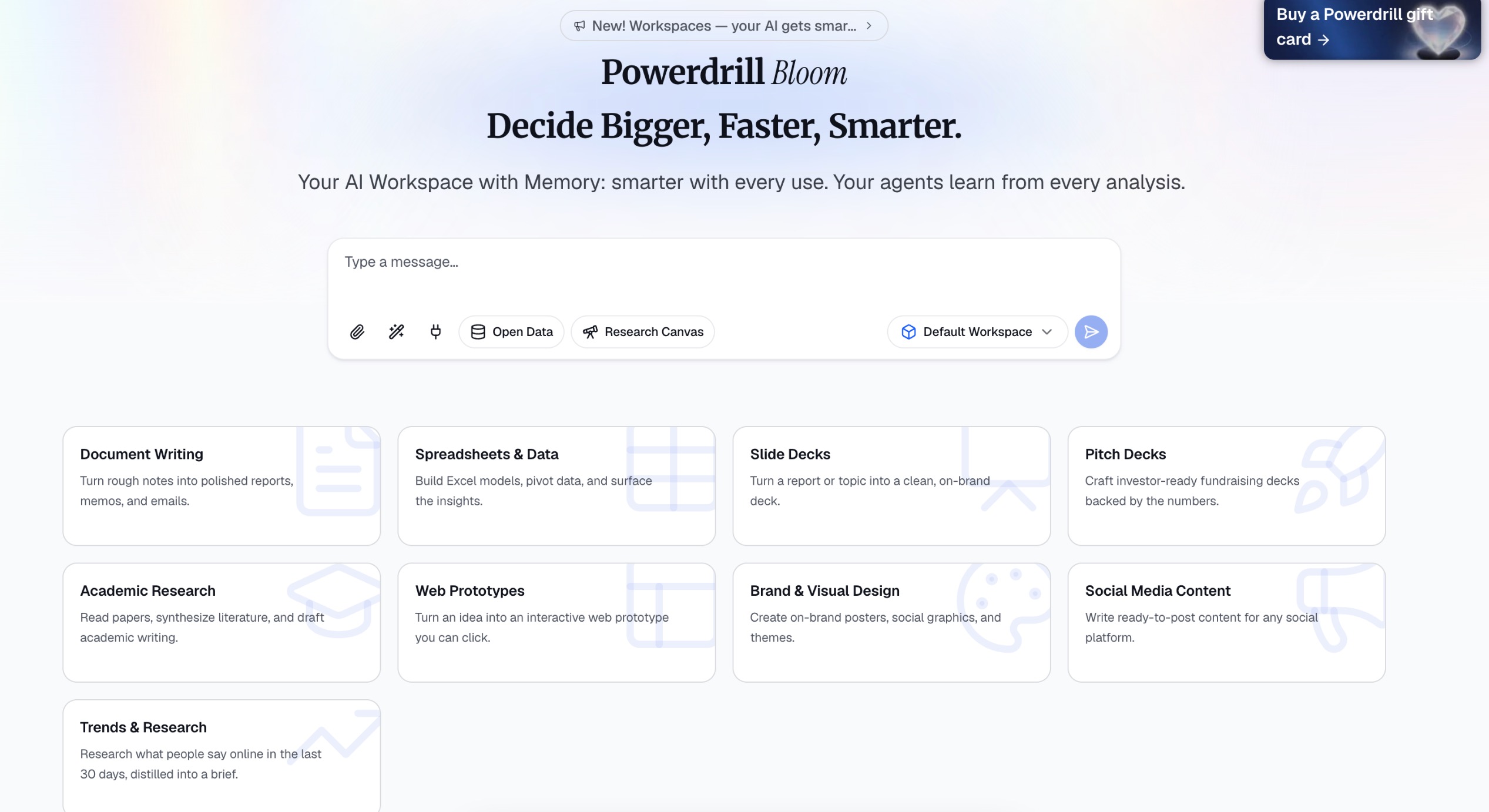
Bloom's "Start from Skills" mode gives you direct access to a library of pre-configured workflows. Instead of staring at a blank input box, you select a skill, provide your topic or data, and let the automated workflow handle the rest.
Let's look at the skills that matter most for slide and pitch deck creation in 2026.
The 9 Essential AI Agent Skills
1. ppt-master – Complete Presentation Generator
Best for: End-to-end slide creation from a topic or document
The ppt-master skill is the workhorse of Powerdrill Bloom's presentation ecosystem. It takes a topic, research brief, or raw data and transforms it into a complete, structured slide deck.
What it does:
Breaks down complex topics into logical slide structure (executive summary, agenda, core content, conclusions)
Formats content with proper hierarchy and visual consistency
Generates a downloadable PowerPoint file ready for final polish
Why it's powerful: You don't need to explain how to build a presentation. The skill already knows. Just input your topic and let it run.
2. mck-ppt-design – McKinsey-Style Visuals
Best for: Strategy decks, consulting presentations, and high-stakes board materials
If you've ever tried to replicate the clean, data-driven aesthetic of top-tier consulting firms, this skill is essential. The mck-ppt-design skill encodes best practices for professional presentation design—including cover pages, timeline visuals, ring charts, and 67 other advanced slide methods.
What it does:
Applies consistent visual branding and layout rules
Generates professional-grade charts and data visualizations
Maintains the clean, structured aesthetic expected in executive settings
3. officecli-pptx – PowerPoint File Operations
Best for: Editing, updating, and repurposing existing presentations
Not every presentation starts from scratch. Sometimes you need to update an existing deck, extract content for a summary, or reformat slides for a new audience.
The officecli-pptx skill gives AI agents direct read/write access to .pptx files:
Extract text and data from existing presentations
Edit slide content and structure
Repurpose deck content for emails, summaries, or reports
4. officecli-docx / xlsx – Cross-Format Content Assembly
Best for: Turning reports into presentations and data into slides
Presentations rarely exist in isolation. They draw from reports, spreadsheets, and research documents. The officecli-docx and officecli-xlsx skills enable seamless cross-format workflows.
What they do:
Extract insights from Word documents and Excel spreadsheets
Convert data tables into presentation-ready charts
Assemble content from multiple sources into cohesive slide decks
5. dcf-model – Financial Modeling & Valuation Decks
Best for: Investment presentations, fundraising decks, and financial analysis
For investors and finance professionals, the dcf-model skill automates discounted cash flow analysis and generates professional Excel models and presentation-ready outputs.
What it does:
Builds DCF models from company financial data
Generates valuation tables and sensitivity analyses
Produces structured slide outputs for investor presentations
6. research-last30days – Trend Research & Market Briefs
Best for: Market analysis, competitor research, and trend-based presentations
Every great pitch deck needs credible market data. The research-last30days skill searches Reddit, X (Twitter), YouTube, and other platforms for recent discussions on any topic—distilling the findings into a concise research brief.
What it does:
Aggregates public sentiment and discussion trends from the past 30 days
Synthesizes findings into structured summaries and visuals
Provides a research foundation for market slides and competitive analysis
7. data-exploration – Automated Analytics & Visualization
Best for: Data-driven presentations and performance reports
💡 Note: This is not an official skill name, but rather a practical workflow based on Bloom's built-in data exploration capabilities. When you upload Excel, CSV, or TSV files, Bloom's AI agents automatically clean the data, analyze metadata, identify relevant dimensions, and generate visualizations—no manual setup required.
What you can do with this capability:
Upload data files and let AI agents analyze and visualize the data
Automatically generate charts, trend lines, and key metric summaries
Surface insights you might not have thought to look for
8. pdf-to-ppt – Document-to-Presentation Conversion
Best for: Turning research papers, white papers, and reports into presentations
💡 Note: This is not an official skill name. PDF processing is supported through ppt-master, which accepts PDF files as input sources, parses their structure, extracts key arguments and data points, and reorganizes the content into a logical slide narrative.
What you can do with this capability:
Upload PDF documents and let Bloom extract key arguments and data
Reorganize content into a logical slide narrative
Add visualizations and insights to enhance the original material
9. research-canvas – Topic Exploration & Synthesis
Best for: Early-stage research and idea validation
Sometimes you don't have a file or a draft—you have a question. The research canvas skill lets you start with a topic and let Bloom explore it for you. Select "Start with a topic," input your area of interest, and the AI generates structured insights and visualizations to guide your analysis.
What it does:
Works without an uploaded file—just a topic prompt
Generates exploration paths and visual insights
Creates a foundation for presentations even before your dataset is ready
How the Skills Work Together: A Complete Workflow
The real power of Powerdrill Bloom isn't any single skill—it's how they combine into a seamless workflow.
A typical presentation creation process might look like this:
Research: Use the
research-last30daysskill to gather market trends and sentiment dataAnalyze & Explore: Upload your data or input a topic. Bloom's built-in exploration capabilities automatically clean the data, generate insights, and produce visualizations—presenting each finding as a node on the research canvas
Curate: Review the insight nodes on the canvas, and favorite the ones you want to include in your presentation
Generate: Click "Generate Slides," select your favorited nodes and a template theme, and let
ppt-masterormck-ppt-designturn them into a complete, structured slide deckRefine: Import and edit additional content using
officecli-pptxfor any final adjustmentsExport: Download a production-ready PowerPoint file
Bloom's memory mechanism ensures your workspace context—files, analysis history, favorited nodes—persists across every step, making the entire process smooth and iterative.
Powerdrill Bloom for Market Intelligence & Competitive Research
Beyond slide creation, Powerdrill Bloom offers capabilities that directly support the research phase of presentation building. The research-last30days skill aggregates real-time discussions from platforms like Reddit, Hacker News, and X, while the platform's data exploration tools can process uploaded reports and spreadsheets. This combination allows users to gather market intelligence and competitor insights without leaving the workspace.
For example, when preparing a competitive analysis deck, you can:
Use
research-last30daysto capture developer sentiment and emerging trendsUpload market reports or internal data for AI-powered analysis and visualization
Favorite the key insight nodes and feed them directly into
ppt-masterormck-ppt-designto generate the final presentation
This research-to-deck workflow reduces the time between gathering intelligence and delivering insights, making Bloom a practical tool for strategy teams, consultants, and market researchers.
Conclusion
In 2026, the best AI tools don't make you guess—they make you productive. The skills you choose matter less than the workflow they enable, and Powerdrill Bloom's skill-based ecosystem offers one of the most comprehensive approaches to slide and pitch deck creation available today.
Whether you're a consultant preparing board materials, an investor building a valuation deck, or a marketer pulling together a campaign report, these 9 AI agent skills represent the new standard for presentation creation.
The question isn't whether AI can help you make better presentations. The question is which skills you're going to use first.
FAQs
1. Do I need design skills to use these AI presentation skills?
No. Every skill applies professional design rules automatically—you just provide the topic or data.
2. Can Bloom generate presentations from my existing files?
Yes. Upload PDFs, Word docs, Excel sheets, or CSVs—Bloom extracts content and turns them into slides.
3. Are these skills beginner-friendly?
Absolutely. You don't need coding or prompt engineering—just select a skill and describe what you need.
4. Do I have to pay for all these skills?
All listed skills are included in Powerdrill Bloom's free beta—no extra cost during the trial period.
5. Can I customize the output style and structure?
Yes. Describe your audience, page count, and preferred visual style for tailored results every time.